
Your sales team is busy all day and still feels behind. Reps jump from prospect research to CRM cleanup to follow-up emails to demos, then miss the narrow window when a buyer is ready to talk. You add tools. You add process. Sometimes you add headcount. Revenue still grows slower than cost.
That's the wall most growth-stage teams hit.
If you want a practical answer to how to use AI in sales, start with this: AI is not a software category. It's a way to remove low-value work, speed up buyer response, and give reps better context at the moment it matters. Used well, it changes output per rep. Used badly, it creates more noise, more dashboards, and more vendor sprawl.
I've seen the same failure pattern over and over. Leadership buys an AI tool before deciding what sales problem it should fix. The team gets a flashy demo, weak adoption, and no real movement in pipeline. The teams that get value take a different path. They diagnose the bottleneck first. Then they choose the right AI model. Then they build one workflow that touches revenue.
Table of Contents
- Stop Trying to Scale Sales Linearly
- Diagnose Your Sales Funnel for AI Opportunities
- Choose Your AI Approach Automation vs Augmentation
- Design High-Impact Sales AI Workflows
- Implementation Roadmap and Vendor Vetting
- The Only Two AI Sales Metrics That Matter
Stop Trying to Scale Sales Linearly
The old sales scaling model breaks earlier than most operators expect. Hire more reps, add more SDR activity, buy more software, and hope pipeline rises at the same rate. It usually doesn't.
At some point, your best reps stop acting like sellers and start acting like workflow managers. They research accounts, rewrite first drafts, chase internal notes, update fields, and coordinate handoffs. None of that closes deals by itself. It just keeps the machine moving.
That's why AI belongs in a revenue conversation, not an innovation conversation. The best use of AI in sales isn't replacing sellers. It's multiplying the output of the team you already have.
Practical rule: Don't ask whether AI can do the job. Ask which parts of the job your reps should never have been doing manually.
This matters most when leadership still believes growth will come from adding more people to a system that already leaks. If your funnel is slow, your qualification is inconsistent, or your reps spend too much time on admin, more headcount reinforces an inefficient process.
The better path is to redesign the motion. Put AI on repetitive work. Put reps on judgment, negotiation, and relationship-building. Put management focus on throughput.
If you're pressure-testing the business case before buying anything, it helps to understand AI sales ROI in terms of output per rep, admin reduction, and pipeline creation rather than novelty. That framing keeps the discussion where it belongs: revenue.
Diagnose Your Sales Funnel for AI Opportunities
Don't start with vendors. Start with friction.
Many sales organizations already know they want AI somewhere in sales. That's not enough. You need to know where the current motion breaks, where delay shows up, and where a machine can improve speed or consistency without hurting buyer experience.
Start with the delay that costs revenue
Look at the stages where time kills momentum or where quality changes from rep to rep. In practice, four areas show up most often:
- Lead response lag: Inbound interest sits too long before first contact.
- Qualification inconsistency: Reps apply fit criteria differently, which clogs the pipe with weak opportunities.
- Follow-up decay: Good first meetings stall because notes, next steps, and follow-up drafts take too long.
- CRM drag: Reps spend too much time documenting instead of selling.
The easiest way to diagnose this is to review a recent set of won, lost, and stalled deals and ask three questions:
- Where did buyer momentum slow down
- Where did rep quality vary the most
- Where did manual work consume selling time
That will usually point to one narrow problem worth fixing first.
For leadership teams that want a structured way to audit this before tool selection, an AI readiness assessment is a useful filter. It forces the conversation around process maturity, data quality, workflow ownership, and team adoption instead of feature wish lists.
Map the leak to an AI use case
Here's the diagnostic table I use with CRO and CEO teams when deciding where to apply AI first.
| Funnel problem | What it usually means | Best AI opportunity |
|---|---|---|
| Leads go cold after form fill or demo request | Response is too slow or routing is messy | Automated first-touch follow-up and lead routing |
| Reps qualify differently | Qualification criteria aren't operationalized | AI-assisted qualification prompts or chat-based pre-qualification |
| AEs lose time after calls | Notes, summaries, and tasks stay manual | Meeting summaries, CRM updates, and follow-up draft generation |
| Outbound feels generic | Research time is too high for account-level personalization | GTM engineering workflow for prospect research and tailored messaging |
| Buyers stall between meetings | Reps miss next-best action cues | AI augmentation for follow-up recommendations and content suggestions |
That table is simple on purpose. You're looking for the shortest path from operational friction to a workflow change.
A weak diagnosis creates expensive AI theater. A clear diagnosis creates a workflow people actually use.
One more point matters here. Don't confuse “high volume” with “high value.” Some teams rush to automate cold outbound because it's visible and easy to demo. Meanwhile, the bigger revenue issue sits in inbound qualification or post-demo follow-up. The best first use case usually lives where buyer intent already exists and human delay is the main problem.
If your company is also looking at AI across the broader GTM engine, adjacent priorities come into alignment. The same diagnostic discipline applies to CRO with AI, AI search optimization for inbound discovery, and agent commerce readiness. The pattern is the same every time. Find the bottleneck first. Then design around it.
Choose Your AI Approach Automation vs Augmentation
A sales team finds the right bottleneck, buys an AI tool, turns it on, and sees almost no revenue impact. The usual problem is approach selection. They chose automation for work that still needed rep judgment, or they gave augmentation a task that should have been fully system-driven from day one.
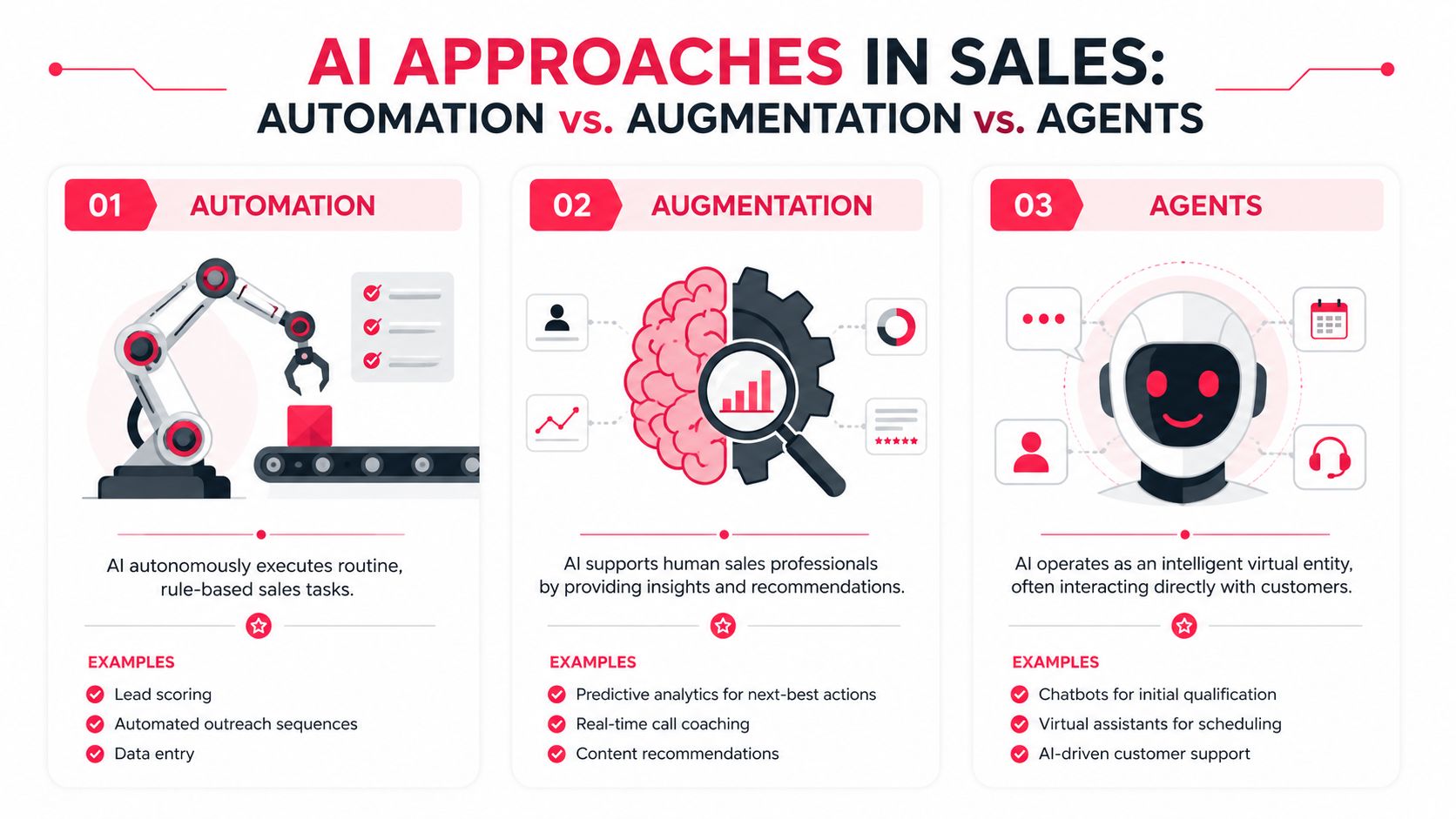
The decision is simpler than vendors make it sound.
Use automation when the task follows clear rules, the cost of a mistake is low, and the output does not need persuasive judgment. Use augmentation when the rep still owns the decision, message, or relationship. Use agents only when the interaction is narrow, handoffs are defined, and someone on your team is accountable for failure cases.
Where automation wins
Automation fits operational drag. CRM updates, lead routing, scheduling, call summaries, enrichment, territory assignment, and sequence enrollment are strong candidates because speed matters more than nuance.
This is usually the first place I go if reps are losing selling time to internal process. The payoff is straightforward. Reps get time back. Managers get cleaner data. Ops gets more consistent execution.
If these tools keep stalling, the problem is usually the stack underneath them. AI in sales: fixing broken GTM stacks covers the routing, data and governance fixes to make first.
The trade-off is just as straightforward. Automation scales whatever logic you feed it. If your lead routing rules are messy or your qualification fields are unreliable, automating that layer spreads bad inputs faster.
Where augmentation wins
Augmentation fits judgment-heavy work. Personalized outbound, account research, objection handling, follow-up drafting, mutual action plan creation, and call coaching all live here because the rep still needs to decide what to say, what to ignore, and when to push.
For growth-stage teams, this is often the better commercial bet. It improves output without putting buyer trust in the hands of a brittle workflow. A good rep with strong AI support usually outperforms a generic automated motion, especially in mid-market and enterprise sales where context changes deal to deal.
The risk is weak suggestions. If the model produces generic outreach, shallow research, or next steps that ignore deal context, reps stop using it fast. Adoption breaks before the workflow has a chance to prove itself.
A useful outside perspective on this model sits in this guide to the AI powered sales assistant, especially if you're comparing co-pilot workflows against fully automated ones.
If you're evaluating platforms that support these models, this roundup of best AI sales tools for automation and augmentation use cases is a practical place to compare categories.
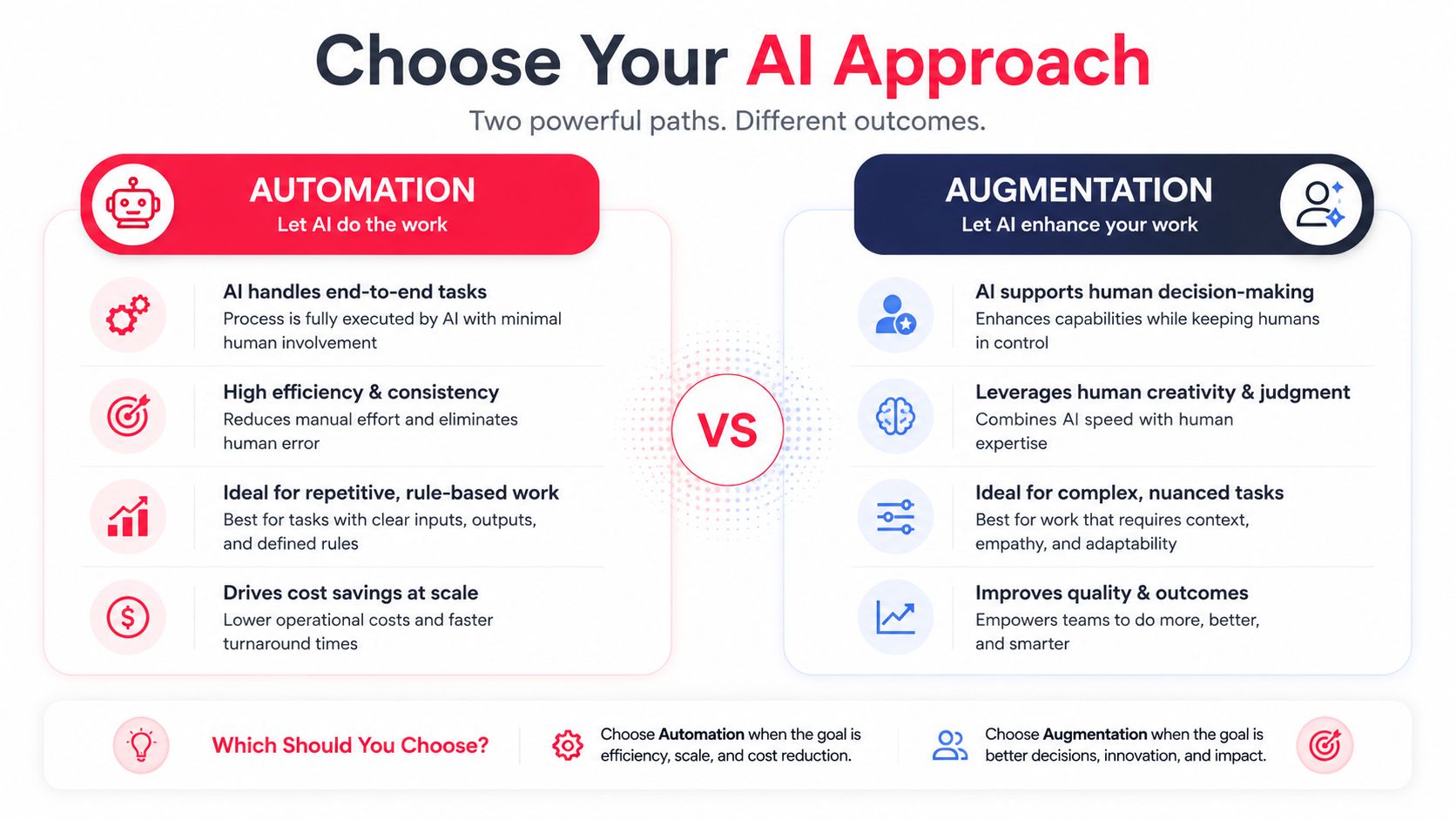
Here's the comparison framework I use with sales leaders before we buy anything:
| Decision factor | Automation | Augmentation |
|---|---|---|
| Best fit | Repetitive tasks with clear rules | Selling tasks that still require rep judgment |
| Workflow impact | Runs in the background or through systems | Sits inside the rep workflow |
| Main upside | More rep capacity and cleaner execution | Better output quality and faster rep throughput |
| Main risk | Faster spread of bad process | Low trust if recommendations are weak |
| Team requirement | Ops discipline and process clarity | Rep adoption, manager coaching, prompt discipline |
| Good first use case | Admin and coordination work | Research, messaging, and follow-up support |
A short visual can help if your leadership team needs alignment on these trade-offs.
Where agents fit
Agents sit in a narrower lane than many teams expect. They work well for inbound qualification, meeting booking, FAQ handling, simple reactivation, and other bounded interactions where the system can collect inputs, follow rules, and hand off cleanly.
They fail when teams ask them to handle open-ended discovery, complex objections, or multi-threaded deal strategy. I have seen companies force agents into those motions because the demo looked impressive. In production, the result is usually poor buyer experience, confused ownership, and a rep team that spends time cleaning up avoidable mistakes.
A useful rule is this: if you cannot define the stop condition, you should not deploy an agent yet. Human review points, escalation logic, and clear ownership need to exist before the first buyer touches the workflow.
Design High-Impact Sales AI Workflows
Strategy matters. Workflow design decides whether AI changes revenue or becomes shelfware.
The best implementations start with one repeatable motion, one clear owner, and one output that a rep or manager can trust. Two workflows stand out because they're practical, fast to pilot, and tied directly to pipeline creation.

Workflow one GTM engineering for personalized outreach
This is an augmentation workflow. The rep stays in control. AI does the research synthesis and first draft work.
The input stack is straightforward:
- Prospect data: LinkedIn profile, role, recent post, or company page
- Company data: website copy, product page, hiring page, recent announcements
- Internal context: ICP notes, common pain points, proof points, customer language
The prompt structure matters more than the model. A weak prompt gives you generic fluff. A precise prompt gives you angles a rep can use.
Use a prompt shape like this:
You are supporting a B2B sales rep. Review the prospect role, company context, and recent signals. Generate three specific talking points for a first-touch email. Each talking point must tie a likely business pain to an observable fact from the company or buyer context. Avoid generic praise. Keep each point brief. Then draft one email opening using one of the talking points in a natural tone.
That output should never go straight to send. The rep should review it, cut weak assumptions, and choose the angle that fits the account. That's the difference between augmentation and spam.
The teams that do this well treat it like GTM engineering, not content generation. They define data inputs, prompt rules, output format, and review standards. If you're comparing platforms before building this stack, this guide on choosing AI sales assistant tools is a decent reference point for thinking through workflow fit instead of chasing broad feature lists.
If you want examples of platforms that support this motion, a curated look at best AI sales tools can help narrow the field by workflow rather than by category label.
Workflow two inbound qualification and booking
This is an automation workflow. Speed and consistency matter more than originality.
A simple inbound chat qualification flow should do five things in sequence:
- Capture intent
Ask why the buyer is reaching out. Keep choices simple and commercial. - Confirm fit
Collect the minimum qualification data your team uses. - Route by logic
Send qualified buyers to the right rep, region, or segment. - Book immediately
Offer calendar options in the same flow. - Write back to systems
Create or update the contact and log the interaction in the CRM.
A basic logic tree might look like this:
- If the visitor wants pricing, product fit, or a demo, continue qualification.
- If the company matches your target profile and the use case is relevant, offer booking.
- If fit is weak but interest is real, route to a lighter nurture path.
- If the request is support-related, divert out of sales immediately.
Keep qualification fields to the minimum needed for routing. Every extra question lowers completion and increases drop-off.
What does not work here is trying to make the chat agent sound overly human or overly clever. Buyers want speed, relevance, and a clean handoff. The transcript should also give the rep enough context to pick up the conversation without asking the buyer to repeat everything.
This same workflow design logic carries into adjacent motions such as AI search optimization and AEO. If buyers increasingly arrive through AI-generated recommendations, your first-touch qualification experience has to be structured, fast, and easy for both humans and software agents to use.
Implementation Roadmap and Vendor Vetting
Most AI sales projects fail in rollout, not in pilot. The model might work. The team still doesn't adopt it because ownership is fuzzy, training is thin, and the workflow adds friction instead of removing it.
That's why I'd rather see a narrow pilot with disciplined measurement than a broad rollout with weak behavior change.
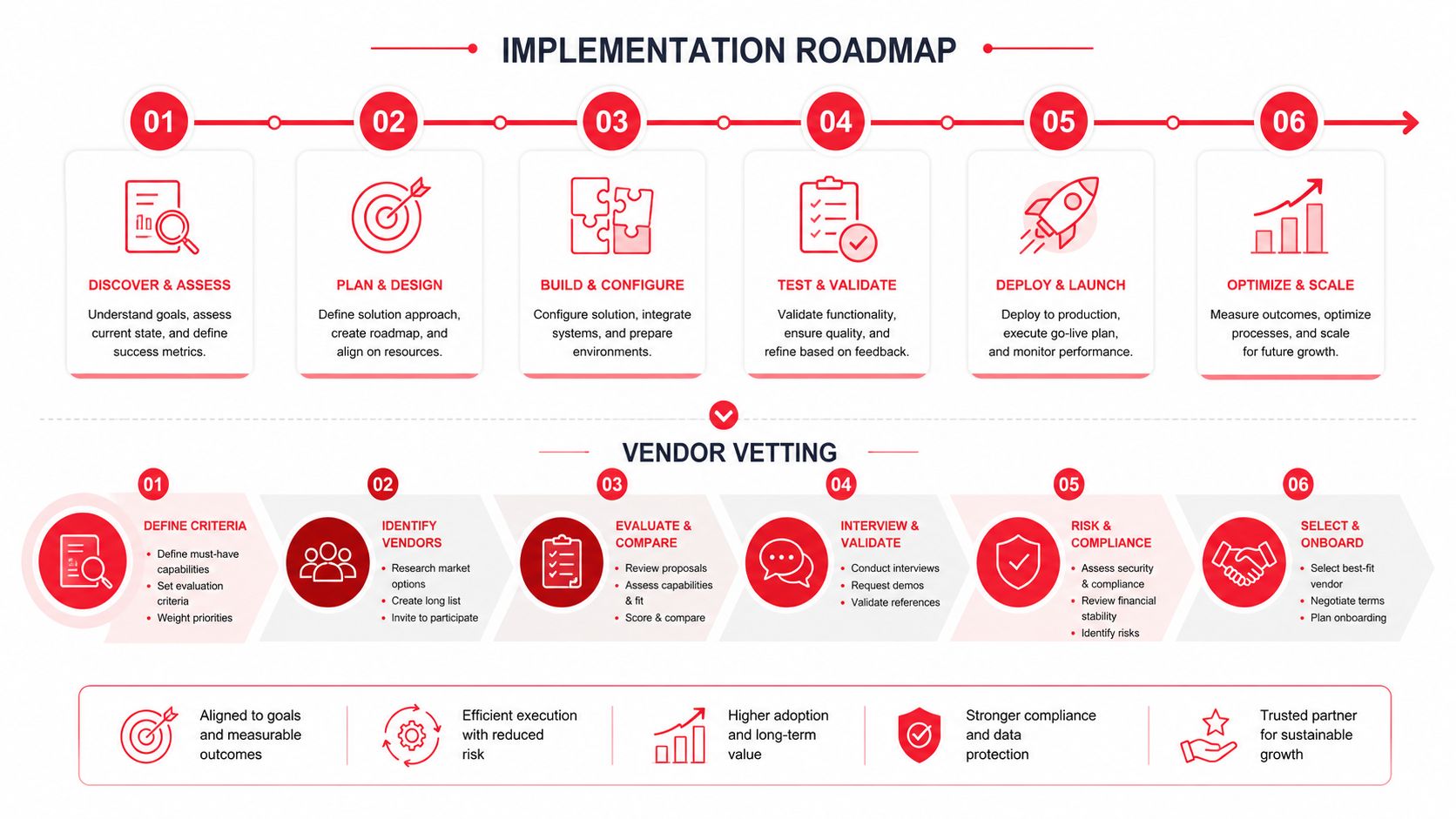
A practical 90-day rollout
Days 1 to 30
Pick one use case. Pick two trusted reps or one rep and one manager. Choose a workflow with visible commercial value, such as outbound personalization support or inbound qualification automation.
Set the baseline before you turn anything on. Document how the workflow operates today, where reps lose time, and what output quality looks like when done well.
Days 31 to 60
Run the workflow in production with tight feedback loops. Review outputs every week. Fix prompts, routing logic, handoff rules, and CRM write-backs quickly.
This phase should answer operational questions, not theoretical ones:
- Adoption question: Do reps use it without being chased
- Trust question: Are outputs good enough to speed work up
- Workflow question: Does it remove steps or add steps
- Revenue question: Is buyer progression improving
Days 61 to 90
Roll out to the broader team only after the workflow is stable. Create a simple playbook, train managers first, and define where AI is required versus optional.
For teams that want a structured guide to planning those phases, an AI implementation roadmap can help turn a rough pilot idea into a sequence with owners, dependencies, and review points.
If managers don't inspect the workflow, reps won't keep using it. AI adoption is a management behavior before it's a rep behavior.
Vendor questions that save you from bad contracts
Vendor demos are built to hide operational friction. Your job is to drag that friction into the room.
Ask questions like these:
- Show the CRM integration live: Don't accept slides. Watch data move in a real environment.
- Walk through exception handling: Ask what happens when data is missing, routing fails, or the model gives a weak output.
- Break down total cost: Include setup, training, support, workflow redesign, and internal admin time.
- Explain data boundaries: Ask how customer data is stored, used, retained, and whether it trains shared models.
- Define ownership: Clarify who on your team will manage prompts, business rules, QA, and vendor coordination.
- Ask for admin controls: You need permissions, auditability, and the ability to turn parts of the workflow off quickly.
Weak vendors answer with vision language. Good vendors answer with operational detail.
The Only Two AI Sales Metrics That Matter
Most AI sales dashboards are bloated. They count generated emails, summaries created, prompts used, and other activity metrics that sound modern but don't tell a CEO or CRO much.
Track two numbers.
Pipeline velocity
This tells you how quickly qualified opportunities move through the pipe after you change the workflow.
Use a simple formula:
Pipeline Velocity = Qualified opportunities × Win rate × Average deal value ÷ Sales cycle length
You don't need AI-specific versions of every sales KPI. You need to know whether the motion got faster. If lead handling improves, follow-up gets tighter, and reps spend more time in live buyer conversations, velocity should improve. If it doesn't, the workflow may be creating activity without commercial movement.
Review this by segment, not only in aggregate. A workflow might help inbound mid-market while doing nothing for enterprise outbound. One blended number can hide that.
Cost of pipeline generation
This is the C-suite metric that many organizations neglect. Calculate what it costs in salaries, tools, and operational overhead to create one unit of qualified pipeline.
If AI is doing its job, this number should move in the right direction because reps spend less time on low-value tasks and more time on work that creates progression. Tool count can rise slightly and still be worth it if the cost to create pipeline falls.
Good AI lowers the effort required to produce qualified pipeline. Bad AI raises software spend and leaves the commercial math unchanged.
Don't obsess over whether the model wrote great copy or whether the chat workflow looked polished. Focus on whether buyers move faster and whether your team creates pipeline more efficiently.
This week, calculate your current pipeline velocity and your current cost of pipeline generation. That's your baseline. Then pick one sales bottleneck, one AI approach, and one workflow to pilot.
If you want outside help pressure-testing that plan, Stimulead works with growth leaders on AI strategy, vendor evaluation, implementation oversight, GTM engineering, AI search optimization, and agent commerce readiness.