
Sales automation uses rules and events to capture revenue data and move leads and deals through defined steps without manual handoffs. Many sales and sales-operations tasks can be automated with current tools, though the share depends on the team and its processes.
The decision is whether the process can run without someone checking every handoff. Treat sales automation as process control over the CRM: define each action, check the inputs, and assign an owner for exceptions before increasing throughput.
Table of Contents
- What Sales Automation Is Made Of
- How a Lead Moves Through an Automated Workflow
- Which Metrics Show Sales Automation Is Working
- Use Cases Worth Automating First
- Where Sales Automation Fails and How to Diagnose It
- Where AI Adds Judgement to Rule-Based Automation
- Confirm the Process Is Ready Before You Automate It
What Sales Automation Is Made Of
Sales automation puts a process-control layer over your CRM. Email tools execute part of that process, but they don't establish who owns a lead or whether a deal qualifies for an approval.
The data-capture layer writes contact, meeting, pricing and opportunity information from communications into the shared record. The orchestration layer watches for changes and starts the appropriate action, such as routing a form submission or requesting approval after a quote changes.
This diagram shows where those responsibilities sit.
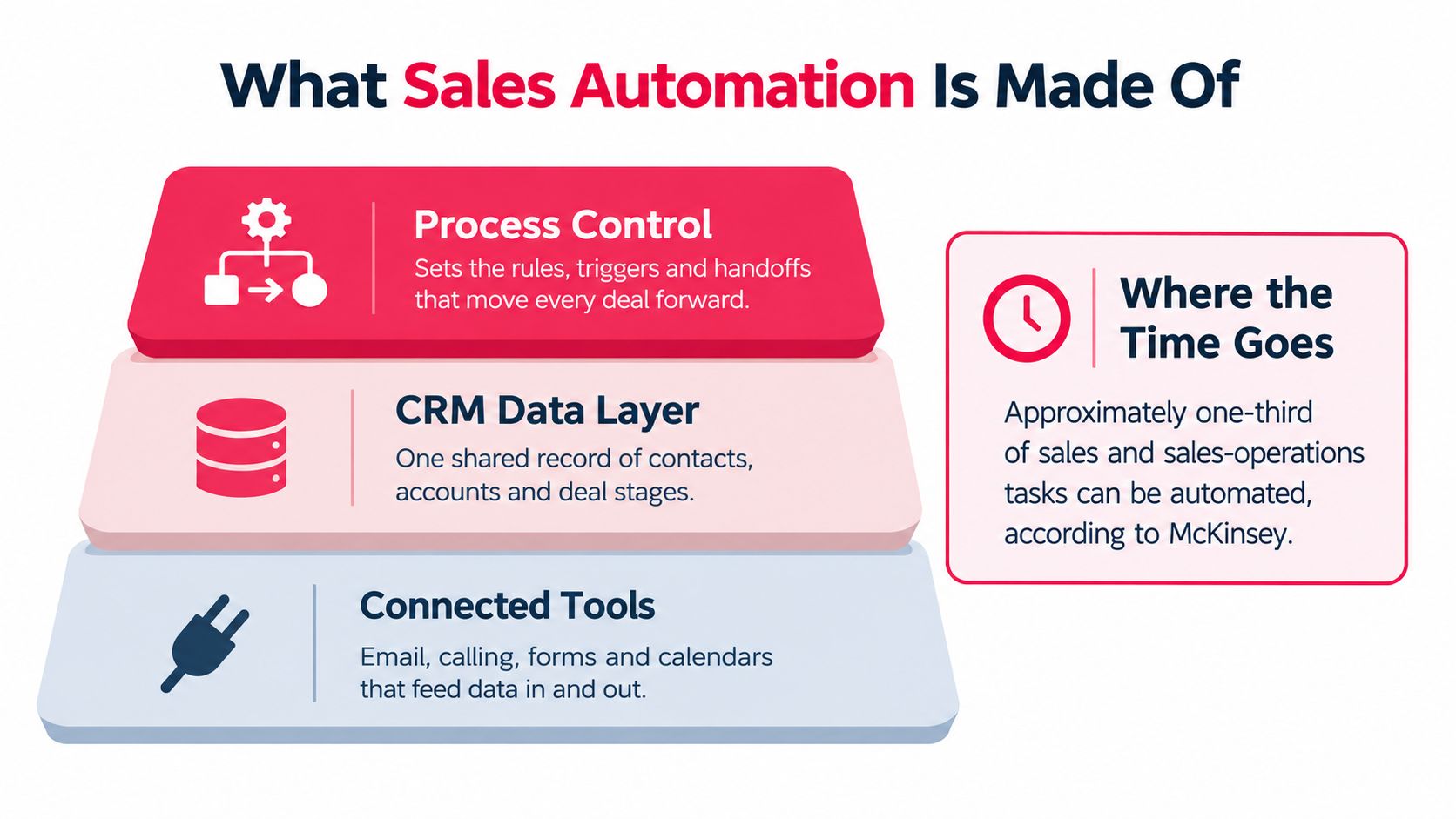
Core components of a sales automation system
| Component | What it does | Example | Failure if missing |
|---|---|---|---|
| Canonical data model | Defines required record fields | Owner, source, stage, refresh date | Routing and scoring use conflicting records |
| Trigger conditions | Start workflows after an event | Form submit, stage change, hypothetical inactivity window | Workflows fire late or never |
| Ownership and routing rules | Assign a live owner | Territory or account-owner rules | Leads wait in a shared queue |
| SLA timers | Set response deadlines and flag breaches | First-touch deadline by inbound channel | Nobody owns response speed |
| Suppression logic | Block unwanted contact | Open opportunity, recent customer, opt-out | Duplicate or irrelevant outreach |
| Human approval thresholds | Send exceptions to a person | Discounts above an agreed limit | Automation commits to unapproved terms |
| Exception alerts | Flag stalled or anomalous records | Opportunity idle beyond its stage norm | Managers miss stalled deals |
Yalc's discussion of helping sales reps spend more time selling gives useful context for the productivity objective. Operationally, the test is whether these components return usable selling time without creating cleanup work.
A stack without them is a collection of disconnected productivity features. The failure column is a cheap audit of the tools you already own.
How a Lead Moves Through an Automated Workflow
The sequence matters more than the tool because each step creates a state the next step needs. Salesforce's automation guide describes this connection between captured customer information and event-driven actions across the sales process.
The diagram shows the broad lifecycle; the implementation needs explicit checks between those stages.
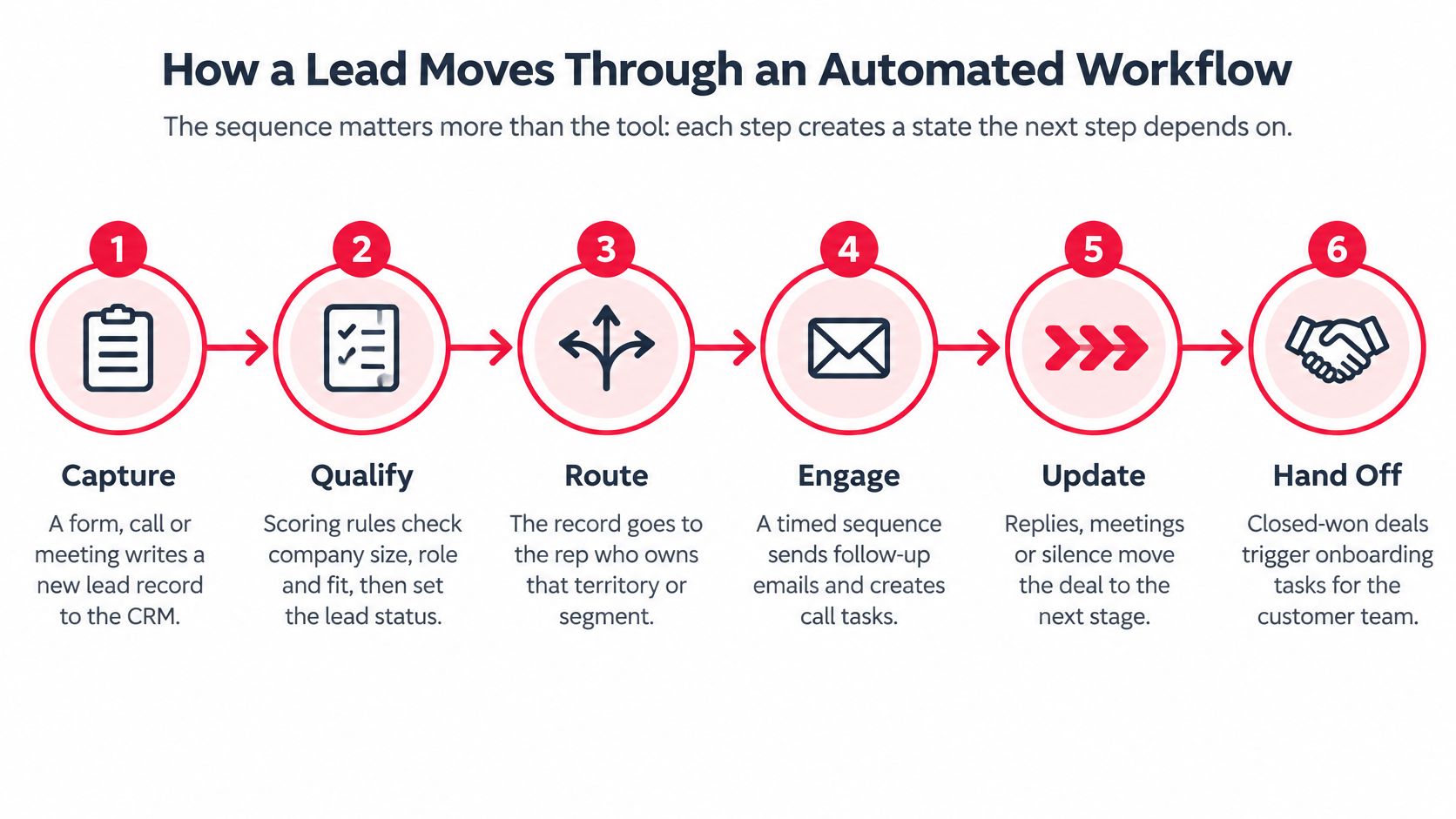
- Capture. A form, call or meeting writes contact and opportunity information to the CRM, including its source.
- Deduplicate and enrich. Match existing contacts before creating records, then populate the firmographic fields needed downstream.
- Score and route. Apply qualification rules and assign a live owner. Missing information should create an exception, not an invented value.
- Start the clock. Create the response timer and task together so assignment has an enforceable deadline.
- First touch. Start the approved sequence, or send an initial message when the rep can't act within the response window.
- Human decision. The rep handles qualification exceptions and decides whether a conversation supports an opportunity.
- Stall detection. Compare inactivity with the stage norm and notify the owner with a proposed corrective action.
Follow the exceptions
Say a qualified inbound request completes the administrative steps in minutes and reaches a rep, who books a meeting. The record stays under monitoring; it doesn't need a stall alert unless progress stops.
For a hypothetical mid-market opportunity, an agreed 14-day inactivity trigger might prompt the owner to confirm the buyer's procurement timeline. That's an example configuration, not a universal stage benchmark.
CapyScout's lead routing software explained is useful when choosing assignment logic. Our guidance on sales and marketing alignment addresses the shared qualification decisions that routing depends on.
Think of a triage desk: software can sort arrivals and start the clock; the physician still makes the clinical decision. Verify the equivalent in your CRM through a timestamp trail for every state change.
The video offers another view of the workflow mechanics.
Which Metrics Show Sales Automation Is Working
Returned admin hours matter when reps use them for customer conversations and those conversations improve conversion or shorten the cycle. McKinsey reports early-adopter efficiency improvements of 10–15% and potential sales uplift of up to 10% in its sales automation analysis.
Those are adopter reports, not controlled proof of what your company will achieve. Evidence specific to growth-stage B2B teams is thin enough that we'd establish a baseline before approving a broader deployment.
Metrics to baseline before and after a rollout
| Metric | Definition | How to baseline | What a real gain looks like |
|---|---|---|---|
| Rep hours on admin | CRM entry, reporting and scheduling time | Two-week time log before launch | Returned hours appear in selling time |
| Customer-facing share of week | Hours in live customer conversations | Calendar and activity sampling | Conversation share rises |
| Speed-to-lead | Inbound signal to first attempt | CRM timestamps | Lower median, more responses within SLA |
| Contact versus qualified rate | Leads reached versus meaningful decision-maker conversations | Separate outcome fields | Qualified rate improves |
| Record completeness | Required fields filled | Random-sample field audit | Passes the agreed scaling threshold |
| Duplicate rate | Records matching existing contacts | Deduplication report | Falls after matching rules launch |
| Sales-cycle duration | Opportunity creation to close | CRM stage history | Automated path outperforms comparable manual path |
| Forecast accuracy | Forecast compared with actual close | Weekly forecast snapshots | Forecast error narrows |
| Revenue per representative | Closed revenue per rep per quarter | Matched cohorts or controlled rollout | Improves relative to the control group |
Use a capacity model rather than a time-saving headline: hours saved per rep × team size, then apply observed qualified-conversation productivity, opportunity conversion and win rate. Don't assume every recovered hour becomes a productive conversation.
Keep a workflow only when its measured benefit exceeds tool, implementation and governance costs.
Compare similar segments and account for rep tenure. Our sales pipeline optimization guidance helps connect operational changes to funnel outcomes rather than isolated activity counts.
Track failures alongside output. More automated activity can mean more duplicate touches before it means more qualified pipeline.
Use Cases Worth Automating First
Start where delay is measurable and expensive, usually lead routing and first response. Choose a narrow workflow with observable outcomes before adding more autonomous decisions.
Use cases by automation fit
| Use case | Automate | Keep human | Start when |
|---|---|---|---|
| Lead routing and first response | Assignment, SLA timers, first-touch email | Replies and qualification exceptions | Inbound volume outruns available reps |
| Lead scoring | Firmographic and behavioural scores | Weight changes and threshold reviews | Scores pass closed-won back-testing |
| Prospecting research and enrichment | Account data, contact enrichment, trigger alerts | Target account selection | Reps rebuild lists manually each week |
| Outbound sequences | Cadence, timing and suppression | Key-account personalisation and sensitive outreach | Reps repeat identical administrative steps |
| CRM logging and hygiene | Call capture and field validation | Deal-stage judgement | Forecast reviews require manual reconstruction |
| Quote and approval routing | Approver assignment and document creation | Pricing exceptions and non-standard terms | Approvals routinely wait more than a day |
Why response speed earns an early pilot
Harvard Business Review research covering 1.25 million web-generated leads found that firms attempting contact within an hour were nearly seven times more likely to qualify a lead than firms waiting another hour, according to Venture Harbour's account of the study. Qualification meant a meaningful conversation with a key decision-maker, not an email acknowledgement.
A separate Lead Response Management Study found that leads contacted within five minutes were 100 times more likely to be reached than those contacted after 30 minutes, as described in Voiso's response-time analysis. That's a different study and a different outcome from qualification.
These findings justify testing fast assignment and contact. They don't establish that a generic automated email has the same effect as a timely conversation.
Lead scoring needs more caution because the evidence here doesn't establish a universal scoring lift. Back-test proposed scores against closed-won outcomes and check whether they merely favour accounts that already received more rep attention.
For prospecting, adding signal sources can lower reply quality when reps mistake weak activity for buying intent. Require a relevance test for each source, and reject signals that can't support an account-specific reason to contact someone.
A use case earns automation after its human exceptions are named. If nobody can describe the exception path, keep the decision supervised.
Where Sales Automation Fails and How to Diagnose It
Automation runs the process it inherits, including its defects. Scaling a workflow before checking its inputs increases the number of incorrect actions the team must reverse.
In a 2026 survey of 222 B2B sales professionals, respondents estimated that 32% of CRM contact and account records were inaccurate, incomplete or outdated, according to PPC Land's coverage of Firmable's findings. The survey did not break down the share by defect type. Poor records can send messages to the wrong contacts, distort scores and trigger actions based on stale information.
IBM's State of Salesforce report identifies poor data availability and quality as an agentic-AI adoption barrier cited by 53% of respondents. Legacy-system modernisation was the top overall roadblock, cited by 64%. These findings point to practical dependencies: workflows need usable data and systems that can support them.
Failure symptoms, likely causes and fixes
| Symptom | Likely cause | Fix |
|---|---|---|
| Reps ignore alerts | Every signal has equal urgency | Rank signals using measured funnel outcomes |
| Scores rise while win rate stays flat | Opinion-based scoring weights | Back-test changes against closed-won deals |
| Replies fall as touches rise | No suppression rules | Cap touches and suppress recent conversations |
| Personalisation cites wrong facts | Stale CRM fields | Validate inputs and refresh dates |
| Forecast drifts from actuals | Automation changes stages without rep judgement | Require confirmation above an agreed deal size |
| Bounce and complaint rates rise | Unverified contact data | Verify email at capture; review bounces weekly |
| Approvals bypass policy | Missing or permissive thresholds | Set thresholds by deal size and account type |
Diagnose the workflow before changing it. Compare execution logs with record samples to see whether the failure comes from bad inputs, a rule that fires too broadly or an exception path that is missing. Then change the cause, not just the symptom.
When automation should wait
Pause deployment when the process is undocumented, required fields fall below the agreed completeness threshold or nobody owns exceptions. Assign RevOps to specify the workflow and the sales manager to approve its business rules.
An unowned exception is a reason to stop the rollout, even when the normal path works.
A workflow is ready to scale only when its normal path and exceptions have clear owners and can be checked in the system.
Where AI Adds Judgement to Rule-Based Automation
AI earns its place after the rule-based layer runs cleanly. Training a model on unreliable pipeline history risks reproducing incorrect labels, while using stale fields in prompts produces unreliable recommendations.
Rules should still enforce permitted state changes. AI can interpret unstructured inputs and propose actions within those boundaries.
The practical question is which recommendations deserve human review before execution.

Match each mechanism to a control
Lead scoring can move beyond fixed weights to models trained on historical outcomes. Back-test each version on held-out deals and retain explanations a rep can challenge.
For data capture, extraction from call notes can replace manual transcription into fields. Have a person confirm proposed writes before they alter consequential account or opportunity information.
Account research can use public-source summaries rather than static CRM templates. Require a source link for each factual claim, and prevent unsupported statements from entering outreach.
Keep execution permissions narrow
Pipeline monitoring can propose actions after detecting unusual deal behaviour instead of issuing only stage-age alerts. Assign every actionable flag to a named owner and record whether that owner accepted the recommendation.
Outreach drafting can produce account-specific messages instead of merge-field templates. Require review for sensitive accounts and above agreed account tiers, and keep pricing commitments outside unsupervised execution.
Our guide to using AI in sales develops these implementation choices. Our GTM engineering team builds research and outreach agents for clients; any engagement-level lift should be reported with its baseline and test design, or omitted.
Relationship decisions and customer commitments stay supervised. A fluent draft doesn't establish permission to promise a delivery date or approve non-standard terms.
For more on this, B2B sales automation for complex cycles covers buying committees and inbound routing, and what is conversation intelligence explains when call analysis is worth adding to the stack.
Confirm the Process Is Ready Before You Automate It
Before buying another tool, document the process, check that it can be measured, test the integrations, and name who owns decisions and exceptions. These controls determine whether a pilot can show what sales automation is worth, or merely automate unreliable inputs.
Check the integration contract
| System | What to inspect |
|---|---|
| Salesforce Sales Cloud or HubSpot Sales Hub | Field model, object permissions and API limits |
| HubSpot Marketing Hub or Marketo Engage | Lifecycle-to-sales-stage mapping |
| Apollo.io or ZoomInfo | Match rate and refresh cycle on your account list |
| Outreach or Salesloft | CRM suppression sync before sending |
| Zapier or Make | Failure alerts, retries and alert recipient |
| Email and calendar sync | Permissions, event capture and bounce handling |
Check current list prices, onboarding fees and enrichment-credit costs directly with vendors before budgeting. Costs alone do not show readiness: confirm that the systems can exchange the fields the workflow depends on, and that someone will act on failures.
Ploot's Spanish-language guide, cómo priorizar tareas para automatizar, offers a complementary way to choose tasks. Keep the decision grounded in measured delay and whether an owner can resolve exceptions. Automating a slow process without exception ownership can make failures harder to spot, not easier to manage.
Run the readiness sequence
- Document the process and name each stage owner.
- Define canonical fields, completeness requirements and pilot success thresholds.
- Set suppression rules and approval limits.
- Map integrations and deliberately trigger failure alerts.
- Run the pilot against a holdout group.
- Scale only when response time, qualified-conversation rate and completeness meet the agreed gates.
Pick the workflow with the slowest measured response time and run a 60-day controlled test against its baseline. If the team cannot design the test or assign owners to exceptions, wait before expanding automation. Stimulead's AI Growth Partnership begins with an audit and prioritized roadmap, then provides ongoing execution support.
