
A major McKinsey analysis estimated that generative AI could lift sales productivity by approximately 3% to 5% of current global sales expenditures. That only matters if your GTM stack can turn that lift into cleaner pipeline, faster conversion, and better rep allocation, because AI by itself won't repair broken routing, messy CRM records, or weak handoffs.
The decision for CROs is simple: keep buying AI features, or fix the stack that decides whether those features create revenue value at all.
Table of Contents
- The Gap Between AI Adoption and Pipeline Impact
- Where AI Actually Moves Conversion Math
- Governing Agent Outputs and External Risk
- Choosing the Right Implementation Pattern
- Why Most AI Sales Deployments Stall
- Measuring Impact and the Next Audit Step
The Gap Between AI Adoption and Pipeline Impact
Sales leaders don't need another reminder that AI is everywhere. They need to know why so much adoption still leaves pipeline quality unchanged, or even worse, noisier than before. One large survey says 87% of sales organizations now use AI somewhere in the sales cycle, yet 51% of sales leaders still point to disconnected systems as a blocker, and 53% still say finding quality leads is a top quota challenge (Salesforce report).
That gap is where the story lies. AI has become a baseline utility, but utility doesn't create value when lead routing is messy, CRM fields are stale, and marketing, sales, and RevOps are working from different versions of the truth.
Practical rule: if AI is making your team faster inside a broken process, you're scaling dysfunction, not improving sales execution.
What CEOs and CROs should stop assuming
The wrong assumption is that more AI access equals better pipeline. In practice, AI tends to expose stack weaknesses faster than it fixes them. A rep can generate a polished outreach sequence in minutes, but if the lead never reaches the right owner, or the account data is wrong, the sequence just accelerates waste.
That's why we treat AI in sales as an operations problem first. Our own client work repeatedly shows that the first gains usually come from cleaning up lead flow, standardising data inputs, and deciding where automation should stop. The technology matters, but it only helps after the GTM system can absorb it.
Once the stack is ready, our guide to using AI in sales covers the specific workflows reps and managers can hand to AI first.
A good first move is a readiness review that checks signal quality, routing rules, and who owns each handoff. Stimulead's AI readiness assessment is built for that kind of diagnostic work, because most organizations don't need more software, they need clearer control points.
Where AI Actually Moves Conversion Math
AI changes pipeline when it reduces friction in a specific motion. That usually means faster prioritisation, sharper personalisation, and less seller time spent on low-value admin. The point isn't to make reps busy, it's to improve conversion math by getting better actions in front of the right buyers sooner.
The three motions that matter most
Lead scoring is the first place AI can help, but only when the scoring model uses live buying signals and not vanity fields. Personalised outreach is the second, because AI can help teams test more variants faster and move beyond one-size-fits-all sequences. Sales enablement agents are the third, especially when they surface next steps, content, or account context inside the flow of work rather than in a separate dashboard.
The best way to think about this is through what each motion changes in the funnel. More qualified leads matter only if routing is clean. Better outreach matters only if the seller actually uses it. Better enablement matters only if it shortens the path from interest to next action.
| AI Use Case | Primary Pipeline Lever | Expected Operational Shift |
|---|---|---|
| Lead scoring | Lead-to-opportunity conversion | Better prioritisation, less time wasted on weak signals |
| Outreach personalisation | Reply and meeting conversion | Faster testing, tighter message-market fit, more relevant follow-up |
| Sales enablement agents | Sales cycle length and win rate | Faster next steps, cleaner follow-through, less context switching |
The practical lesson is that reclaimed hours only matter if they get reinvested into more selling. Gong Labs says teams using AI more frequently report materially stronger commercial outcomes, and it cites an early Forrester estimate that gen AI can lift sales productivity by about 50%, freeing up six or more hours per rep each week (Gong Labs). That time is only valuable if managers redirect it into conversations, account planning, and live deal work.
Practical rule: if the rep uses the saved time to send more low-quality emails, the AI program is failing.
How testing velocity changes the math
AI's strongest advantage in outbound is testing velocity. Teams can iterate subject lines, call openers, and account-specific angles faster than manual workflows allow. That doesn't guarantee lift, but it does let sellers learn what converts before the quarter is half over.
Our own client engagements show the same pattern. The teams that get value fastest use AI to sharpen a single motion, then measure the downstream effect on conversion rate and cycle length. The teams that stall spread AI across too many motions before any one of them is stable.
For a deeper view on how to structure those experiments, see Stimulead's AI conversion rate optimisation work, which focuses on fitting AI into the parts of the funnel where conversion friction is already visible.
Governing Agent Outputs and External Risk
AI outputs should not all be treated the same way. A CRM note and a client proposal carry very different risk, so governance has to separate them. The cleaner the rule, the easier it is for CROs to scale AI without creating brand or compliance problems.
The boundary we use in practice
Internal work can often be automated. Research summaries, CRM updates, meeting notes, and task drafting are usually fine for machine assistance if the source data is clean. External outputs need a different rule set. Emails to prospects, proposals, and contracts should be human reviewed, because any error there lands in front of a buyer and can damage trust immediately.
That boundary is also where brand voice and citation standards matter. If AI is writing anything customer-facing, the team needs a clear voice guide, source verification rules, and a review path that someone owns. Without those controls, teams end up with inconsistent messaging and avoidable mistakes.
Practical rule: automate internal memory, review external persuasion.
What to document before rollout
We recommend three written controls before scaling AI across the revenue team.
- Data usage policy. Define what can enter the system and what cannot.
- Brand voice guidance. Show the model what your company sounds like in a sales context.
- Review thresholds. Decide which assets need human approval before they go out.
Stimulead's AI quality control framework covers this kind of policy boundary work, which is where many teams need help before they can safely automate more of the sales motion.
Choosing the Right Implementation Pattern
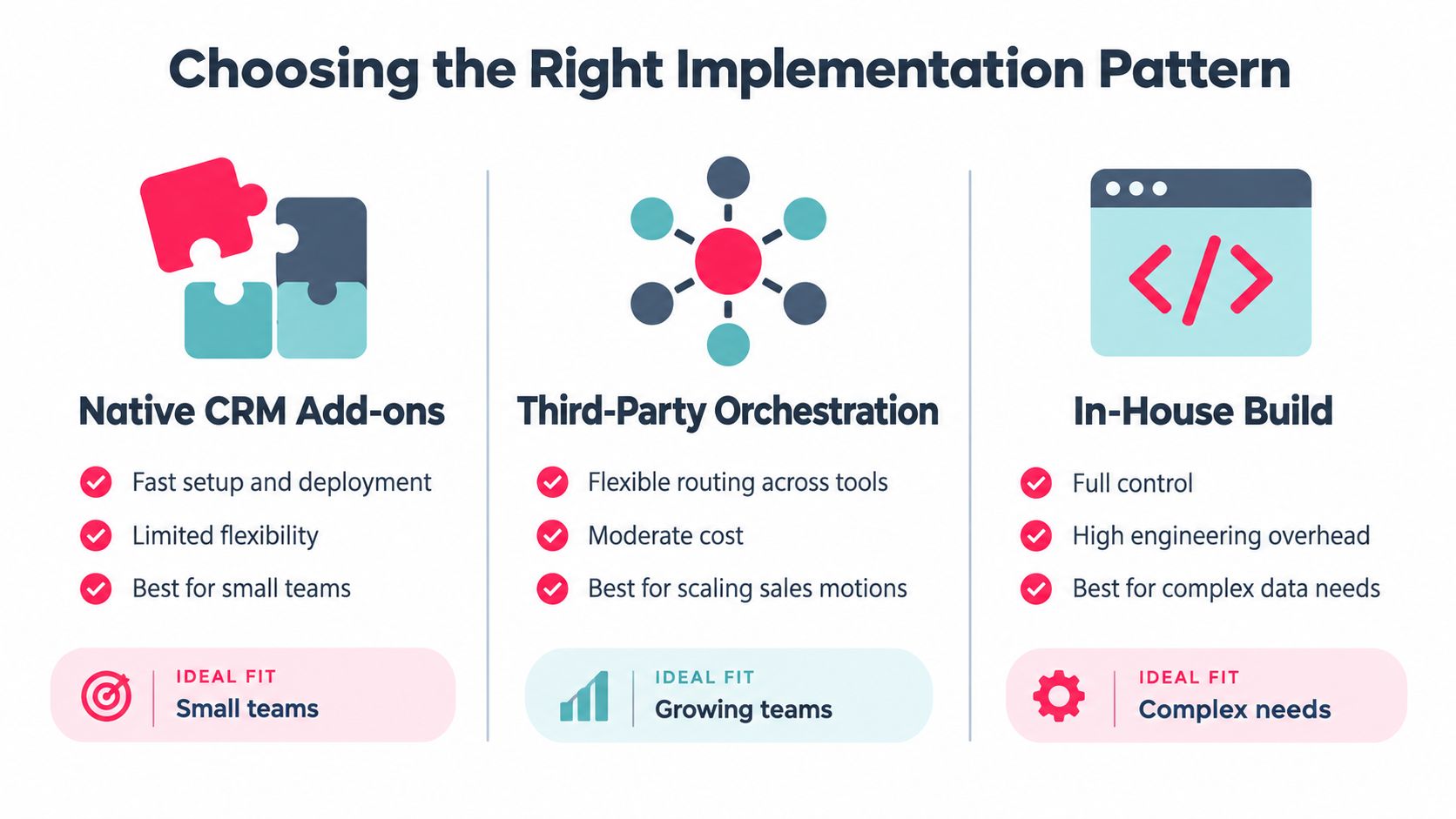
Implementation choice should follow stack maturity, not vendor hype. A company with a stable CRM and modest workflow complexity can move quickly with native add-ons. A company with multiple routing rules, enrichment layers, and handoffs usually needs orchestration. A company with heavy data dependency and engineering support may choose a custom build.
How the three patterns differ
| Pattern | Best Fit | Main Trade-off |
|---|---|---|
| Native CRM add-ons | Small teams with simple workflows | Fast to deploy, limited flexibility |
| Third-party orchestration | Scaling sales motions across multiple tools | More control, more configuration |
| In-house build | Complex data needs and strong engineering support | Highest control, highest overhead |
Many teams get stuck here. They compare features instead of operational fit. A native tool may look simpler, but if your data routing is fragmented, simplicity just hides the problem. A custom build may sound strategic, but if the team can't maintain it, you inherit a new layer of technical debt.
The right question is which pattern keeps the stack understandable for the people who run it. That means the CRO, RevOps lead, and sales managers all need to see the same routing logic, the same field definitions, and the same ownership rules.
For teams comparing implementation styles, this external guide on AI explainer video best practices for 2026 is useful because it shows how to explain complex systems clearly to internal stakeholders before rollout.
A simple selection rule
Use the pattern that matches your current operating reality.
- Choose native add-ons when speed matters more than custom routing.
- Choose orchestration when several tools need to pass clean signals to each other.
- Choose custom build only when your data model is unusual enough that the off-the-shelf options keep breaking.
We've seen teams waste months trying to force a simple tool into a complex stack. The better move is to pick the least complicated architecture that still respects your actual workflow.
Why Most AI Sales Deployments Stall
Most stalled deployments fail for operational reasons, not because the model is weak. Bad CRM hygiene, noisy signals, and vague routing rules make AI look smarter than the stack underneath it. If the system is full of duplicates, stale owners, and inconsistent lifecycle stages, AI just accelerates the confusion.
The failure modes we see most often
The first is dirty input data. If lead records are incomplete or inconsistent, scoring becomes unreliable and personalization gets awkward fast. The second is weak routing logic, where the system knows a lead exists but can't hand it to the right rep with confidence. The third is unmanaged signal noise, where every engagement is treated as meaningful even when the buyer intent is low.
Another common failure is that teams automate the wrong layer. They invest in copy generation before they fix intake, enrichment, or ownership. That creates more activity, but it doesn't improve pipeline quality.
Practical rule: if your AI program starts with content generation, you may be optimising the easiest problem, not the most important one.
Sales teams also need to be honest about what AI can't fix. It won't rescue poor segmentation, vague ICP definitions, or a broken handoff between marketing and sales. It won't repair a CRM that nobody trusts. And it definitely won't compensate for a team that refuses to change its operating habits.
If your team is already dealing with stalled opportunities, the right next move is often a workflow review, not another model. A practical reference point is revive stalled sales with Supercenter, which is useful for leaders thinking about friction inside active deals rather than at the top of funnel.
Measuring Impact and the Next Audit Step
AI impact should be measured against a baseline, then compared after implementation. The four metrics we trust most are pipeline created, conversion rate, rep productivity, and sales cycle length (Markets and Markets). If those numbers don't move, the team is probably measuring activity instead of outcomes.
A stronger scorecard also tracks pipeline influenced, lead-to-opportunity conversion, opportunity-to-close conversion, sales cycle length, and revenue per rep (ZoomInfo). That's where pipeline attribution stops being theoretical and starts showing how signals, routing, and seller actions affect commercial output.
The first audit to run
Start with data routing. Map where signals enter the system, who enriches them, where they get scored, and who receives them next. Then check for leakage, duplicate records, and fields that nobody maintains. If the audit reveals broken handoffs, fix those before adding more AI layers.
The best teams also measure usage frequency because the tool only matters if sellers actually work in it. ZoomInfo's research says AI-enabled sellers using the tools weekly or more report 73% larger deal sizes, 78% shorter deal cycles, and 80% higher win rates (ZoomInfo). Those numbers are useful because they tie behaviour to commercial output, but only when the workflow behind them is clean.
If you want one next step, do the audit before the pilot expands. Ask RevOps to trace one lead from source to close, inspect every routing decision, and document every place the data can break. That gives the CRO a real picture of whether AI can help the stack, or whether the stack needs repair first.
If you want a cleaner view of where AI will help your sales motion, start with a routing and governance audit, then compare your current stack against the simplest implementation pattern that can support it. Stimulead can help map the gaps, define the controls, and prioritise the first fixes before you buy another layer of tooling.