
Agentic AI is software that takes an outcome, plans the work, calls tools, inspects results, and revises its actions within defined permissions. Calling a chatbot agentic usually fails that test because generating a useful answer isn't the same as carrying out a workflow.
The popular advice to “add an AI agent” skips the decision that matters to a CEO, CMO, or CRO: what will the system do in your live stack, and what happens when it gets something wrong? For a growth-stage B2B team, the practical test is simple: can it change a CRM field, send an approved message, or move a qualified opportunity through a defined process, with the right controls? If not, you may have a useful assistant, but you don't yet have an agentic workflow.
Table of Contents
- What ‘Agentic AI' Actually Means in a B2B Stack
- The Six Components Every Agentic System Must Have
- Where Agentic AI Sits on the Autonomy Spectrum
- Three Workflows Where Agentic AI Earns Pipeline
- Where Agentic AI Fails and Pilots Stall
- The Adoption Checklist a Growth Leader Should Run This Quarter
What ‘Agentic AI' Actually Means in a B2B Stack
“Agentic AI” is mostly a marketing label until a vendor can show what the software does beyond generating text. We use a behavioral test: the system must interpret business context, plan connected steps, call external tools, inspect the results, and revise its approach under bounded permissions. That separates a working agent from a polished ChatGPT session.
IBM traces the modern agent concept to Russell and Norvig's 1995 description of systems that operate autonomously, perceive their environment, persist over time, adapt, and pursue goals (IBM's account of AI agents' evolution). The underlying idea predates today's foundation models. What's changed is that modern models can help interpret requests and choose actions across software, while integrations let those actions affect real business processes.

A conventional generative-AI workflow might research an account and draft an outreach email. An agentic workflow could also record its evidence in HubSpot, prepare an approved sequence, pause for review where policy requires it, and update the record after a response. The distinction is execution, not the interface or the model's ability to sound confident.
Our vendor-call test: Ask the vendor to demonstrate a complete workflow in your systems, including a failed tool call and the way the agent recovers or escalates.
Mislabeling a chatbot as an agent can waste implementation budget and leave access risks unexamined. Treat “agentic” as a claim to verify, not a product category that guarantees autonomy or results. The business question is whether bounded action improves a process you already measure.
The Six Components Every Agentic System Must Have
A system's architecture determines whether it can act reliably, not the label on its sales deck. A useful assessment separates six components, then asks which are handled by software and which still depend on a person.
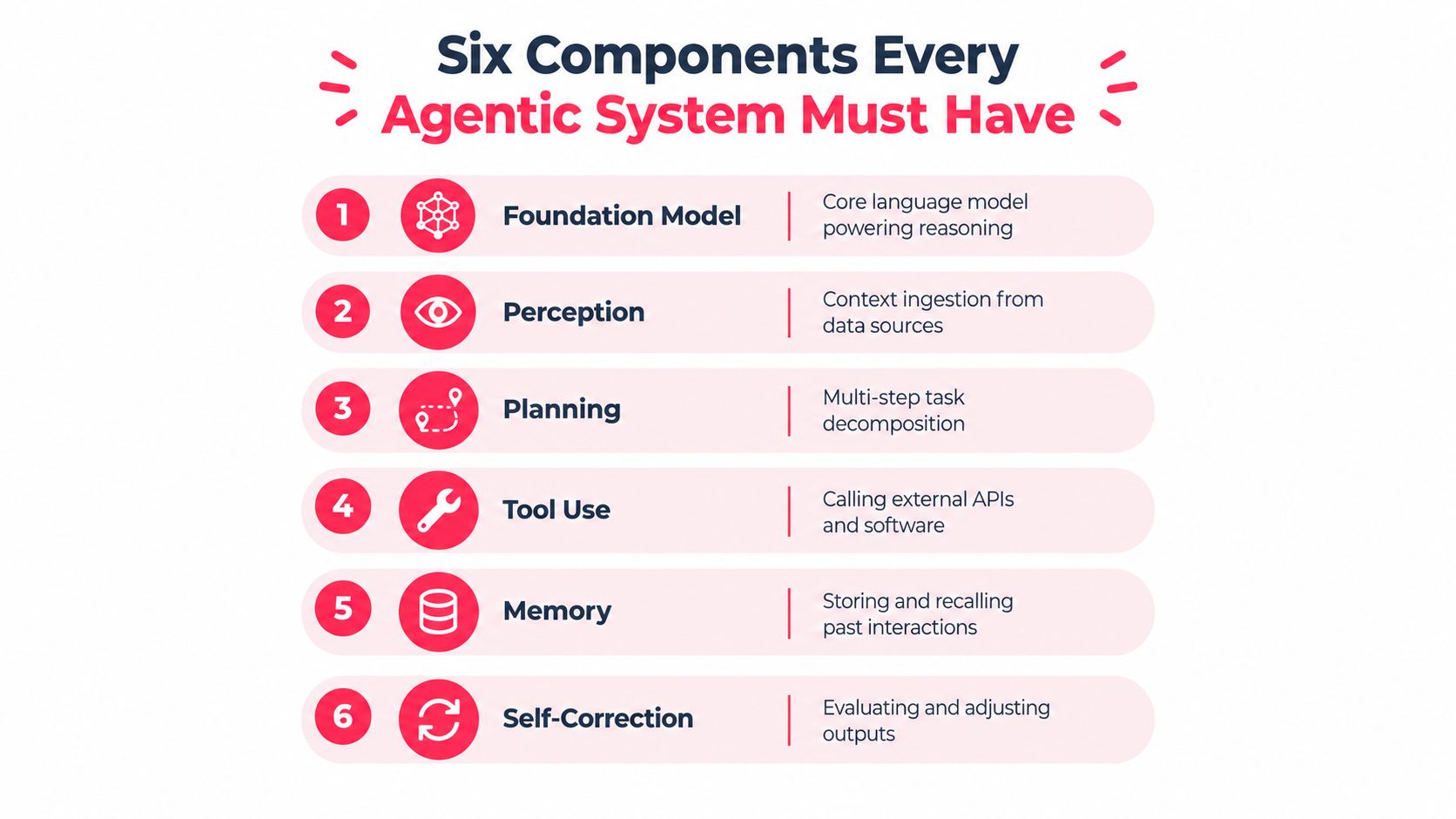
| Component | What it does | Growth question to ask |
|---|---|---|
| Foundation model | Interprets requests and supports reasoning. | Which model handles the task, and what happens if it returns an uncertain result? |
| Perception | Ingests context from CRM records, forms, call notes, and analytics. | Can it access current, relevant account data? |
| Planning | Breaks an outcome into steps and selects a course of action. | Can you inspect the plan before it runs? |
| Tool access | Reads from or writes to external systems through APIs or approved integrations. | Can it update HubSpot or retrieve a GA4 report, and under whose credentials? |
| Memory | Retains relevant workflow state and approved history. | Does it know what has already happened on this account? |
| Feedback and oversight | Checks outputs, responds to results, and routes exceptions for review. | What stops an incorrect email or CRM update from moving forward? |
These components have to work together. A model that can plan but can't call tools is a recommender. One that can write to Salesforce but follows a rigid script may be useful automation, yet it won't adapt when an API returns unexpected data. NIST-aligned guidance describes autonomy in terms of the initiative or discretion an agent has when using tools without user intervention (NIST's discussion of tool-use agents).
For a practical implementation reference, Applied's guide to deploying agentic AI can help teams think through workflow design and execution. Use it to frame questions, then validate the system against your own CRM permissions, data quality, and approval requirements.
Ask any vendor to identify which components its product performs, which depend on integrations, and which remain human responsibilities. The answer should be concrete: a live tool call, the returned result, the next decision, and the point where the system must stop.
Where Agentic AI Sits on the Autonomy Spectrum
“Agent” doesn't mean “fully autonomous.” The useful buying decision is how much discretion the system gets, and which actions still require a person.
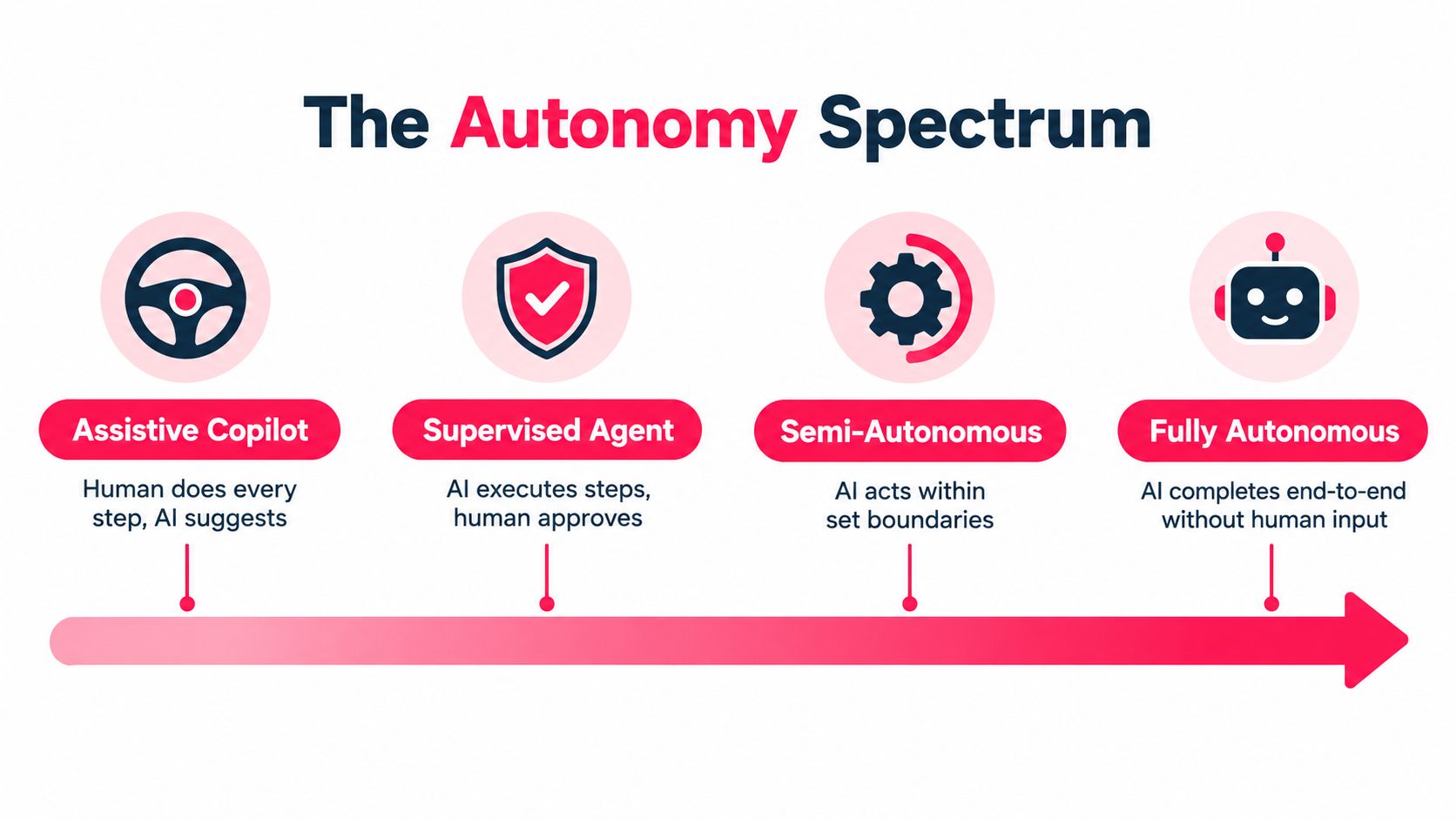
| Level | What the agent does | What still needs a human |
|---|---|---|
| Assistive copilot | Researches a prospect or drafts an email for a rep. | The person chooses actions, sends messages, and updates the CRM. |
| Supervised workflow | Enriches an account, recommends a score, and prepares a CRM update. | A reviewer approves changes before they take effect. |
| Bounded autonomous workflow | Updates permitted fields, routes qualified leads, or sends an approved follow-up based on defined rules. | A person handles exceptions and reviews actions outside policy. |
| Fully autonomous multi-agent system | Coordinates agents across systems to pursue a broader objective with limited intervention. | People set policy, oversee risk, and decide what authority to grant. |
A team can use the table to place a current workflow without pretending every project needs maximum autonomy. For example, a copilot that drafts a message but leaves the rep to send it has a different risk profile from a workflow that sends messages and changes lead status on its own. Treat those as separate operating choices.
The OECD's conceptual framing puts coordinated agents that break down tasks, collaborate, and pursue objectives over extended periods at the high end of this spectrum (OECD's analysis of agentic AI concepts). For most growth teams, that isn't the first implementation target. Start with one bounded workflow where the inputs are dependable, the allowed actions are explicit, and a process owner can review exceptions.
Move up a level only when the current one performs reliably against agreed operational measures. More autonomy without a clear owner doesn't create capacity. It creates a harder-to-audit process.
Three Workflows Where Agentic AI Earns Pipeline
The strongest use case isn't the most elaborate agent. It's a workflow where fewer manual handoffs improve speed, data quality, or conversion, and where the team can see whether that improvement happened.
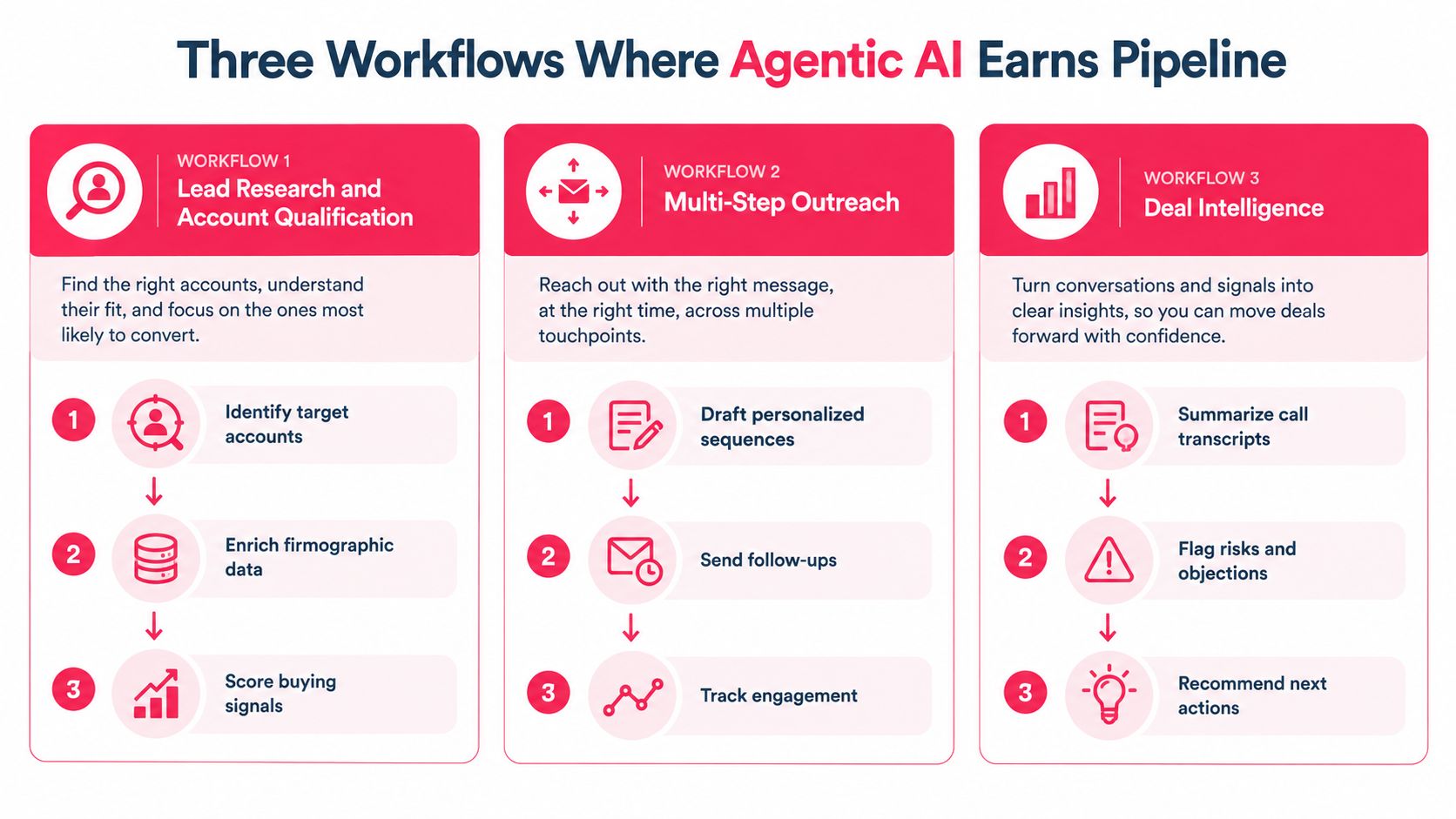
Lead research and account qualification
The agent starts with a target account or inbound lead, retrieves firmographic information and approved buying signals, and checks that evidence against the team's qualification criteria. It can prepare a score and record the source of each signal in the CRM, then route unclear cases to a sales development representative.
The human gate belongs where a weak or ambiguous signal could distort prioritization. Track completion quality, correction rate, qualification-to-meeting conversion, and time from lead arrival to first review. For teams refining this process, Franchise Foundry's AI lead qualification guide offers a related perspective on turning qualification into a defined workflow.
Multi-step outreach orchestration
An agent can assemble account context, choose from approved messaging, draft a sequence, and queue it for approval. Depending on permissions, it may also record replies and stop follow-ups when a prospect responds. Don't let it improvise claims, contact rules, or sales positioning without review.
Measure the time from qualification to first touch, sequence completion, positive replies, and meetings booked. Compare those results with the team's existing process, rather than giving the agent credit for activity alone. For broader sales workflow ideas, see Stimulead's guide to using AI in sales.
AI search visibility monitoring
A monitoring agent can check a defined set of buyer questions across approved AI search tools, capture whether the company or its products appear, and route notable changes to the marketing owner. It can also organize evidence and suggest pages or product information for review. Keep publishing decisions with a person: an observation about visibility isn't permission to alter public claims.
This workflow is useful when the team has a clear set of questions and a process for acting on findings. It's a poor fit if nobody owns the resulting content or site changes. Measure completed reviews and the downstream buyer actions the team can observe.
PwC's May 2025 survey of 308 US executives found that among organizations adopting agents, 66% reported increased productivity, 57% cost savings, 55% faster decision-making, and 54% improved customer experience (PwC's AI agent survey). Those are reported outcomes, not a substitute for your baseline. Choose the workflow with clean inputs and a metric your team already trusts.
Where Agentic AI Fails and Pilots Stall
Agents fail when teams grant broad authority to a system that can't reliably handle the conditions its workflow will encounter. A clean demo rarely exercises the messy cases: missing CRM fields, stale records, changed API responses, or conflicting instructions inside a document.
A planning benchmark across 4,209 multimodal cases reported weaknesses in long-horizon planning, tool-noise resilience, calibrated refusal, and inference-time refinement across 12 multimodal language models (the planning benchmark and its findings). For a sales workflow, a plausible plan can still go wrong if an enrichment tool returns incomplete data or a CRM update fails midway through execution.
Prompt injection adds a separate risk. A webpage or document can contain adversarial instructions that try to redirect the agent, and connected systems create potential paths to unauthorized actions or privilege escalation. If multiple agents pass information among themselves, teams also need to consider how one compromised or mistaken action can affect later steps.
Control authority, not confidence. An agent's fluent explanation doesn't prove its next action is safe.
Reduce exposure with least-privilege access, validated tool inputs, logging, explicit approval before irreversible actions, and a kill switch. Set limits on iteration and spending where relevant, and decide in advance which errors require a person to intervene. Measure erroneous actions and human escalations alongside successful completion; a workflow that shifts error detection onto an overloaded sales team hasn't removed the work.
Before choosing a model or agent framework, test the system against your task and risk profile. Stimulead's AI model evaluation approach can help teams structure that assessment. The operative principle is simple: permissions and recovery controls determine how much trust the workflow deserves.
Related reading: what is agentic AI covers where these systems fail in revenue work, the agentic AI definition sets out how to decide when autonomy is earned, and what is an agentic workflow covers architecture and governance for a live rollout.
The Adoption Checklist a Growth Leader Should Run This Quarter
Adoption is moving ahead of broad production use. McKinsey's 2025 global survey found that 23% of respondents said their organizations were scaling an agentic AI system in at least one business function, while 39% were experimenting. No individual business function exceeded 10% reporting scaled deployment (McKinsey's 2025 State of AI survey). For a growth-stage company, that supports sequencing one workflow rather than launching an enterprise-wide program.
- Choose one process. Pick a workflow with stable inputs, a named owner, and an output tied to a current pipeline or marketing measure.
- Set permissions and gates. Specify what the agent can read, change, and send. Require approval for actions that are hard to reverse, and keep an audit trail.
- Define the scorecard. Track completed workflows, escalation and error rates, cycle time, and relevant pipeline or conversion outcomes.
- Run a four-week pilot. Compare performance with the existing process, inspect exceptions, and decide whether the agent earned more authority.
The first number we ask teams to track is cost per completed workflow. If that cost is unclear or the workflow can't be audited, don't expand access yet. Use an AI readiness assessment to identify a suitable process, then schedule a working session with its owner to map inputs, permissions, approvals, and the success measure before building.
Choose one live workflow and map its inputs, permissions, approval gates, and cost per completed task with its owner before authorizing an agent to act.
