
Should you fund a dedicated platform when your CRM, recordings, and manager check-ins already exist? We only recommend buying one when its outputs land in a specific workflow, and we advise skipping it otherwise.
Table of Contents
- What Conversation Intelligence Is and Where Purchases Stall
- How Conversation Intelligence Works
- Where to Deploy It First
- How to Measure ROI
- A Six-Step Rollout Sequence
- How to Evaluate Vendors
- When to Skip It
- Three Conditions for Starting Now
What Conversation Intelligence Is and Where Purchases Stall
Conversation intelligence uses AI to capture, transcribe, and analyze calls, video meetings, emails, and chats, then turns what was said into fields, scores, and alerts. For a B2B CRO, the real question is the gap between what a buyer says and how the team responds. A searchable recording helps someone find an objection after the fact. A connected workflow assigns someone to resolve that objection before the deal moves on.
Salesloft’s explanation of conversation intelligence gets at this gap between capturing information and acting on it. At Stimulead, we split the platform into four layers. That makes it easier for buyers to see exactly what they're paying for.
| Layer | What It Does | Output Your Team Uses |
|---|---|---|
| Capture | Collects permitted conversations across connected channels | Records linked to accounts and opportunities |
| Transcription | Converts recorded speech into searchable text | Transcripts with speaker labels |
| Analysis | Interprets language and identifies relevant signals | Summaries, objection tags, scores, and alerts |
| Action | Routes reviewed outputs into existing processes | CRM updates, assigned tasks, and coaching queues |
Think of it like a kitchen. Capture is buying the ingredients, transcription is prepping them, analysis is cooking, and action is actually serving the meal to the customer. Plenty of kitchens do the first three well and still send out nothing.
These layers are a way to evaluate vendors, not a promise that every product covers every channel or action. Mindtickle’s platform comparison shows how recording, analysis, and coaching capabilities vary from one product to the next.

Where Does the Purchase Actually Stall?
In our client work, failed purchases usually stall at the action layer. Summaries pile up, but nobody owns the next step. We haven't audited that pattern across a large sample, so read it as implementation experience, not a market statistic.
Our buying rule is simple: every useful signal needs an owner and a destination.
Take a prospect who mentions an unresolved security review. The test is whether that comment changes anything inside the deal:
- The account executive gets a task to confirm the review requirements.
- RevOps checks that the opportunity's next step has an owner and a date.
- The manager raises the open blocker in the existing pipeline meeting.
If none of those things happen, the mention was just a recording. For broader workflow context, Flowkon’s sales engagement platform guide helps show where conversation outputs fit alongside outreach and CRM activity.
Before you approve budget, ask your RevOps lead to map one buyer signal to one accountable owner. Then have them show the resulting action inside the workflow your team already uses.

How Conversation Intelligence Works
A call recording is just evidence until someone turns it into something a manager can filter. Conversation intelligence handles that conversion through a chain of four technologies, and each one hands a cleaner product to the next. Market size estimates for the category vary widely, so treat any single number as a rough sense of direction rather than a forecast to plan a budget around.
The Four Technologies in the Stack
It starts with automatic speech recognition. This layer converts audio into a time-stamped transcript, and everything downstream depends on how good that transcript is.
- Speaker separation tags each segment with the person who said it, so the system knows which lines came from the rep and which came from the buyer.
- Natural language processing picks out topics, competitor names, pricing questions, and agreed next steps. These are the things a sales manager actually goes looking for.
- Generative summarization boils the call down to a short brief that a rep can skim before the next meeting.
Picture the whole stack as a court stenographer who also indexes every exhibit and notices the exact moment the buyer went quiet.
Following One Call Through the Data Path
The journey starts at the dialer or meeting platform, which passes along the audio file. Each stage adds a layer, but the CRM only sees the fields someone has chosen to map. That last point matters more than most teams expect.
- The dialer or meeting platform sends the recording to the vendor, often within minutes of the call ending.
- Speech recognition produces the transcript, and speaker separation attaches a name to each segment.
- Language models annotate the transcript with topics, objections, and next steps, giving a reviewer a timeline they can jump through.
- Mapped fields write back to the CRM, such as the stage note, the competitor field, and the next-step date.
Where Accuracy Breaks Down
In practice, accuracy tends to fall apart in three predictable places: crosstalk, regional accents, and poor headset audio.
In our client work, those three account for most of the transcript errors we review.
A transcript can look clean and still miss the one word that matters, like a competitor's name or the price the buyer turned down.
Testing Quality on Your Own Audio
Before anything goes live, we run a transcript test using the client's own recordings. A vendor demo doesn't sound like your team. It rarely reflects how your reps actually come across on a busy Tuesday afternoon with a laptop mic.
Read also: how we design the data pipeline behind these outputs.
We pull sample calls from each team, score transcript accuracy by hand, and agree on a go or no-go threshold before the pilot starts. That way, problems surface early, before any real budget is on the line.
Where to Deploy It First
Pick your first workflow based on how quickly you can confirm that something useful has changed. The order below is a planning assumption, not a benchmark. Integration readiness and sales cycle length can easily flip it.
Objection-handling content tends to show movement before coaching does. Publishing a tested response asks far less of your team than building a coaching habit that actually sticks.
Measure the first usable output separately from the first attributable commercial result.
Start With Content and CRM Workflows
Objection handling. Start by grouping the objections your reps hear again and again. Then compare how reps respond in won and lost opportunities at similar stages. Hand product marketing your strongest talk tracks so they can test them in follow-up emails or sales collateral. A response that correlates with wins doesn't prove it caused them. Experienced reps may simply get better opportunities to begin with.
Pipeline hygiene. Send automatically extracted next steps into CRM review queues, and flag any missing qualification fields. RevOps should track field completeness and how much time people spend fixing records. Account executives should confirm commitments before updates become official. Salesloft describes routing conversation signals into seller workflows, but your field permissions decide whether that works safely.
These workflows produce something you can inspect long before they produce closed deals. For example, compare next-step completion before and after activation. Then check whether accepted follow-up meetings actually increase.
| Priority | First Result to Inspect |
|---|---|
| Objection handling | Response usage and reply quality |
| Pipeline hygiene | Verified fields and dated commitments |
| Manager coaching | Adoption of one coached behavior |
| Lead scoring | Qualification accuracy |
| Answer engine optimization | Relevant citations and qualified visits |
Expand Only When Feedback Loops Exist
Manager coaching. Build reviews around specific moments, like an unanswered procurement question, instead of whichever calls a manager happened to pull. Then track one behavior across later calls. Mindtickle's comparison covers coaching playlists and snippets. Those features still depend on managers giving real feedback.
Lead scoring. Pair explicit buying signals with firmographic fit. A stated purchase deadline should help set priority, but positive sentiment alone shouldn't qualify an account. Check scoring decisions against later qualification outcomes before you automate routing.
Answer engine optimization. Turn recurring customer questions into evidence-backed pages that AI search tools might cite. Our voice-of-customer analytics guide walks through the input process. Citation gains are still uncertain, so treat this as a content experiment, not a channel you can count on.
The vendor-reported 21% revenue increase shows the kind of value buyers chase. It's still a vendor claim with no independent benchmark behind it, so it isn't a forecast for your company.
Choose one workflow this week and commit to it. Move forward only once you have enough call volume, a defined sales process, and a manager who reviews outputs every week.
How to Measure ROI
Most conversation intelligence ROI claims fall apart on attribution long before anyone checks the math. Decide up front what will count as proof, and capture those numbers before the first call is recorded.
Start with a Baseline You Can Defend
Pull at least 90 days of pre-rollout data for every KPI below. If you can, hold out a comparison group of reps who won't use the tool during the pilot.
No control means no defense. Any lift could be a new pricing page, a strong quarter, or one rep who just inherited better territory.

Core KPIs for a Conversation Intelligence Program
Hold the program to these seven measures. Track each against your baseline and, where you can, against control.
| KPI | How to Measure It | Minimum Measurement Window |
|---|---|---|
| Win rate on analyzed conversations | Closed-won divided by closed opportunities with recorded calls, versus control | One full sales cycle, at least 90 days |
| Sales cycle length | Median days from opportunity creation to close | Two quarters |
| Stage-to-stage conversion | Share of deals advancing each CRM stage, pilot versus control | 90 days |
| Ramp time for new reps | Days until a rep hits target activity or quota attainment | One hire cohort |
| Qualified pipeline per BDR | Qualified opportunities created per BDR per month | 90 days |
| Forecast accuracy | Variance between forecast call and actual close | Two quarter-end cycles |
| Research time per lead | Logged minutes from assignment to first outreach | 30 days |
Give each metric enough runway before you call it a result. That's how you avoid reading early noise as impact.
Building the Model Without Inflating It
Keep the model to three inputs:
- Incremental gross margin from attributable wins: extra closed-won revenue in the pilot group over control, times gross margin
- Hours saved at loaded cost: minutes recovered per lead or per coached rep, times fully loaded hourly cost
- Total cost of ownership: licenses, implementation, and integration, plus internal admin time
Net value is the first two minus the third. Nothing else goes in.
The arithmetic takes ten minutes. Defending the attribution assumption takes weeks, and that is what decides whether the number survives a CFO review.
Where Attribution Usually Breaks
Vendor examples tell you what teams tend to track, not what you will earn. In one reported deployment, the team saw a 2x year-over-year increase in BDR-sourced pipeline and cut lead-research time by 50%. Use that as a list of metrics to watch, not a promise. You can learn more about the reported pipeline results on gong.io.
In our client work, the usual break is hours saved that never get reallocated. Those hours never reach the P&L, so the model overstates the return.
This week, ask your RevOps lead to pull 90 days of stage data and name a comparison group before anyone signs a contract or sets a rollout date.
A Six-Step Rollout Sequence
Order is what decides whether a conversation intelligence rollout makes it past quarter one. Buy the tool first and fix the workflow later, and you almost never recover.
The graphic below lays out the six moves in order, plus the trap that kills each one. Give yourself an eight to twelve week window for the pilot if you want a clean read.
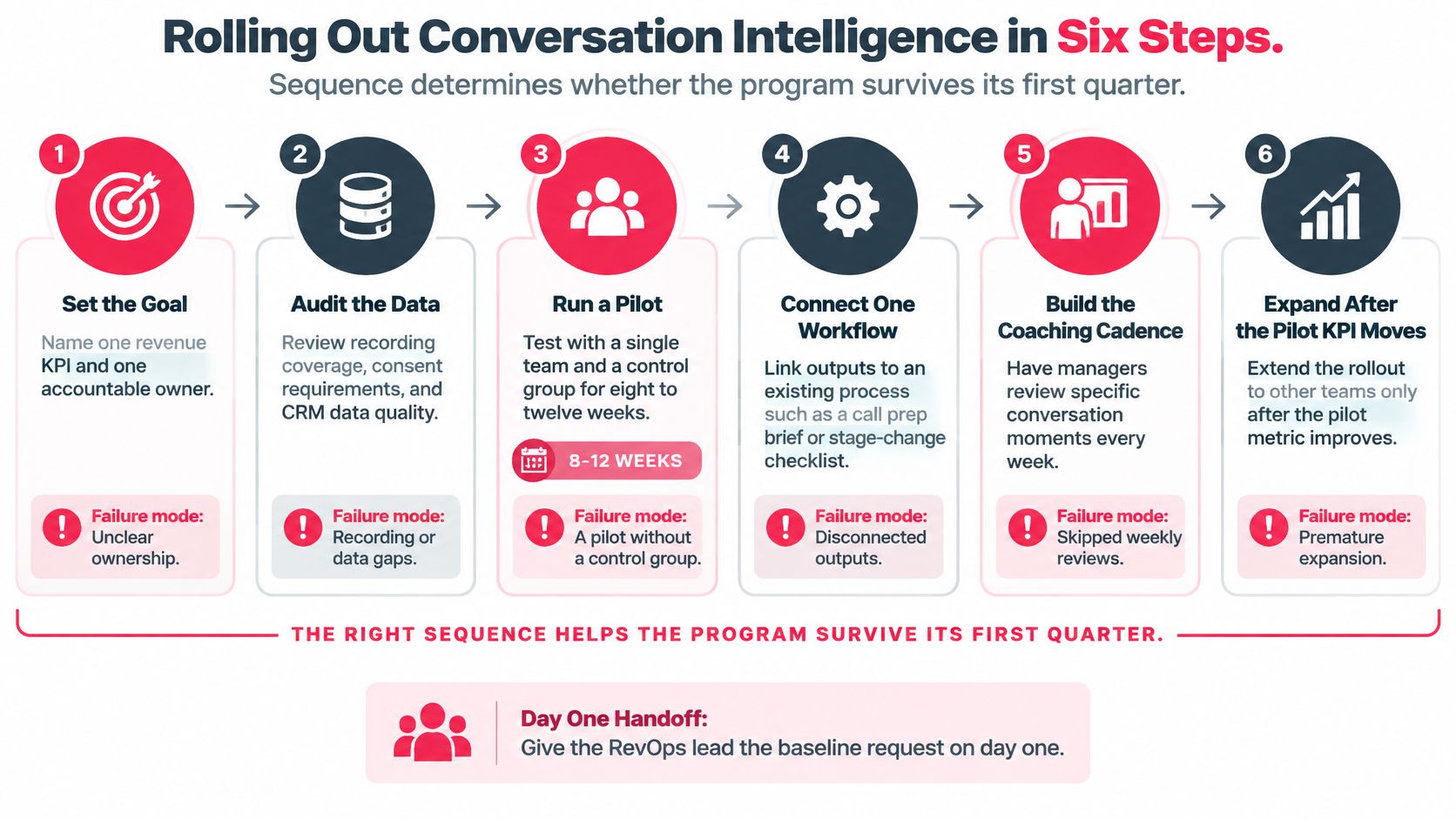
The pattern is hard to miss. Steps one and two are the cheapest, and they protect everything after them. Skip them and you pay for it later.
Setting the Goal and Auditing the Data
Step 1: Pick one revenue KPI and one owner. Win rate on analyzed calls works well, with a single person reporting it every week. When ownership is shared, no one reconciles the numbers and the pilot turns into an argument about definitions.
Step 2: Audit your data before you buy seats. How many calls are actually getting recorded? Where do you need consent language? Are account and opportunity fields clean? We've watched one team skip this and lose weeks untangling conflicting records before coaching ever started.
Running the Pilot and Connecting One Workflow
Step 3: Run an eight to twelve week pilot with one team and a control group. Measure win rate and stage conversion against a similar team working the old way. Without that comparison, any lift gets credited to a pricing change or a good quarter.
Step 4: Plug output into one workflow you already use. A call prep brief works. So does a stage-change checklist. Pick one and route insights there first. Anything that lives only in a dashboard never gets opened before the forecast call.
Building the Coaching Cadence and Expanding Safely
Step 5: Build a weekly coaching habit around real moments. Managers should pull specific clips, not random calls, and leave each review with one behavior to watch next week. Skip those reviews and the system becomes a library no one searches.
Step 6: Expand only after the pilot KPI actually moves. Rolling out early just spreads every data gap across more reps. New teams inherit messy fields, stop trusting the scores, and you're back to square one.
In our experience, sequence predicts whether a program survives better than platform choice does.
Hand your RevOps lead a baseline request on day one. Ask for 90 days of pre-rollout stage data, recorded and consented call volume by team, and a named comparison group to measure against.
How to Evaluate Vendors
Most procurement calls go sideways for one reason: the demo quietly turns into the evaluation. Take this checklist into every vendor call, ask each vendor the same questions, and make them answer with your own data.
Testing Accuracy and CRM Sync
Send each vendor 20 to 30 of your own recordings, and make sure the messy ones are in the pile. Score the transcripts by hand and write down every misheard competitor name, price, and date.
Vendor demo recordings are polished. Your reps' calls have crosstalk, bad headsets, and someone's dog barking in the background. That gap is where the real answer is, and no slide deck will show it to you.
Add these six items to your scorecard:
- Bidirectional CRM sync with field-level control. You decide which fields write back, not the vendor.
- Search and clip access. Test how quickly a manager can find one specific objection.
- Data export through an API. Your transcripts and tags should be able to leave with you if you switch.
- Retention and deletion controls. Get a deletion timeline in writing.
- Role-based access. Reps should see their own calls, and managers should see their teams' calls.
- Data residency for EU and UK teams. This belongs in the contract, not the sales deck.
Comparing Shortlisted Platforms
Gong and Chorus show up on most shortlists, and Salesloft Conversations, Mindtickle, and Outreach often join them. Each one is stronger in a different area. The better question is which platform fits the workflow your team already runs.
If your needs are narrower, native meeting transcription in Microsoft Teams or Zoom is a cheaper place to start. You get searchable call notes out of it. What you usually don't get is a coaching queue or CRM write-back at any real scale.
Requesting a Total Cost Schedule
Most platforms don't publish prices. You'll get quotes, usually priced per user per year with a minimum seat count.
Ask every vendor for a total cost schedule that covers licenses, implementation, integrations, and storage. Then compare vendors on that schedule alone, because the headline price rarely tells the full story.
Compliance Duties to Confirm
Start with all-party consent. Several US states require every participant to agree before a call can be recorded. The vendor needs to announce recording clearly and keep a log of consent.
If any EU participants are on the call, GDPR applies too. That means you need a lawful basis, firm retention limits, and a process for handling access requests.
Payment card and health details also need to be redacted from stored recordings. Don't take the vendor's word that redaction works. Test it on your own calls.
Read also: how we set AI governance approvals before a rollout.
Before your next vendor call, send every shortlisted vendor the same recording set and the same cost schedule request. Then ask your privacy lead to sign off on the consent wording and retention periods in writing. Do that before you buy a single seat.
When to Skip It
In our client work, failed rollouts almost always trace back to problems you can spot before the first call is recorded. The warning signs are predictable, so check for them before anyone signs a contract.
Five Patterns That Sink Programs
- Recording calls with no named owner for the output. Recordings pile up, and nobody acts on them.
- Using talk-time ratios as a performance target. This rewards reps who talk over buyers, which is the opposite of what you want.
- Publishing rep scorecards to the whole team. Coaching quickly turns into a public leaderboard, and reps stop taking risks.
- Buying before CRM hygiene is fixed. The analysis will describe your bad data faster, but it won't make the data any better.
- Rolling out to reps who were never told what the data is for. They will assume it's a surveillance tool, and they'll act accordingly.
When Call Volume Is Too Low
Small teams have a hard time telling signal from noise. If you only have a handful of conversations a month, one unusually good or bad call can look like a trend. We set the threshold for each client because it depends on how many conversations each stage of the sales process produces. We don't quote a single number, since any number we picked would be arbitrary.
A pilot run on too few calls will give you a confident-looking answer that is really just noise.
Fix the Process Before Buying Analysis
Weak discovery questions and a confusing pricing page are common culprits. If either is broken, analysis won't fix anything. It will just show you the broken process in more detail. Repair those first, then measure what changes. You'll know whether the fix worked, and you won't be guessing.
Reading Vendor Statistics Carefully
Vendor statistics are marketing unless they come with a stated method, a sample, and a comparison group. A striking percentage without those details tells you very little. Before a number goes into a board deck, ask how it was measured, who was included, and what it was compared against.
Three Conditions for Starting Now
Start now only if all three of these hold:
- Your team records and has consent for a meaningful share of sales calls, and a named owner reviews the outputs every week.
- Account, opportunity, and stage fields are clean enough that your RevOps lead trusts them.
- Discovery and pricing are documented well enough that you know exactly which behavior you want to change.
If a team fails any of these, run a process audit and a conversion test first. Our conversion testing velocity work is a sensible place to begin. Faster tests show you which messages move buyers, and that gives you a much better foundation before you add analysis on top.
Related reading: what is revenue intelligence covers the data and governance work a forecasting platform needs, and what is sales automation covers the CRM workflows that call insights usually feed.
The Action to Take This Week
Draft the baseline request for your RevOps lead. Ask for 90 days of pre-rollout stage data, call recording coverage broken down by team, and a proposed comparison group. Having that baseline in hand makes every later decision easier to defend.
