Your homepage is already getting paid traffic, the demo requests are fine on paper, and the board still wants more pipeline. Meanwhile, the best-funded competitor in your category keeps shipping sharper pages, cleaner offers, and better follow-up paths. That gap usually isn't a “creative” problem. It's a landing page optimization problem, and AI is finally useful when it's pointed at the parts of the page that move revenue.
The mistake I see most is teams treating AI like a page factory. That's a waste. AI belongs where it can make the biggest impact: message match, personalization, CTA performance, and the plumbing that lets you test faster without burning traffic. That matters because average landing pages sit around 6.5% to 6.6% conversion, while strong pages reach 10% or more, and top performers can hit 15% to 20% when traffic and intent are aligned, according to the industry roundup from Genesys Growth. The headroom is real.
I've shipped this kind of work across SaaS and e-commerce, and the pattern is consistent. The teams that win don't start by making pages prettier. They start by wiring AI into CRO, AI search and AEO, GTM engineering, and, where the buying flow is getting automated, agent commerce readiness. If you want a practical starting point on page anatomy, high converting landing pages is a useful reference, because the structure matters before the model does.
By the end of this, you should know where AI helps, where it hurts, how to structure pages for both humans and LLMs, and how to ship experiments at speed without fooling yourself with noisy data.
Table of Contents
- Why AI Landing Page Optimization Is a Revenue Lever, Not a Trend
- Data Readiness, Tracking, and Instrumentation Before You Touch a Page
- Audience Segmentation and Personalization That Actually Lifts Conversion
- AI Content Generation, Copy QA, and AI Search Optimization
- Designing Experiments at Roughly 10x Traditional Velocity
- Tooling and Vendor Evaluation Without the Demo Theater
- KPIs, Team Roles, Rollout Checklist, and Common Pitfalls
Why AI Landing Page Optimization Is a Revenue Lever, Not a Trend
A growth-stage CMO running paid traffic to a homepage that converts at 4% is already living the problem. The dashboard looks busy, the ads are spending, and the sales team still complains about lead quality. In practice, that page probably has enough traffic to justify deeper work, because AI pays off most when it improves the most impactful elements on pages that already get meaningful visits.
The spread in conversion rates is the opportunity
The conversion math is simple. If average landing pages are around 6.5% to 6.6% and strong pages are pushing into 10%+, with top performers at 15% to 20% under strong traffic match conditions, the gap is big enough to matter in board conversations, not just marketing ops reviews. That same source set also notes that companies with 10 to 15 landing pages generate 55% more customers than those with fewer than 10, which tells you something important, segmentation and page count are part of the revenue system, not a design preference. Those figures come from the roundup by Genesys Growth.
AI is useful because it can move the parts that are hard to scale manually. It can tighten message match between the ad and the page, vary proof by intent, and test CTA language faster than a human team can build each version by hand. That's why I don't treat AI landing page optimization as a novelty. I treat it as a way to compress the distance between traffic and revenue.
Practical rule: start with pages that already receive enough visits to learn quickly. AI doesn't rescue low-signal pages, it amplifies the signal you already have.
Four lenses keep the work honest
I look at every project through CRO, AI search and AEO, GTM engineering, and agent commerce readiness. CRO asks whether the page converts. AEO asks whether the page can be cited by AI systems that summarize buying options. GTM engineering asks whether the data, routing, and automation behind the page are dependable. Agent commerce readiness asks whether the page can still serve as buying behavior shifts toward assistants and mediated purchase flows.
That framing keeps the work from drifting into cosmetic changes. A nicer hero section won't save a weak offer. A smarter CTA won't fix a broken handoff into CRM. And a faster generator won't matter if the page can't be found, read, measured, and tested cleanly.
Data Readiness, Tracking, and Instrumentation Before You Touch a Page
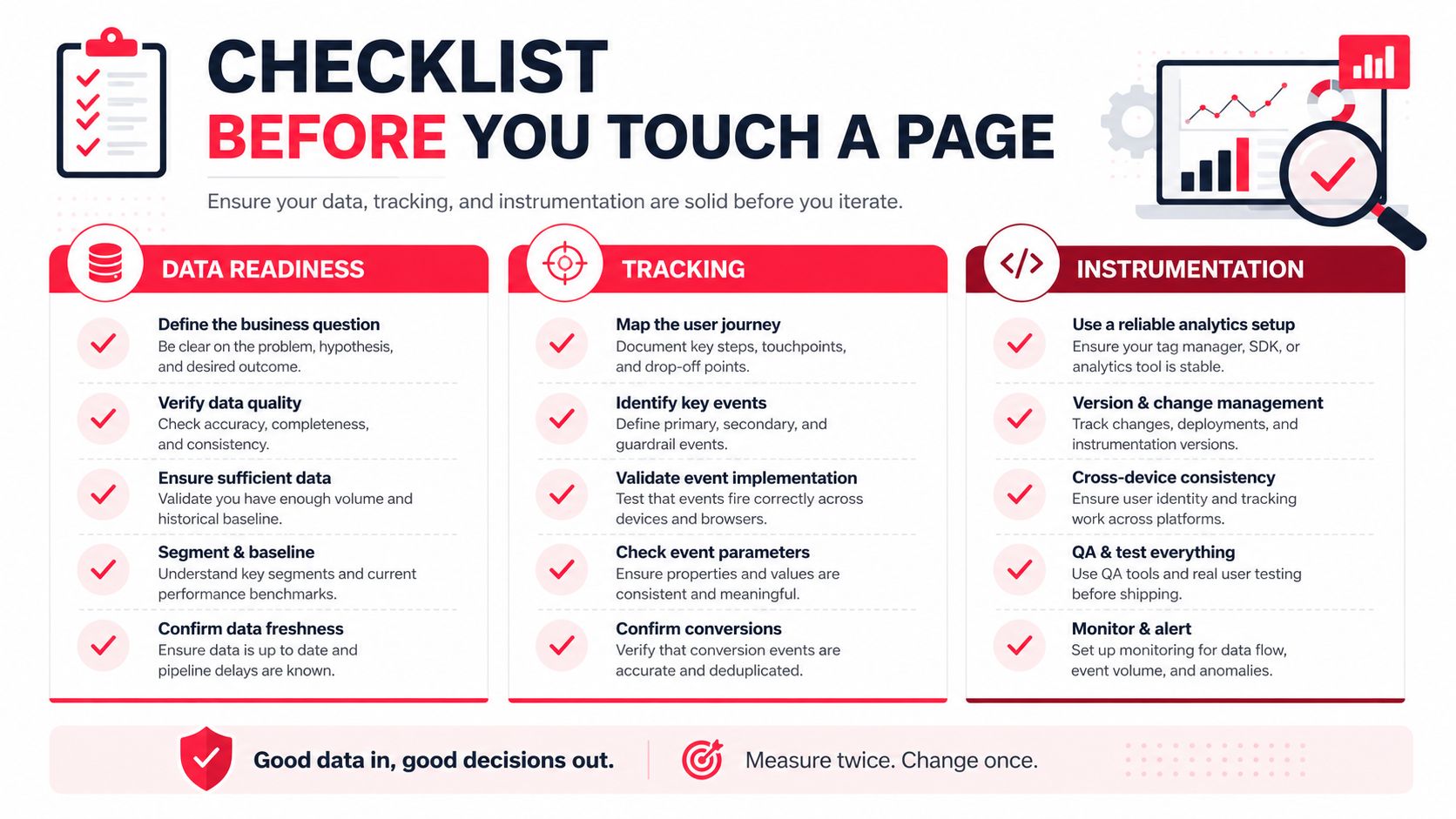
A page can only improve if the stack around it can explain what happened. If your analytics are fuzzy, AI will produce confident nonsense. I've watched teams spend weeks generating variants while their event taxonomy still could not separate a demo request from a trial signup, or a qualified lead from a random form fill.
Start with one conversion definition and one path to truth
The first rule is simple, define one source of truth for conversion events. If marketing calls a submitted form a lead, sales calls a booked meeting a lead, and finance only trusts opportunities accepted by the SDR team, your models learn against three different realities. AI personalization then gets blamed for a tracking problem it did not create.
Identity stitching has to work across ads, site, and CRM. If a visitor clicks a paid ad, browses three pages, comes back direct, and fills out a form, the system needs to preserve that story. Server-side tagging matters when client-side tracking breaks or gets blocked, but the larger point is continuity from click to record.
Minimum stack before AI work is worth the effort
A workable setup usually includes a clean GA4 or equivalent, reliable CRM sync, a recorded-session tool, and a place to log experiment IDs and variant history. If you are running AI personalization, you also need enough behavioral volume for the system to learn from. One published workflow recommends focusing on 2 to 3 high-traffic pages first, then running 2 to 3 full optimization loops before moving into live A/B testing, because the model needs enough data to behave like a model and not a guess engine. That workflow is documented in Cybage's AI-driven landing page optimization guide.
If you cannot measure a page weekly with confidence, do not expect AI to find the lift.
That is the bar I use with clients. Weekly confidence means the event definitions hold, the attribution does not bounce around every Tuesday, and the team can trace a result back to a real page change. If you want a structured way to assess whether your stack is ready, the Stimulead AI readiness assessment is the kind of internal checkpoint I would want in place before turning on serious automation.
Audience Segmentation and Personalization That Actually Lifts Conversion
Personalization is where AI tends to get oversold. Teams hear “dynamic” and assume every visitor needs a unique experience. In reality, too much variation can slow the page, blur the offer, and make trust signals feel inconsistent. That's when relevance turns into friction.
Segment by intent first, then by fit
The best segmentation starts with first-party behavior and CRM fit, then gets refined by traffic source and lifecycle stage. A visitor from a branded retargeting campaign doesn't need the same message as a first-time prospect from a cold keyword search. A current customer looking for an expansion motion doesn't need the same CTA as an evaluator comparing vendors.
The practical move is to decide which segments deserve a full page, which deserve a swapped block, and which should stay on the core page. High-intent paid traffic can justify a unique hero, proof set, and CTA. Lower-volume segments usually need a modular block change, maybe headline, maybe testimonial, maybe pricing context. If the segment is thin and the behavior is noisy, leave it alone.
Personalization has a break-even point
The hidden cost is speed and coherence. Supportive guidance notes that slow pages reduce the effectiveness of personalization, and that teams should prioritize page speed, clean UI, and a single clear CTA before adding AI features, a point made clearly in Leadpages' AI landing page guidance. I agree. If the personalization layer adds latency or makes the page feel stitched together, the relevance gain can disappear.
One useful guardrail is to treat Core Web Vitals as a hard ceiling, not a nice-to-have. A recent technical guide recommends keeping LCP under 2.5 seconds, FID under 100 ms, and CLS under 0.1 while layering in personalization and predictive analytics, because better targeting won't matter if the page feels unstable or slow. That benchmark appears in PPC Growth Studio's AI landing page guide.
Use personalization when the segment has clear intent, high enough traffic, and a meaningful offer difference. Skip it when the message is already clear, the page is slow, or the data volume is too small to justify the complexity.
AI Content Generation, Copy QA, and AI Search Optimization
AI is good at first drafts. It's good at producing headline angles, proof block variants, and FAQ candidates fast enough that a human can compare choices instead of starting from a blank page. It's bad at brand judgment, claim discipline, and deciding what deserves to be on the page.
Draft with AI, then edit like a closer
The best workflow I've seen is simple. Use AI to generate several headline-frame combinations, a few proof block options, and draft FAQ entries. Then edit the language for voice, verify every claim, and strip out anything that muddies the offer. If a sentence sounds clever but doesn't help the buyer decide, cut it.
The first 100 words matter more than many realize. One AI-search landing page guide says the opening should plainly state what the company is, what it does, and who it is for, and it recommends server-rendered HTML, JSON-LD, and allowing crawlers such as GPTBot, PerplexityBot, and ClaudeBot in robots.txt. That guidance is in Foglift's AI search landing page article. I'd also keep the visible copy tight. Another practical source recommends an answer-first hero of 50 to 80 words, plus modular H2 and H3 blocks that each answer one question in 60 to 120 words, with a visible FAQ and Q&A section. That framework is laid out in Geneo's AI summary-snippet guide.
Write for citations, not just clicks
AEO and CRO meet. AI assistants pull cleaner signals from pages that are explicit, structured, and easy to parse. Guidance from Snoika suggests that pages using FAQ and schema markup see a 41% citation rate, and that data tables get cited about 2.5x more often than the same information written in paragraphs. I wouldn't treat those numbers as a universal law, but the direction is clear, structured content gets retrieved more often than fuzzy prose.
That means your page should have a content brief that serves both humans and machines. I'd use a clear hero statement, short modular sections, a visible FAQ, and schema for the offer and the brand. If the page is a product offer, add Product schema. If it's a service offer, add Service schema. Add Organization schema for the brand, and keep the structured data aligned with the visible page. If you want a deeper tactical reference on retrieval-friendly content, Stimulead's guide to optimizing content for LLMs is the right adjacent resource.
If you want a second point of comparison for AI visibility work, boost your AI visibility is a practical external read, especially if your team is trying to connect conversion pages to answer-engine discovery.
Designing Experiments at Roughly 10x Traditional Velocity
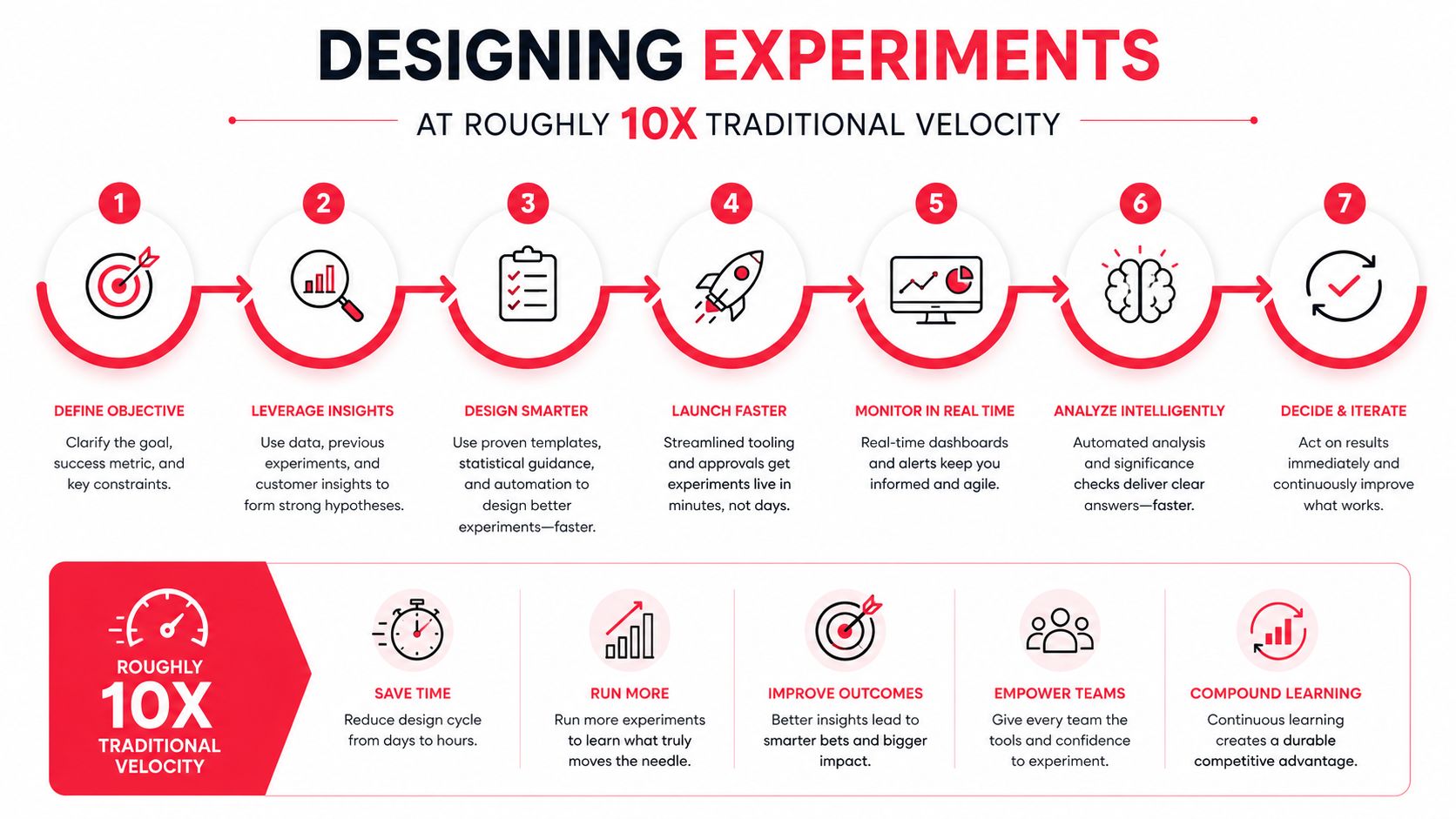
Classic A/B testing is too slow for AI-assisted page work when traffic is decent and the team can ship weekly. The answer isn't reckless testing. It's choosing the right test type for the traffic pattern and keeping one clean control in the system so you know what changed and why.
Pick the test method based on traffic reality
For a high-traffic page, I'll use bandit testing when the goal is to shift traffic toward a winner while learning fast. For lower-traffic funnels, sequential testing is safer because it respects the fact that you don't have enough volume to act like a giant marketplace. If trust is a concern, keep a holdout cohort that never sees the new variant, so you can compare behavior over time.
Synthetic controls and session stitching help when individual session paths are messy. They don't replace discipline, they reduce noise. The important thing is to avoid pretending every uplift is clean when the sample is thin or the user journey is fragmented across devices.
My rule: every client keeps at least one untouched control live each quarter. If you don't preserve a baseline, your reported lift turns into a memory of past experiments.
The cadence should be weekly, not monthly
A good operating model ships variants weekly when traffic allows. The team drafts with AI, a human edits, analytics validates the setup, and the experiment lands with a clear success metric. If the traffic is too low for a confident read, don't force it. Use the time to improve the page hierarchy, the proof, or the offer itself.
For a practical implementation lens, Stimulead's AI CRO approach is the closest match to how I'd structure a fast-moving testing program. The goal isn't more experiments for their own sake. The goal is faster decisions with less wasted traffic.
Tooling and Vendor Evaluation Without the Demo Theater
Most vendor demos are designed to make the product look complete before it's proven useful in your stack. I prefer a blunt scorecard. It keeps conversations about models, integrations, consent, page speed, and evidence from turning into vague optimism.
Score the vendor on what breaks in production
For AI copy and page generators, I want to know how the model is tuned, how prompts are stored, and whether the output can be edited without clunky handoffs. For personalization engines, I care about the integration depth with your CRM and analytics stack. For AEO tools, I care about whether the system helps you shape content for retrieval, not just report on rankings. For experimentation platforms, I care about traffic allocation, holdouts, and event quality.
Tooling reference from Landra's AI landing page guide is worth reading if your team is comparing generation tools, because the category is crowded and the differences are easy to blur in sales calls.
| AI CRO and AEO Vendor Evaluation Scorecard | What to ask | Red flag |
|---|---|---|
| Model transparency | What model powers the output, and how are prompts and edits handled? | “Proprietary AI” with no detail |
| Integration depth | Does it connect cleanly to CRM, analytics, ad platforms, and CMS? | Manual exports and CSV dependence |
| Data residency and consent | Where is customer data stored, and how is consent respected? | No clear policy on customer data use |
| Evidence of lift | Can you show lift numbers on pages similar to ours? | Only mockups, no actual outcomes |
| Page speed impact | What happens to load time after implementation? | Performance is ignored in the pitch |
Buy when speed matters, build when control matters
For teams of 5 to 50, I usually buy the core layer and keep the stack simple. For teams of 50 to 200, building pieces of the workflow can make sense if the business has enough page volume, enough engineering support, and enough internal process to maintain it. The wrong move is buying a platform that can't talk to your data, or building a custom setup nobody owns.
KPIs, Team Roles, Rollout Checklist, and Common Pitfalls
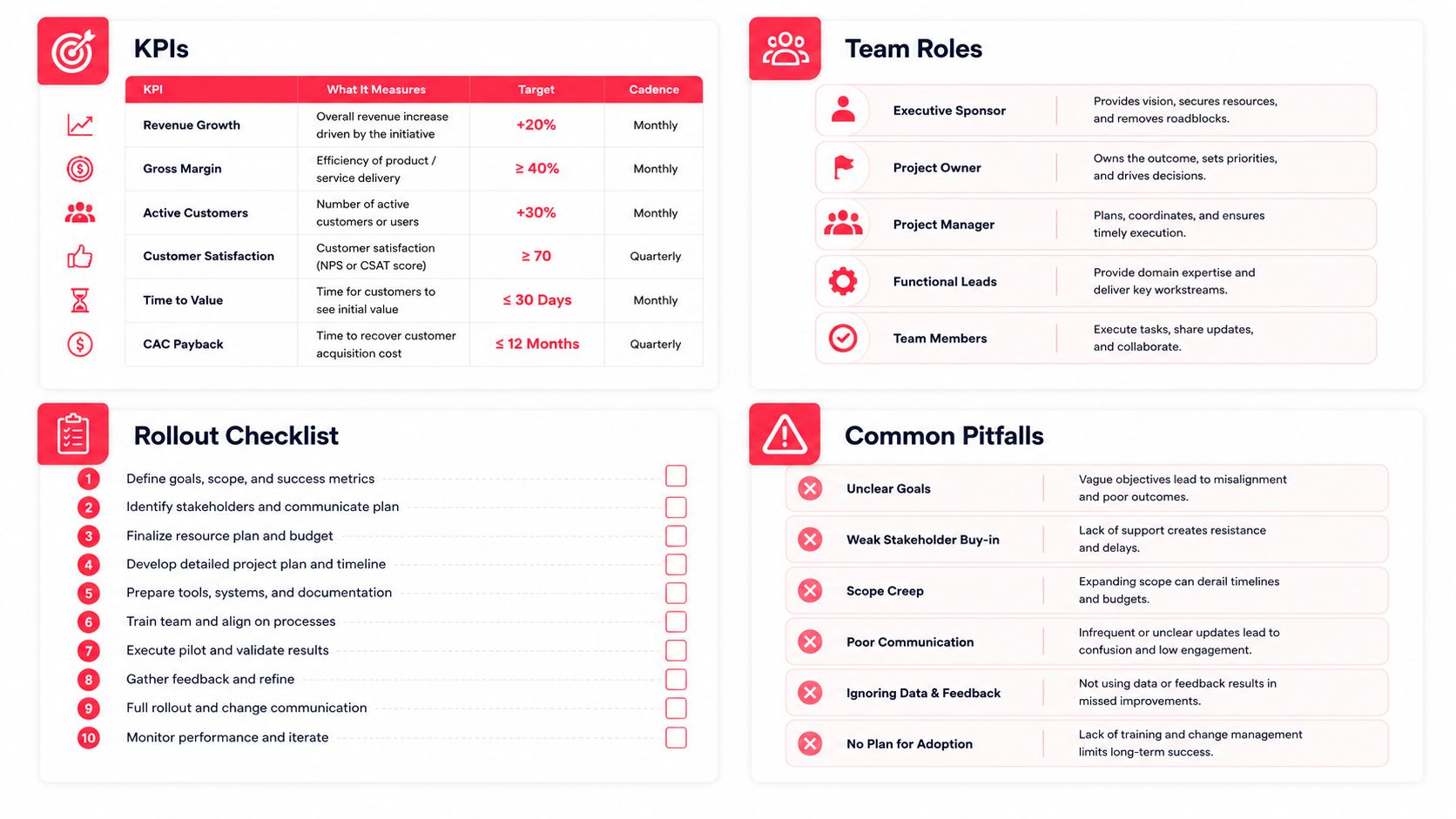
The KPI stack has to tie to revenue or it won't survive budget season. Weekly CRO dashboards should track conversion by page, traffic source, and segment. Quarterly board updates should care about revenue influence, pipeline quality, and whether the AI program is producing repeatable learning or just isolated wins.
Team roles should be explicit
Marketing owns message, offer, and launch timing. Sales owns feedback from real buyers and lead quality signals. Data owns event integrity and experiment reads. Engineering owns performance, tagging architecture, and any server-side or CMS work that needs to stay stable. The connective tissue is GTM engineering, the role that turns campaign intent into working systems without dragging the product team into every request.
A practical 30-60-90 rollout
In the first 30 days, pick one high-traffic page, clean the tracking, and create one AI-assisted variant. In the next 30 days, add a second segment, introduce a holdout, and extend the page to answer-engine friendly structure. In the final 30 days, turn the learning into a small portfolio of pages and a repeatable AEO motion, so the team isn't rebuilding the same workflow every time.
The failure modes are predictable. AI writes copy that a human never reviews. Personalization breaks message match. Schema says one thing while the visible page says another. Experiments launch without a holdout, so nobody can trust the lift. Every one of those problems is fixable before launch.
Pick one page, one segment, and one metric this week, then ship a measured variant. If you want a partner that works across CRO with AI, GTM engineering, AEO, and agent commerce readiness, book a working session with Stimulead and turn one live page into a real revenue test.