
Many email marketing teams buy AI for email marketing in the wrong order. They start with subject line generators and copy tools, then wonder why revenue barely moves.
That approach ignores the economics of the channel. Automated emails generate 320% more revenue than non-automated emails, and although they account for only 2% of email volume in 2026, they drive 37% of all email-generated sales according to these email marketing benchmarks. The lesson is simple. Revenue comes from systems, triggers, segmentation, and measurement. Copy generation is a supporting layer.
If you're a CEO, CMO, or CRO, treat AI for email marketing as a pipeline operation. The goal isn't prettier campaigns. The goal is more qualified demand, faster testing, and better revenue per send.
Table of Contents
- First Validate Your Email Strategy Before Using AI
- Deploy These High-Impact AI Campaign Workflows
- Accelerate Testing and Measure What Matters
- How to Select Vendors and Structure Your Team
- Your 90-Day Revenue-Focused Rollout Plan
First Validate Your Email Strategy Before Using AI
The fastest way to waste money on AI for email marketing is to automate bad positioning.
Klaviyo says it plainly: "AI can speed up email marketing, but it can also scale bad strategy". That's the trap I see most often. The team has weak offer framing, muddy segmentation, and generic calls to action. Then they add AI and produce more of the same, faster. Recent 2025 to 2026 data makes that failure mode hard to ignore: 62% of marketers over-rely on AI-generated content without human oversight, and those campaigns see 35% lower engagement than human-refined campaigns.
Audit the message before you automate the machine
Before you add another tool, audit the existing program against revenue. Not engagement in isolation. Revenue.
If I'm advising a growth-stage team, I start with five questions:
- Offer fit: Does each core segment get a distinct offer, or does everyone receive the same polished generic message?
- Journey fit: Are you mapping emails to buying stages, or just filling a calendar?
- CTA clarity: Does each message ask for one concrete next step?
- Segment logic: Are segments based on behavior and account context, or only broad list labels?
- Conversion path: When someone clicks, does the landing page continue the same narrative and intent?
Practical rule: If your team can't explain why a sequence converts in terms of buyer intent, AI won't fix it. It will just produce more output.
This is the same issue we address in GTM engineering work. The constraint usually isn't effort. It's logic. Teams confuse activity volume with system quality.
If your team needs a structured starting point, use an AI readiness assessment before you commit budget. You want clarity on data, process, ownership, and revenue reporting before rollout.
Use AI for revenue rescue before net-new production
Many organizations use AI like a junior copywriter. That's too narrow.
A better first use is diagnostic analysis of past campaigns. Feed winning and losing emails into your model. Ask it to isolate where the sequence broke: subject line, opening, offer framing, CTA, segment mismatch, or click destination. That gives you a revenue rescue workflow instead of a content factory.
The hidden advantage is speed. You don't need to rebuild the whole program. You can identify the weak link in a sequence that's already getting traffic and tighten it.
If you're building stricter editorial controls for generated copy, this guide on AI strategies for content creators is a useful reference point. It's relevant because brand voice drift is one of the first things that slips when teams move too fast with generated email copy.
Run this pre-AI audit checklist
Use this before any vendor selection or pilot.
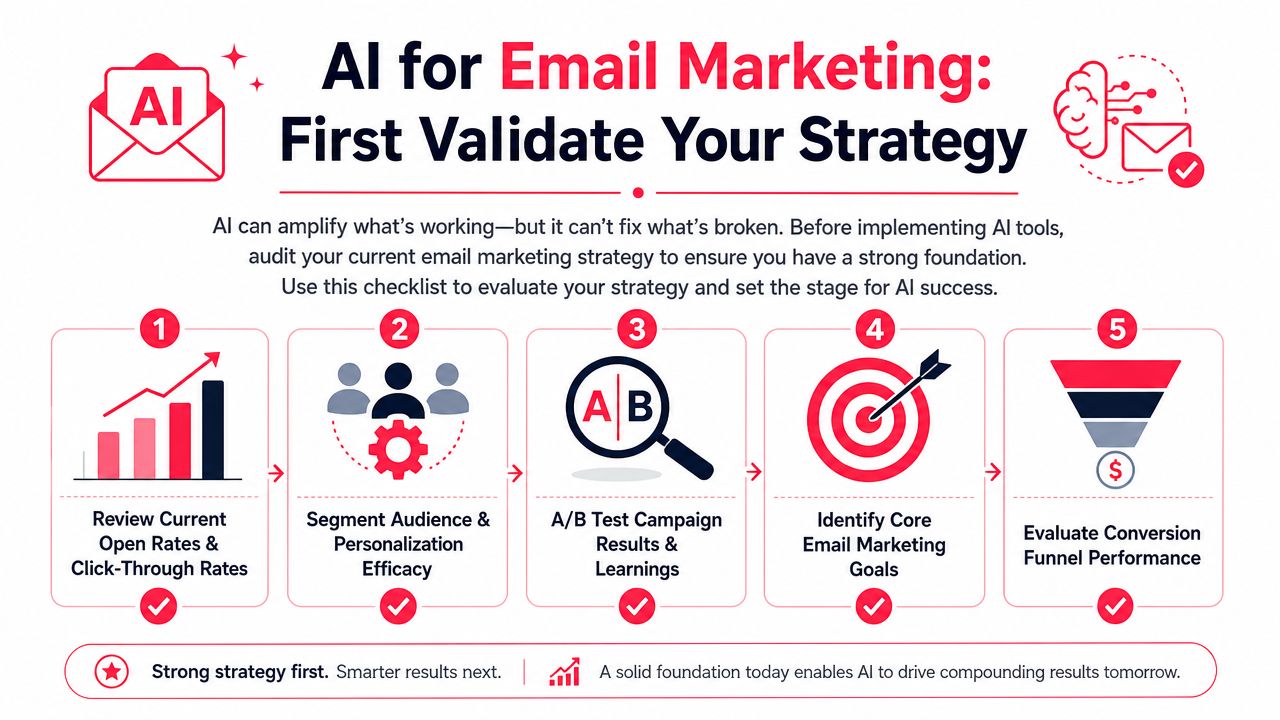
- Review current open rates and click behavior: Look for gaps between opens, clicks, and actual downstream action. Strong opens with weak clicks usually mean the promise and message body don't match.
- Check segmentation efficacy: Review whether your core segments reflect product interest, buying stage, account type, or prior engagement.
- Audit A/B test learnings: Many groups run tests and archive them. Pull those learnings into a working playbook.
- Define core goals: Separate newsletter goals from demo-booking goals, expansion goals, and reactivation goals.
- Inspect the funnel after the click: Email performance often fails on the landing page, form, scheduling flow, or offer mismatch.
Your first AI project should produce a better decision, not more assets.
That mindset matters beyond email. It's the same discipline you need in CRO with AI, AI search optimization, and agent commerce readiness. If the underlying demand path is weak, automation multiplies the weakness.
Deploy These High-Impact AI Campaign Workflows
Once strategy is sound, move fast on workflows that affect revenue per send.
The mistake here is isolated feature adoption. A subject line tool alone won't move the business much. According to Digital Applied's guide to AI email automation, AI-driven send-time optimization can lift open rates by 26% and CTR by 41%. Notably, programs that combine send-time optimization, predictive segmentation, and AI-generated content report a 41% average revenue increase, while single-feature rollouts produce much smaller gains.
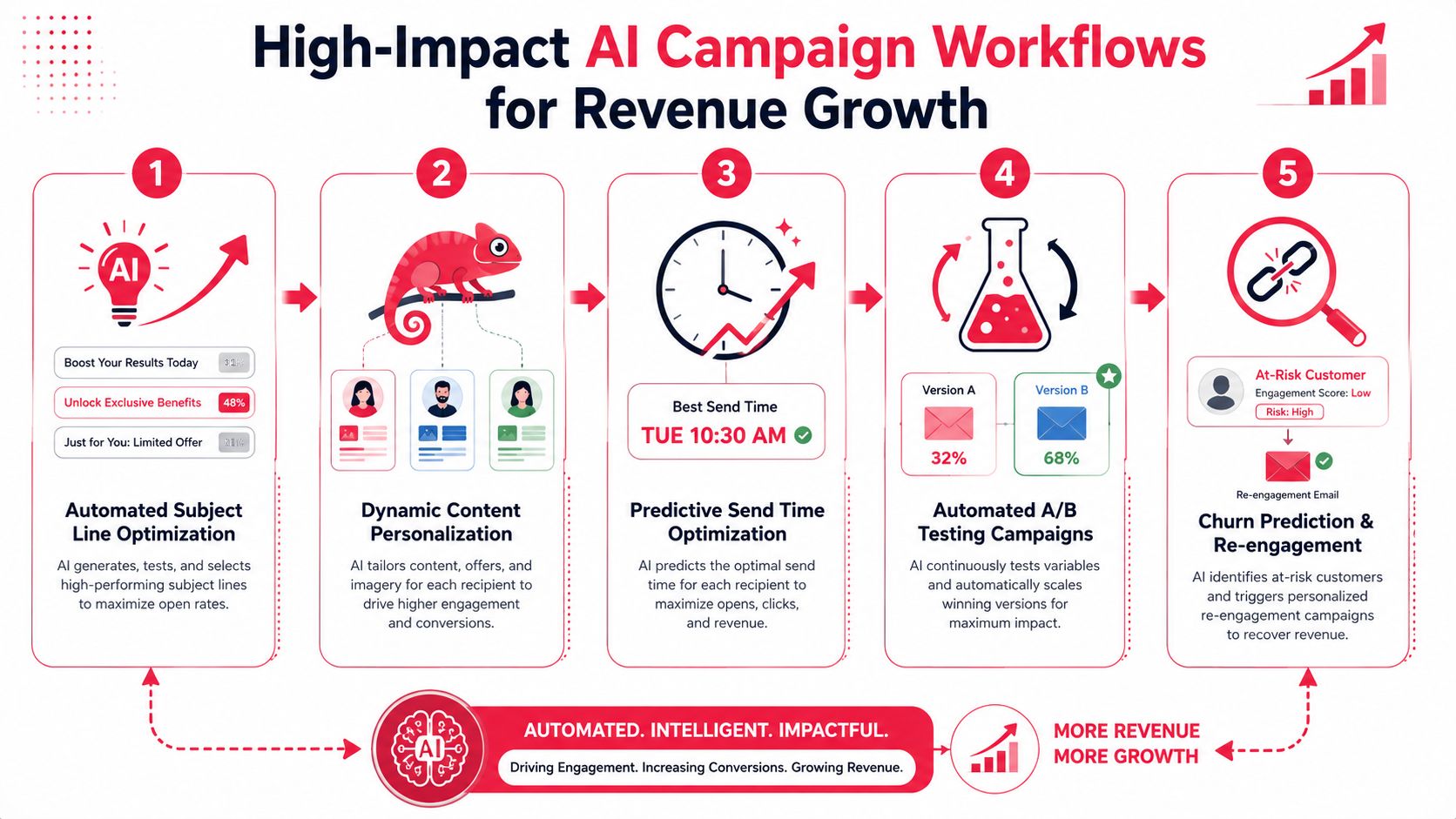
Start with behavioral personalization
Use behavior first. Demographics second.
For B2B and SaaS, the highest-value signals usually come from page views, feature usage, pricing-page return visits, webinar attendance, prior email interaction, and sales-stage movement. For ecommerce, it's browse depth, category interest, cart activity, and repeat purchase behavior.
Here's the before-and-after difference:
- Before: One nurture email goes to everyone who downloaded a guide.
- After: The pricing-page visitor gets ROI framing, the product-user gets upgrade logic, and the no-show webinar attendee gets a short recap with a tighter CTA.
That's what makes AI useful. It can assemble variants at speed once the logic exists.
A lot of teams are now pushing this further with agent layers that trigger tasks, route leads, and coordinate channel actions. If you want a practical look at that model, learn about SynaBot's AI agents. The useful idea isn't novelty. It's workflow compression.
Move next to send-time optimization
Send-time optimization is one of the easiest wins because it changes timing without forcing a total creative rewrite.
Instead of broadcasting at 10 a.m. because that's when marketing always sends, the model predicts when each subscriber is most likely to engage. That matters in real programs because timing compounds with segment quality and offer relevance.
Use STO in these areas first:
- Lifecycle sequences: Trial onboarding, demo follow-up, abandoned-cart, and expansion flows.
- High-intent campaigns: Price drop alerts, product launches, and hand-raiser follow-up.
- Re-engagement: Subscribers who still have value but stopped responding to normal cadence.
A common failure is treating STO as a standalone fix. It isn't. Poor segmentation sent at the perfect time is still poor segmentation.
Here's a useful walkthrough of the workflow in action:
Use dynamic blocks instead of rewriting whole emails
Many overcomplicate AI copy generation. You don't need ten full emails. You need one strong structure and modular blocks that swap by segment.
I prefer this model:
| Email element | Keep fixed | Make dynamic |
|---|---|---|
| Subject line logic | Brand promise and campaign intent | Segment-specific angle |
| Hero section | Core offer | Use case or problem framing |
| Social proof | Format and placement | Industry or persona relevance |
| CTA | One primary action | CTA language based on funnel stage |
This gives you control. It also raises testing velocity because your team can isolate one variable at a time.
Keep the skeleton stable. Let AI rewrite the muscles.
For teams moving toward broader GTM automation, this starts to overlap with AI agents for marketing operations. The operational point is simple. Use AI where decisions repeat and data changes fast.
Accelerate Testing and Measure What Matters
Email teams that optimize for opens get busy. Email teams that optimize for pipeline get budget.
Open rate still helps with diagnosis. It does not deserve top billing in your reporting. Privacy changes, mailbox prefetching, and inbox UI behavior have made it too noisy to guide investment decisions. If your AI program is producing more subject line variants but you cannot show revenue impact by workflow, you are funding content production, not performance improvement.
The standard needs to change. Automated email programs routinely outperform one-off sends on revenue contribution, as noted earlier. The practical takeaway is simple. Separate automated workflow performance from broadcast performance and judge each by commercial output.
Use a measurement stack like this:
| Old KPI view | Better KPI view |
|---|---|
| Open rate | Revenue per send |
| Click rate | Conversion rate per email |
| Total list growth | Qualified lead creation from email |
| Campaign sends | Pipeline influenced per workflow |
| Unsubscribes in isolation | Net revenue impact by segment |
This shift changes how teams work. Creative debates get shorter. Test design gets sharper. Budget conversations get easier because the metrics map to finance, not vanity.
Ask questions that expose economic value:
- Which workflow creates the most pipeline per 1,000 sends?
- Which segment converts after the first click and which one needs a sequence?
- Which CTA drives booked meetings or started checkouts, not just visits?
- Which landing page is wasting paid and lifecycle traffic after a strong email click?
Build a dashboard your CFO will respect
A useful dashboard fits on one screen and answers one question fast. Where is email producing revenue, and where is it leaking it?
Track four categories:
- Workflow performance: Revenue by automation, conversion rate by sequence, and results by trigger type.
- Sales impact: Lead-to-MQL speed, MQL-to-opportunity progression, and meeting creation from email-assisted journeys.
- Testing velocity: Tests launched, tests completed, win rate, and days from idea to live experiment.
- Segment economics: Revenue, margin, expansion potential, and unsubscribe risk by audience.
That last category gets ignored too often. A segment with lower click rate but higher close rate is more valuable than a high-engagement segment that never turns into pipeline. AI can help you generate variants faster, but your reporting has to tell the team where speed is profitable and where it is just noise.
I recommend one operating rule. Every AI-driven email test should tie to a business event inside your CRM or commerce platform. That means opportunity creation, meeting booked, trial started, purchase completed, repeat purchase, or expansion signal. If the test cannot connect to one of those outcomes, put it lower in the queue.
For B2B teams, build reporting by funnel stage and account progression. For ecommerce teams, build it around conversion, average order value, and repeat purchase behavior. For both, assign an owner who can connect experimentation to commercial outcomes. Many companies formalize that accountability through a fractional Chief AI Officer model so marketing, ops, and revenue teams work from one scorecard.
One more point. Measure testing velocity as seriously as you measure win rate.
A slow team with clever ideas loses to a disciplined team that can launch, read, and ship improvements every week. AI should increase the number of quality tests your team can run without lowering analytical discipline. If it does not raise throughput and decision speed, the system is not implemented well enough yet.
How to Select Vendors and Structure Your Team
Vendor choice will either raise email-attributed pipeline or slow your team down for the next 12 months. Treat it like a revenue systems decision.
The wrong platform usually looks impressive in a demo. Then implementation starts, data breaks across systems, reporting stops at clicks, and the team cannot ship tests without technical help. If AI for email marketing does not improve execution speed and commercial visibility, it is overhead.
Pick the stack based on data flow and reporting
Start with one question. Can this system connect audience data, campaign actions, and downstream revenue events without custom work every week?
If the answer is no, remove it from the shortlist.
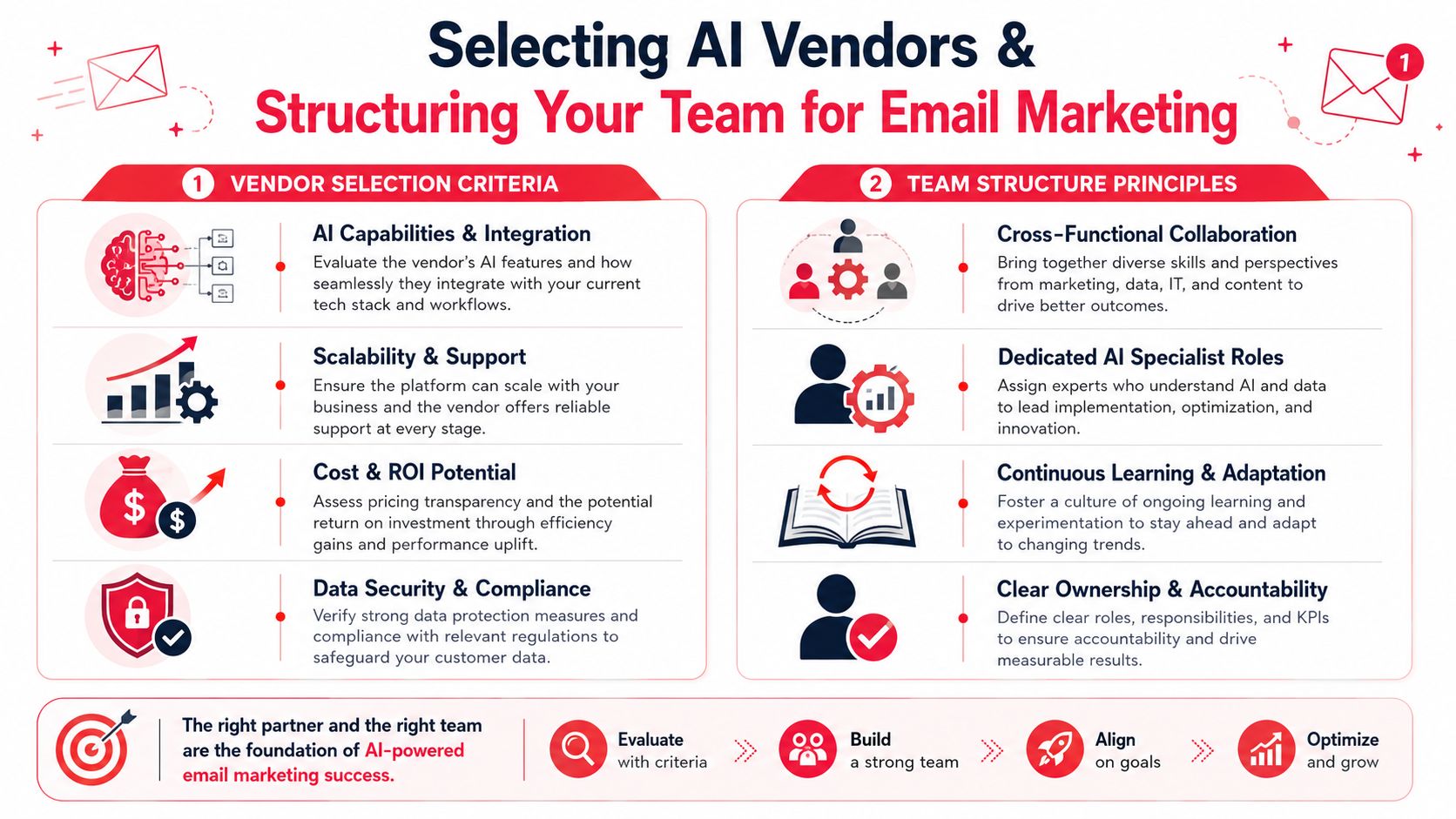
A strong vendor for AI-driven email operations should cover five areas:
- Data integration: Reliable connections to your CRM, CDP, product analytics, ecommerce platform, and attribution setup.
- Workflow control: Trigger logic, branching, suppression rules, approvals, and version history.
- Model transparency: Clear visibility into what data shapes recommendations, what the model can change, and where human review happens.
- Revenue reporting: Dashboards that tie sends and automations to meetings, opportunities, purchases, repeat orders, or expansion signals.
- Implementation support: Useful onboarding, clear documentation, and support that can solve workflow issues instead of sending your team to a help center article.
I also care about one practical issue that procurement teams often miss. How many people does it take to launch a meaningful test?
If every audience change, prompt update, or workflow edit needs an admin or agency ticket, your testing velocity drops. That cost does not show up in the software line item. It shows up in delayed learning, fewer launches, and slower pipeline creation.
Build a small team with clear decision rights
You do not need a large AI team. You need direct ownership and fast decisions.
For most growth-stage companies, four roles are enough:
- Marketing owner: Usually the lifecycle, CRM, or demand gen lead. Owns use case priority, segmentation, offers, and performance reviews.
- Revenue operations owner: Owns field mapping, routing logic, event quality, and attribution consistency.
- Creative or content lead: Owns message quality, brand fit, compliance review, and CTA clarity.
- Executive sponsor: Usually the CMO or CRO. Sets the commercial target, resolves tradeoffs, and keeps the program tied to pipeline.
Add a specialist only if there is a real gap. If your team lacks systems discipline, governance, or experimentation rigor, a fractional chief AI officer model is often a better choice than hiring too early. It gives you operating structure without adding another full-time salary before the program proves ROI.
One warning. Shared ownership kills momentum.
If nobody clearly owns prompt standards, workflow approvals, and reporting QA, the platform turns into shelfware with a few generated subject lines attached.
Use this vendor scorecard
Run procurement with a simple scorecard. Score each vendor against how your team will work after launch, not how polished the demo looks.
Vendor scorecard
Category What to check Integration fit CRM, CDP, product, and ecommerce data connections Reporting quality Revenue, pipeline, and workflow-level attribution Workflow depth Triggering, branching, approvals, and dynamic content control Human oversight Editing controls, audit trails, permissioning Time to value Setup burden, support quality, and pilot readiness
Use weighted scoring if you want better decisions. Reporting and integration should carry more weight than copy generation. A platform that writes decent email and connects cleanly will outperform a flashy writing tool that cannot prove revenue impact.
Pass on any vendor that cannot answer three questions clearly: what data feeds the model, how results are reviewed by humans, and how campaign activity connects to pipeline or sales outcomes. If the answers are vague during the sales process, implementation will be worse.
Your 90-Day Revenue-Focused Rollout Plan
You don't need a year-long transformation program to make AI for email marketing useful. You need a controlled rollout with one commercial target, one accountable owner, and a weekly operating rhythm.
The highest-return place to start is automated sequences. In projected late-2026 benchmarks, automated sequences achieve 52% higher open rates, 332% higher click rates, and 2,361% higher conversion rates compared with regular scheduled campaigns, based on Omnisend's email marketing data. That tells you where to focus first. Put AI into flows that already sit close to buying intent.
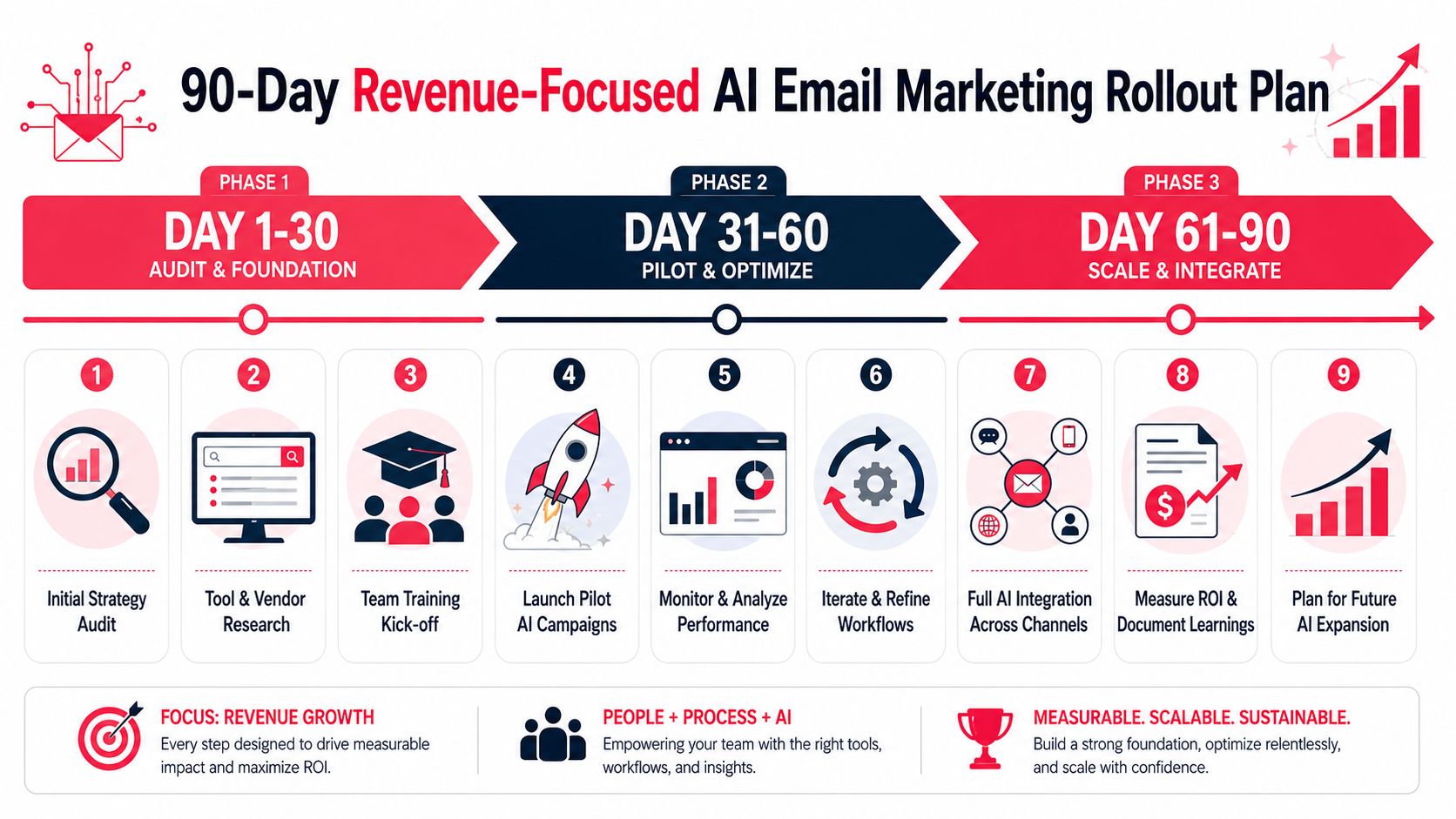
Day 1 to 30 Audit and foundation
Your first month is about control. Don't chase breadth.
Pick one revenue-critical workflow. For SaaS, that might be trial-to-demo or demo no-show recovery. For ecommerce, abandoned cart or post-purchase cross-sell is usually the cleanest starting point. For services, use lead magnet to consultation booking.
Focus your team on four actions:
Audit the current sequence
- Pull the current flow, message by message.
- Review audience rules, timing, offer structure, CTA, and click destination.
- Mark the probable breakpoints.
Map the data inputs
- Confirm what behavioral and profile data exists.
- Remove fields nobody trusts.
- Decide which signals should drive personalization.
Set the operating metric
- Choose one must-win metric for the pilot.
- Good choices are booked meetings, checkout completion, trial activation, or qualified reply rate.
Create approval rules
- Decide where AI can draft automatically.
- Decide where a human must review.
- Document tone, compliance, and escalation rules.
A lot of teams skip that last point. Then they spend the next two months debating whether the output sounds on-brand.
Use a prompt format that forces the model to stay inside the strategy. For example:
Rewrite this subject line for a high-intent SaaS prospect who visited the pricing page twice and attended a webinar but didn't book a demo. Keep the tone direct and credible. Focus on time-to-value and implementation clarity. Give 10 options under 50 characters. Avoid hype, curiosity bait, and vague urgency.
That prompt works because it includes segment, behavior, buying stage, angle, and constraints. Most bad prompts omit half of that.
Must-win metric for days 1 to 30: one clean baseline for the chosen sequence, agreed by marketing and sales.
Day 31 to 60 Pilot and optimize
At this stage, teams either create evidence or create noise. Keep the pilot narrow and instrumented.
Launch one AI-assisted sequence with three live components:
- Predictive segmentation: Branch the flow based on intent or customer status.
- AI-assisted copy variants: Generate specific subject line and body variants within fixed messaging rules.
- Send-time optimization: Let the system distribute by individual engagement timing if your platform supports it.
Do not rewrite the whole customer journey in this window. You want a valid test, not an internal theater production.
I like a weekly review format with five questions:
| Review question | What the team should decide |
|---|---|
| Which branch performed best? | Keep, revise, or kill a segment path |
| Which message lost momentum? | Rewrite subject, body, CTA, or landing page |
| Which clicks turned into outcomes? | Prioritize high-intent offers |
| Where did sales reject the lead quality? | Tighten segment rules or CTA wording |
| What can ship this week? | Maintain testing velocity |
Use AI diagnostically during the pilot. Feed it the performance split and ask for a reasoned explanation of message mismatch, then have a human operator approve the revision. That's the right balance. Fast machine analysis. Human commercial judgment.
You should also brief sales during this phase. If email starts generating more hand-raisers and the SDR or AE team doesn't know the new messaging, you'll lose pipeline in follow-up.
Ship fewer tests with tighter logic. Random variation isn't a strategy.
Must-win metric for days 31 to 60: the pilot sequence beats the baseline on the selected commercial outcome.
Day 61 to 90 Scale and integrate
Scale comes after proof. If the pilot wins, extend the operating model to adjacent workflows.
Typical expansion path:
- For SaaS: trial onboarding, PQL expansion, renewal risk, and no-show recovery
- For ecommerce: browse abandonment, cart recovery, post-purchase cross-sell, and winback
- For B2B services: lead nurture, proposal follow-up, event follow-up, and dormant pipeline reactivation
By this point, your focus shifts from campaign performance to system performance.
That means:
- Standardize prompts: Build reusable prompt templates by funnel stage and segment type.
- Create a testing queue: Prioritize experiments by expected commercial impact.
- Connect reporting: Pull email workflow outcomes into pipeline and revenue dashboards.
- Train the team: Document who edits, who approves, who reads the reports, and who decides the next test.
This is also where AI starts feeding broader GTM systems. Email insights should inform sales outreach, landing page tests, AEO content priorities, and eventually agent commerce flows where machines evaluate your offer before humans do.
A board-ready pilot summary can stay simple:
Pilot summary
Workflow tested
Audience targeted
AI layers used
Baseline result
Pilot result
Revenue or pipeline impact observed
Next two workflows recommended for rollout
Risks or dependencies before expansion
That format forces commercial clarity. No vanity metrics deck. No ten-slide explanation of prompts.
If you're the executive sponsor, your final decision at day 90 is straightforward:
- Scale if the workflow improved a business metric and the team can repeat the process.
- Refine if engagement improved but revenue did not.
- Stop if the team still lacks data quality, ownership, or message discipline.
A lot of AI programs fail because leaders scale activity before they standardize decision-making. Don't do that.
If you want a practical starting point, have your team audit one revenue-critical email sequence this week. Score the strategy, tighten the segment logic, and test one AI-assisted workflow against a hard business metric. If you need outside help structuring that rollout, vendor evaluation, or team operating model, Stimulead can help through fractional CAIO advisory and AI growth execution.