
Most companies start in the wrong place with AI agents. They look for labor savings. Instead, the shift is in go-to-market math.
The change comes from throughput. A small team can research more accounts, ship more tests, respond faster, and keep more context across tools without adding headcount to every bottleneck. That's why the category moved so fast. The global AI agents market was valued at $5.1 billion in 2024 and is projected to reach $47.1 billion by 2033, with a 45.8% CAGR, and companies using them report a 55% increase in operational efficiency according to Precedence Research's AI agent market analysis.
That matters for growth-stage companies because GTM teams usually don't lose on strategy. They lose on execution lag. Follow-up slips. Research gets shallow. Tests pile up in a backlog. Sales ops becomes the choke point. Agents change that operating model.
If you want a useful companion piece on where AI already fits inside marketing workflows, The AI CMO's insights are worth reading. Then come back to the harder question: where should agents own work, where should humans keep control, and how do you measure revenue impact without creating a mess?
Table of Contents
- AI Agents Are Here to Change Your GTM Math
- What an AI Agent Is and Why It Is Not a Chatbot
- Single vs Multi-Agent Systems for Business Use
- Concrete Use Cases for Your GTM Teams
- The Vendor and Technology Evaluation Checklist
- Governance and Measuring Agent Performance
- Your First 90 Days A Pilot Plan for AI Agents
AI Agents Are Here to Change Your GTM Math
Growth-stage teams feel every handoff. One marketer waiting on analytics. One AE waiting on research. One RevOps lead cleaning fields before a sequence can go live. AI agents matter because they compress those waits.
That changes unit economics in practical ways. Your team can run more experiments per month. Sales can work more accounts with better prep. Support can resolve routine requests without dragging senior people into every thread. Each of those gains compounds into pipeline speed and conversion quality.
Where the revenue effect shows up first
The first wins usually appear in areas with repeatable steps and expensive human context switching:
- Pipeline preparation: Account research, enrichment, segmentation, and first-draft messaging
- Conversion work: QA, funnel analysis, test ideation, and experiment operations
- Customer response: Triage, routing, policy lookups, and standard resolution paths
Practical rule: If a workflow already has a clear owner, a defined outcome, and repeated tool switching, it's a candidate for an agent.
A lot of teams still treat agents like glorified assistants. That's too small. In a GTM context, the better frame is operational capacity. You're buying faster cycles on revenue work.
Waiting carries its own cost
The mistake isn't “failing to adopt the newest thing.” The mistake is keeping expensive people trapped in low-yield coordination work while competitors move those steps into software.
For a CEO, that affects hiring plans. For a CMO, it affects testing velocity and content operations. For a CRO, it affects rep productivity and speed to first touch. The point isn't novelty. It's whether your current GTM system can produce more output without adding another layer of labor.
What an AI Agent Is and Why It Is Not a Chatbot
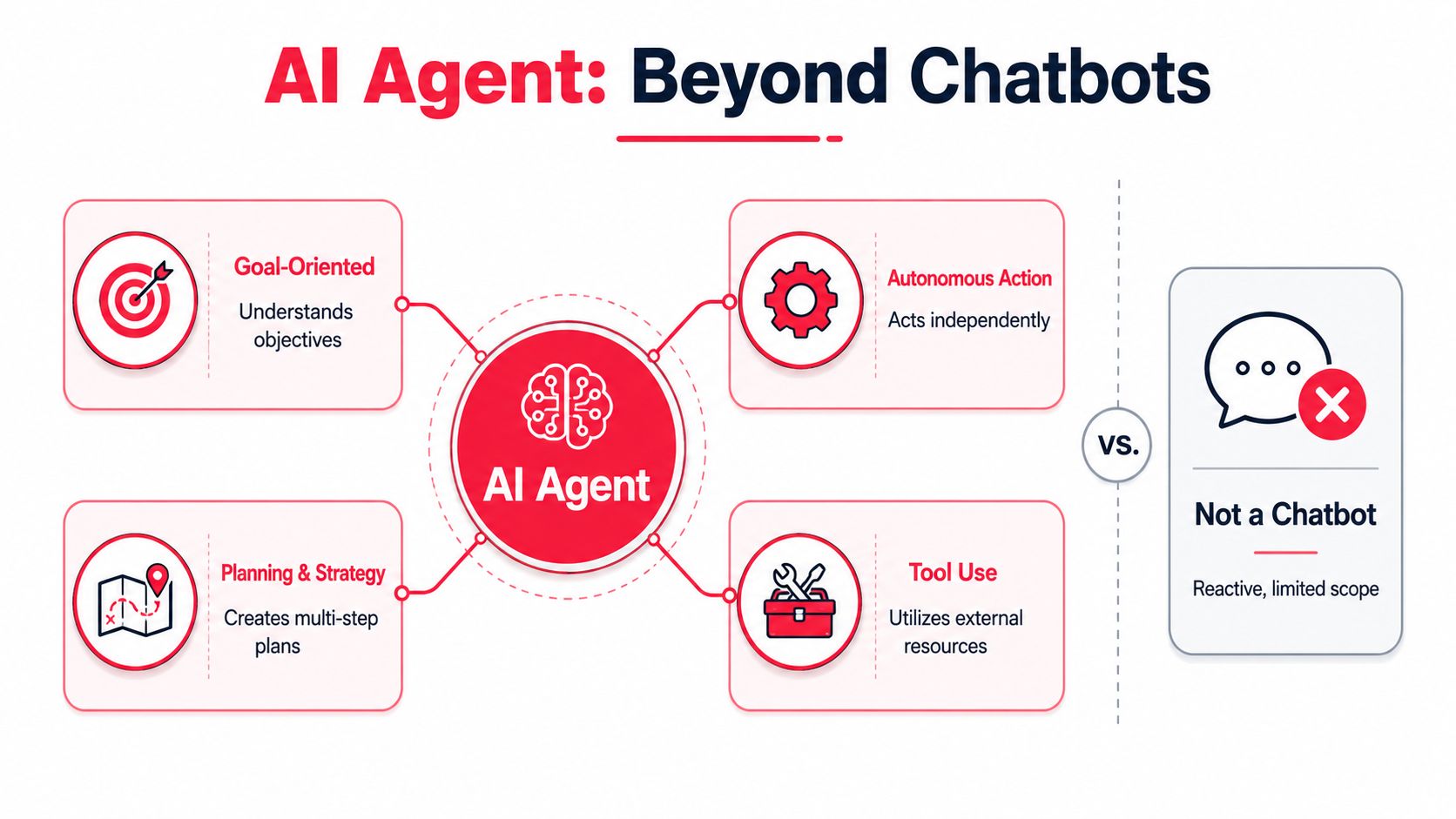
A chatbot talks. An AI agent works.
That distinction matters because most bad buying decisions start with a category mistake. If you buy a chatbot and expect operational autonomy, you'll get polished language and weak execution. If you deploy an agent against a narrow workflow with the right controls, you can hand it real work. For how the underlying architectures differ, see our guide to AI intelligent agents.
The three parts that make an agent useful
BCG describes agents as a system with a planning model, memory, and an action layer that calls external APIs or internal systems. The model decides when to retrieve data, invoke tools, and persist state across steps, as outlined in BCG's explanation of AI agents.
In plain English:
- Planning model: Takes a goal and turns it into steps
- Memory: Keeps track of prior context, rules, and progress
- Action layer: Does something inside your stack, such as updating HubSpot, querying Salesforce, searching a knowledge base, or drafting an email in Outreach
A chatbot usually stops at response generation. An agent can move the work forward.
The intern analogy is useful, with one warning
The easiest mental model is a smart intern with system access. You give it a goal. It breaks the job down. It checks information. It takes action. It reports back.
That framing is useful because it forces the right management questions. What can this system access? What decisions can it make on its own? When must it ask for approval? What does success look like?
Give an agent a goal without boundaries and you don't get speed. You get cleanup work.
For teams comparing customer-facing tools, compare autonomous customer support if you want a practical read on where support agents differ from traditional chatbots. The same logic applies across marketing and sales. Tool use and memory turn language software into operating software.
Single vs Multi-Agent Systems for Business Use
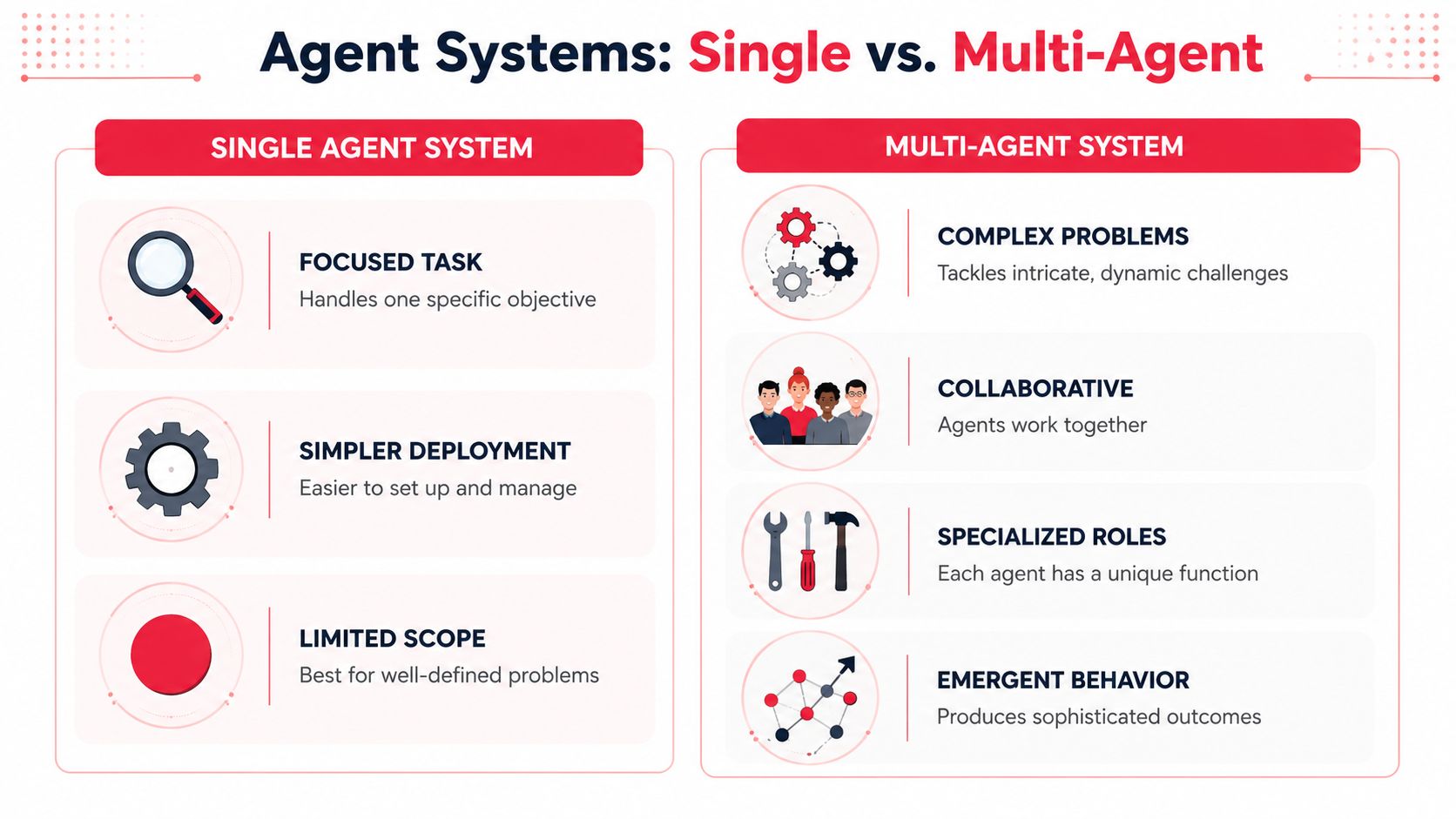
A single agent can be enough for one bounded workflow. The moment the work branches into research, judgment, formatting, compliance checks, and system updates, one generalist usually starts to wobble.
That's why multi-agent orchestration is getting traction. AWS notes that this pattern uses an orchestrator agent to coordinate specialist agents, and LangChain's 2024 survey found the top use cases were research and summarization at 58% and personal task automation at 53.5%, which supports the idea that current value is concentrated in workflow-centric deployments, as summarized in AWS's guide to AI agents.
When a single agent is enough
Use a single agent when the task has one outcome, a short chain of steps, and limited downside.
Examples:
- Lead enrichment: Pull firmographic data, summarize the company, and update the CRM
- Meeting prep: Compile notes from prior calls, website changes, and product usage
- Content repurposing: Turn one webinar transcript into channel-specific drafts for review
These workflows don't need a “team” of agents. They need one competent operator with access to the right tools.
When you need multiple agents
Now take outbound for strategic accounts. One agent researches the account. Another checks signal quality. Another drafts messaging by persona. Another scores confidence and routes edge cases to a human. An orchestrator decides the sequence and assembles the output.
That setup is better for GTM because each role can be tuned for a specific job. You get cleaner outputs and easier troubleshooting. When something breaks, you know whether the issue came from research, reasoning, formatting, or action execution.
Here's a simple comparison:
| System type | Best fit | Main advantage | Main risk |
|---|---|---|---|
| Single agent | Narrow, repeatable workflows | Faster setup | Becomes brittle as complexity rises |
| Multi-agent | Cross-functional workflows with several steps | Better specialization and control | More orchestration overhead |
A practical decision filter
Ask these three questions before choosing the architecture:
- Does the workflow split into distinct specialist jobs? If yes, multi-agent usually fits better.
- Will errors have different owners? If marketing owns message quality and RevOps owns CRM integrity, separate roles help.
- Do you need traceability? Multi-agent systems are often easier to inspect because each component has a defined job.
The common mistake is overbuilding too early. Start with one agent where you can. Move to orchestration when one agent becomes the bottleneck.
Concrete Use Cases for Your GTM Teams
The value of AI agents shows up when they remove delays from revenue work. Not in theory. In the workflows your team already runs every week.

Marketing and CRO workflows
A common marketing problem is simple. The team knows where conversion friction lives, but nobody has time to investigate every drop, draft every hypothesis, prepare every asset variation, and push every test into the queue.
An agent can own the operating layer around that work. It can monitor funnel behavior, surface anomalies, compile session evidence, draft test briefs, prepare copy variants, and package the output for a human to approve. The marketer keeps strategy control. The agent clears the backlog.
That's the practical value in AI-driven CRO. More tests reach the review stage. More ideas get validated or killed quickly. Teams stop wasting senior time on setup work. If you're exploring how that fits broader digital workflows, Stimulead's guide to using AI tools in online marketing is a useful reference.
A good setup usually includes:
- Signal collection: Pull data from GA4, heatmaps, CRM notes, and experiment logs
- Hypothesis drafting: Turn observed friction into testable ideas with clear expected outcomes
- Execution support: Prepare variants, QA checklists, and launch tickets for human approval
The best CRO agents don't replace your strategist. They make sure your strategist spends time on decisions instead of prep.
Sales and GTM engineering workflows
Sales teams waste a lot of time before the first message goes out. Reps bounce between LinkedIn, the prospect's site, the CRM, call notes, and enrichment tools. By the time they finish, they've spent real selling time on research assembly.
An agent can take over that pre-work. It can pull account context, summarize recent events, map likely pain points by role, draft outreach angles, and create CRM-ready notes. A rep reviews, adjusts, and sends. The quality bar stays high because the human still owns judgment.
GTM engineering becomes practical. You're building systems around the rep so the rep can stay in the conversation instead of becoming a data-entry coordinator.
Useful patterns include:
- Prospect research agents that gather firm, role, and buying-context signals
- Messaging agents that turn that research into first-draft email and call prep
- CRM hygiene agents that normalize notes, tags, and follow-up fields after activity
These workflows also pair well with account scoring, territory planning, and post-call summarization. The key is to keep the first deployment close to revenue activity, not buried in a back-office experiment.
A short walkthrough helps make this more concrete.
Support and agent commerce readiness
Support is often the first place companies see agents operate at scale. In customer support, AI agents are already handling 80% of queries and speeding up service delivery by 52%, according to Gartner newsroom coverage on AI agents. For GTM leaders, that matters because support often acts as the proving ground for broader operational trust.
If your agent can resolve standard requests, escalate cleanly, and log outcomes correctly, you've learned something valuable about production readiness. You've also trained the organization to work with autonomous systems.
There's also a forward-looking GTM angle. Buyers will increasingly use AI to research vendors, compare offers, and complete transactions with less direct human interaction. That means your product data, pricing logic, policy clarity, and machine-readable content need to be accessible to software agents, not only people.
Three near-term actions matter here:
- Prepare your knowledge base: Agents fail when support content is vague, outdated, or fragmented.
- Structure product and offer data: Agent commerce depends on machine-friendly information, not clever brand copy alone.
- Define escalation paths: High-trust moments still need a person. Billing edge cases, contract changes, and sensitive support issues shouldn't sit in an autonomous loop.
The Vendor and Technology Evaluation Checklist
Most demos are designed to make the agent look smart. Your job is to find out whether it's controllable, inspectable, and useful after the sales engineer leaves.
Feature lists won't help much. Ask operational questions. Press for specifics. If the vendor can't explain how the system behaves under stress, you're looking at future cleanup work.
Questions to ask in every demo
Use this list and insist on direct answers.
- How does it handle failure? Ask what happens when the agent can't complete a task, gets conflicting data, or hits a permission wall.
- Where does human approval sit? You need to know which actions can be auto-executed and which require review.
- What systems can it act inside? “Integrates with your stack” is vague. Ask whether it can read, write, update, trigger workflows, and log actions in the tools you use.
- How are rules enforced? Budget caps, contact limits, brand controls, and approval thresholds should be configurable.
- What audit trail exists? You need a clear record of what the agent saw, decided, and did.
A strong vendor will answer plainly. A weak one will pivot back to generic AI performance claims.
What usually breaks after purchase
The failure points are boring. That's why teams miss them.
| Failure point | What to check before buying |
|---|---|
| Weak integrations | Ask for a live walkthrough in your core stack, not a slide |
| Poor exception handling | Review real edge cases from your business |
| Unclear ownership | Decide who manages prompts, rules, and output review |
| Messy data inputs | Inspect the data sources the agent will rely on |
| Low transparency | Require logs, action history, and review workflows |
Buy the system your operators can manage on a normal Tuesday, not the one that looks impressive in a scripted demo.
A final test helps. Ask the vendor to map one of your actual workflows end to end. If they can't translate your process into actions, approvals, and fallback logic, the product probably isn't ready for your team.
Governance and Measuring Agent Performance
Governance sounds slow until an agent writes to the wrong record, contacts the wrong person, or takes an action nobody approved. Then governance becomes urgent.
The governance issue is bigger with agents because they act. R Street argues that agents only create value when they have clear outcome boundaries, authority limits, and measurable success criteria, since autonomy expands the risk of unintended actions, as discussed in R Street's analysis of governing AI agents in production.
The guardrails that matter
A useful governance model is simple enough for operators to follow and strict enough to contain risk.
Start with four controls:
- Outcome boundaries: Define the exact business outcome the agent owns. “Improve outreach” is too vague. “Prepare account briefs and draft first-touch emails for named accounts” is workable.
- Authority limits: Decide what the agent may do alone, what needs approval, and what it may never do.
- Escalation rules: List the triggers that route the work to a human. Missing data, low confidence, policy-sensitive requests, and unusual customer language usually belong here.
- Success criteria: Tie performance to business outcomes and workflow quality, not output volume.
If you need executive ownership for this operating model, Stimulead's fractional Chief AI Officer framework outlines the kind of oversight structure many growth-stage teams end up needing as deployments spread.
Agents need the same thing good employees need. Clear scope, clear authority, and a manager who reviews outcomes.
KPIs that actually tell you something
A common error is tracking inappropriate metrics initially. Task counts and generic accuracy scores don't tell you whether the system is helping revenue.
Better measures include:
- Cost per successful outcome: What does it cost to get a completed brief, a routed lead, a resolved ticket, or a launch-ready test package?
- Human intervention rate: How often does a person need to step in?
- Cycle time: Does the workflow move faster from request to completion?
- Downstream business impact: For example, does better account prep improve meeting quality or follow-up consistency?
- Error severity: A typo and a compliance mistake aren't the same. Score them differently.
Governance doesn't slow AI adoption. It's what makes repeatable adoption possible. Without it, every pilot looks promising until scale exposes the weak spots.
Your First 90 Days A Pilot Plan for AI Agents
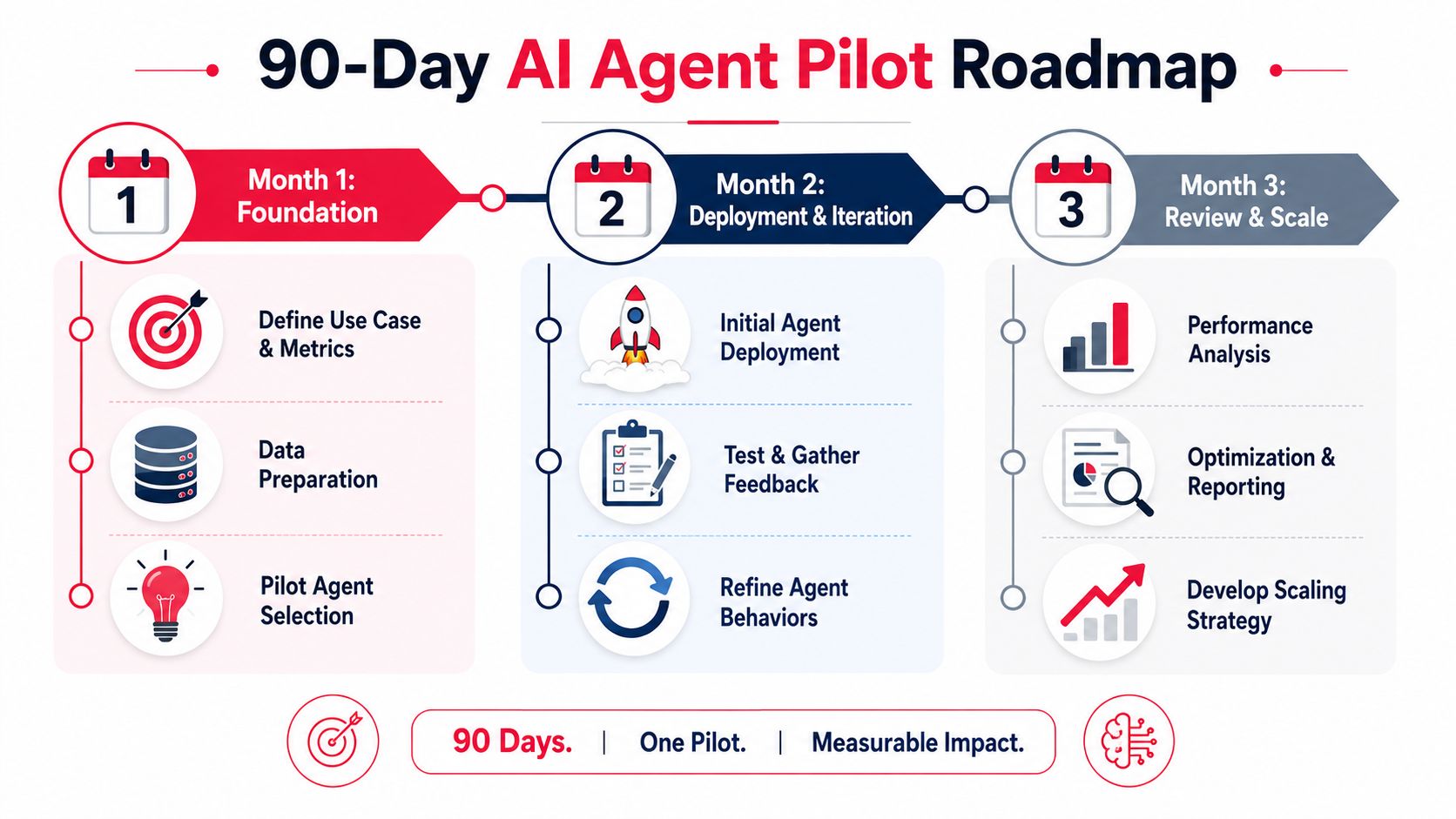
Don't start with a grand platform plan. Start with one workflow that matters, has clean ownership, and won't create a disaster if the agent stumbles.
Days 1 to 30
Pick a single use case inside marketing, sales, or support. Good examples include account research, support triage, or CRO test preparation.
Document the current workflow. Who does what, in which tool, with what handoffs, and where delays happen. Then define the success metric and the approval model. If you need a practical starting point for selecting growth-focused use cases, this article on using AI for growth marketing at scale is a useful planning input.
Days 31 to 60
Deploy the agent in a controlled environment. Give it a narrow scope and real inputs. Keep a human in the loop.
At this stage, review logs constantly. Look for failure patterns, unclear prompts, missing data, and edge cases. Tighten permissions before you expand task scope.
Days 61 to 90
Run the pilot against a baseline. Compare the new workflow to the old one on speed, output quality, intervention rate, and business usefulness.
Then make one of three calls:
- Scale it if the workflow is stable and the economics are clear.
- Refine it if the value is real but the controls are still weak.
- Kill it if the process was never a good fit for autonomy.
The next step is simple. Pick one revenue-adjacent workflow this week and map it in detail. If you can't define the outcome, approval rules, and success metric on one page, you're not ready for an agent yet.
If you want AI agents to improve revenue, treat them like production systems, not demos. Start with one constrained workflow. Set boundaries early. Measure business outcomes, not novelty. That's how you get a real win inside the first quarter.