
The global AI agent market was valued at $3.7 billion in 2023 and is projected to reach $103.6 billion by 2032, with a 44.9% CAGR, while 85% of enterprises already use AI agents and 90% see them as a competitive advantage, according to Tenet’s AI agent statistics roundup. That should change how you frame the conversation internally.
This isn’t an R&D topic anymore. It’s a revenue operations topic.
For CEOs, CMOs, and CROs, the key question isn’t whether AI intelligent agents are interesting. It’s whether they can create pipeline, raise conversion rates, cut cycle time, and give your team more shots on goal without adding headcount at the same pace. In practice, they can. But only when they’re tied to a business workflow with clear guardrails.
Most companies still approach agents backwards. They start with the model, the demo, or the vendor pitch. The better move is to start with a P&L line. Pick the commercial bottleneck first. Pipeline coverage. Landing page testing velocity. Follow-up lag. AI search visibility. Agent commerce readiness. Then design an agent around that constraint.
If your leadership team needs a practical way to assess where to begin, an AI readiness assessment for growth teams is a better starting point than another generic AI brainstorm.
Table of Contents
- Why AI Agents Matter to Your P&L Now
- What Exactly Is an AI Intelligent Agent
- Three Revenue-Driving Agent Use Cases
- How to Measure Agent Performance and ROI
- Your Implementation Roadmap and Governance Plan
- Sample Agentic Workflows for Growth Teams
- A Quick Decision Framework for Leaders
Why AI Agents Matter to Your P&L Now
A short response window changes revenue faster than another quarter of planning. Teams that react to buyer signals in hours instead of days create more pipeline coverage, run more tests, and waste less payroll on manual prep work. That is the P&L case for agents.
The mistake I see in executive reviews is simple. Leaders frame agents as an AI line item instead of an operating model decision. If an agent reduces account research time, improves follow-up speed, or increases the number of qualified experiments your team can run each month, it is no longer an innovation project. It is a margin and growth project.
Revenue teams should care because agents can do work that sits between strategy and execution. They can collect context from your CRM and public sources, prepare outreach drafts, monitor funnel friction, and keep routine motions running outside business hours. Used well, that raises output per headcount without adding process drag.
A useful filter is straightforward. If a workflow affects pipeline creation, sales cycle speed, conversion rate, or retention, it deserves an agent review. A practical starting point is an AI readiness assessment for revenue workflows that scores process maturity, data access, and governance risk before you fund a rollout.
Revenue teams should care about operating speed
Speed matters because revenue loss usually shows up in small delays. An SDR waits until tomorrow to research an account. A paid landing page sits unchanged for two weeks while conversion drops. A buyer intent signal goes cold before anyone acts on it. Agents help close those gaps.
Used in the right places, they can:
- Research accounts: pull buying context before an SDR or AE reaches out
- Prepare outreach: draft first messages based on account data and offer fit
- Support CRO work: review pages, flag friction, and log test ideas
- Monitor AI visibility: check whether your brand appears in AI-generated recommendations
- Handle repetitive follow-up: keep leads and deals progressing when your team is offline
The upside is not just labor savings. It is faster execution on revenue work your team already knows matters.
The board-level case is simple
Boards do not need another demo. They need a clear view of where agents improve unit economics and where they create risk. The strongest business cases usually start with one narrow workflow, one accountable owner, and one financial target such as more qualified meetings booked, faster lead response, or lower cost per opportunity.
Governance decides whether that gain sticks. An agent that touches prospect data, pricing, or customer communications needs approval rules, logging, and human review at the right points. That distinction is why many leaders benefit from understanding AI agents vs assistants for digital transformation before they buy software. The category labels sound similar, but the operating risk and commercial value are very different.
Treat agents like revenue infrastructure. Pick the bottleneck, define the metric, set the guardrails, and require proof in the numbers.
What Exactly Is an AI Intelligent Agent
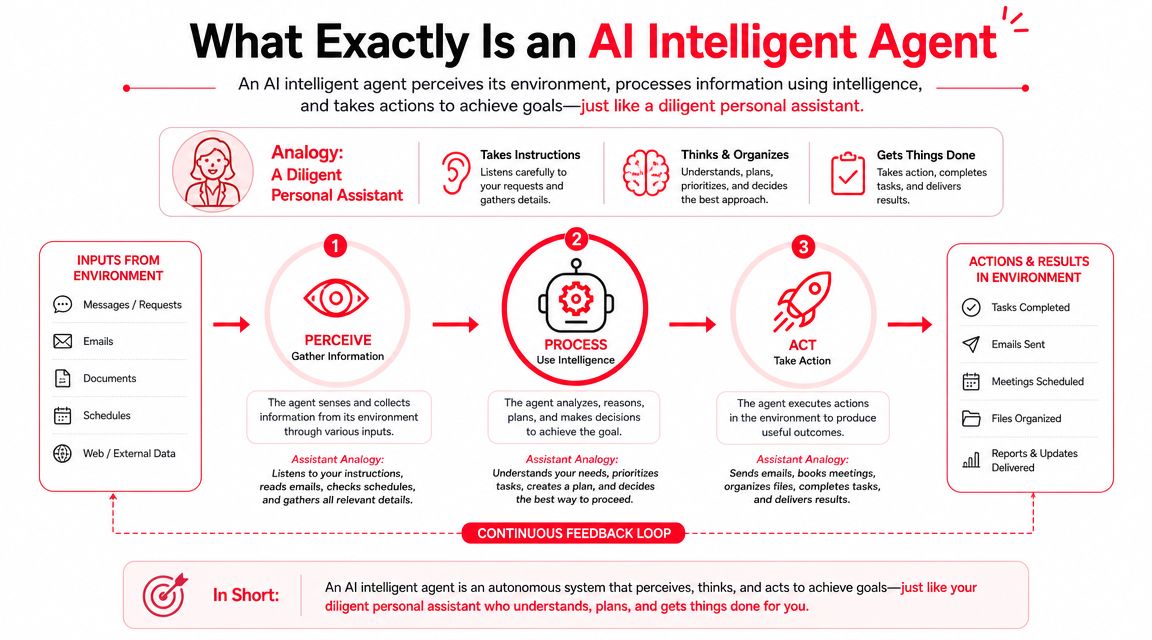
A chatbot answers a prompt. An agent owns a goal.
That distinction matters because many vendors still package scripted automation and prompt wrappers as “agents.” For a growth team, the easiest way to think about AI intelligent agents is this: a chatbot is like a calculator. You ask for output, it returns output. An agent is like a junior analyst. You assign a target, give it context and tools, and it works through the steps needed to complete the job.
Think junior analyst, not chatbot
A useful commercial example looks like this:
You don’t ask, “Write me an email.”
You ask, “Find ten enterprise prospects in fintech that match our ICP, review their hiring and product signals, draft a personalized opening line for each, and flag the three accounts most likely to buy now.”
That’s agent behavior. It requires context, judgment, tool use, and the ability to move through a workflow without waiting for a human after every step.
If your team is comparing categories, this breakdown of AI agents vs assistants for digital transformation is a useful reference because it clarifies where simple assistance ends and delegated execution begins.
The five traits that matter in buying decisions
According to Monday.com’s explanation of agentic AI in sales, true agentic autonomy requires five characteristics:
| Trait | What it means in practice |
|---|---|
| Goal-oriented behavior | The agent works toward an outcome, not a single response |
| Independent decision-making | It chooses next actions inside a defined scope |
| Environmental awareness | It reads inputs from tools, systems, and current conditions |
| Continuous learning | It improves from feedback, outcomes, and updated context |
| Adaptive execution | It adjusts when the workflow changes or encounters exceptions |
Here’s the practical filter I use with leadership teams. If a tool can’t hold context across multiple steps, can’t choose actions inside a workflow, and can’t respond to new information, it isn’t an agent in the business sense. It’s software with a chat box.
Buy based on delegated outcomes. Don’t buy based on fluent text.
That one distinction will save a lot of wasted budget.
Three Revenue-Driving Agent Use Cases
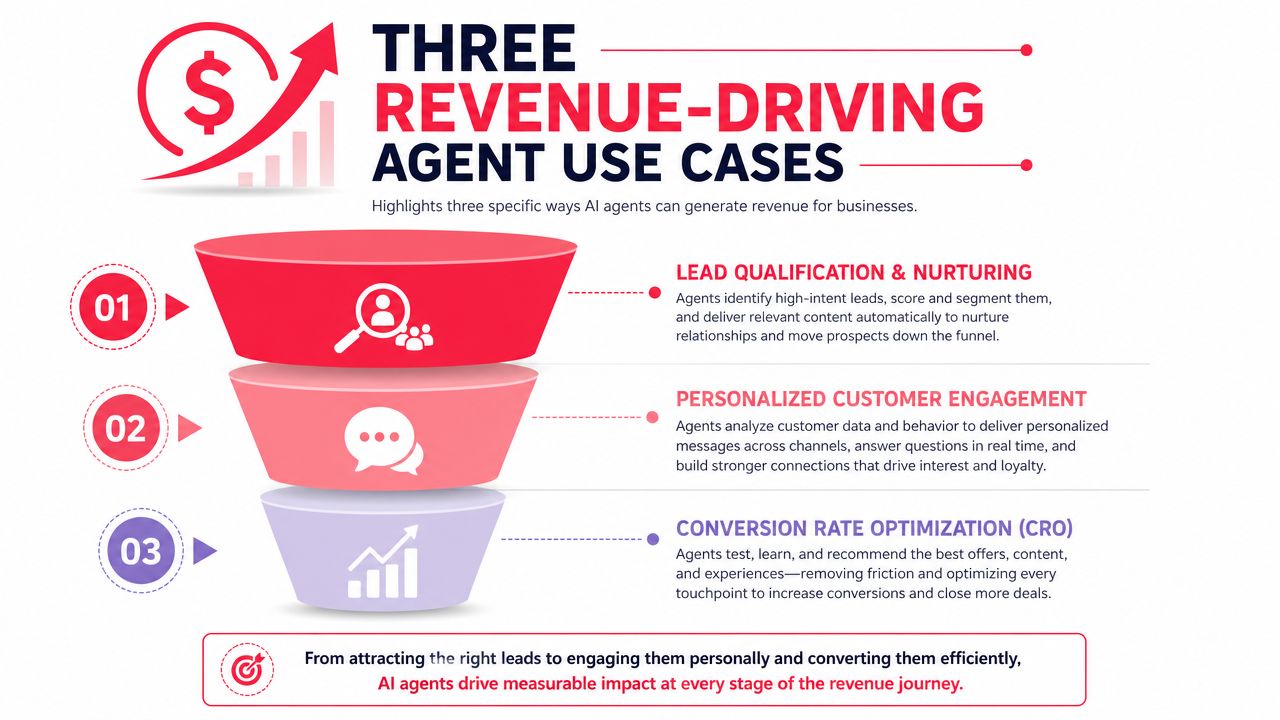
The commercial upside is strongest where your team already has repeatable work and visible bottlenecks. In marketing and sales, agents fit best in workflows where speed and consistency drive revenue. McKinsey projects that agentic AI will power more than 60% of the increased value generated by AI deployments in marketing and sales. That tracks with what growth teams are seeing on the ground.
CRO and conversion testing
Teams often don’t lose on CRO because they lack ideas. They lose because they can’t turn ideas into a steady test pipeline with clean documentation.
A CRO agent is useful when it can inspect a landing page, review the offer, compare message hierarchy to the target audience, and produce test hypotheses with event tracking requirements and expected user behavior changes. That gives your team more testing velocity without adding more meetings.
A good workflow usually includes:
- Page analysis: review hero copy, CTA placement, trust signals, form friction, and offer clarity
- Hypothesis generation: produce multiple test ideas tied to a single conversion event
- Experiment documentation: write the brief, define success criteria, and list tracking dependencies
- Post-test synthesis: summarize what changed, what happened, and what should be tested next
If you want a broader set of AI agent use cases for revenue teams, this is one of the fastest categories to put into production because the inputs are visible and the output is easy to review.
A related example worth studying is automated Google Ads assistance. Paid media is a strong proving ground because the loop between decision and result is tighter than most marketing work.
GTM engineering and prospecting
Many teams get early wins here.
An agent can take a target account list, enrich it with public context, identify likely decision-makers, summarize buying signals, and draft specific openers for outbound or follow-up. The SDR or AE still approves what goes out. But the prep work no longer eats half the day.
The revenue effect comes from better sales coverage. More accounts researched. Faster first-touch execution. Better context in the message. Less lag after intent signals show up.
What works:
- Starting with one ICP and one offer
- Feeding the agent approved positioning and proof points
- Restricting which data sources it can use
- Requiring human approval before send
What fails:
- Asking the agent to personalize with no source data
- Mixing several buyer types into one workflow
- Letting it write in brand voice without examples
- Measuring output count instead of meetings and pipeline contribution
Here’s a practical walkthrough of agent workflows in action:
Agent commerce readiness and AI search visibility
A third use case gets less attention today than it should. Buyers are starting to use AI systems to research vendors, compare options, and narrow choices before a human ever sees your site.
That changes what revenue teams need to prepare. Product pages, pricing pages, category positioning, FAQ structure, comparison content, schema choices, and proof assets all become inputs for machine-mediated discovery. Against this backdrop, AI search optimization and agent commerce readiness matter.
If an AI system can’t understand what you sell, who it fits, and why you’re different, your sales team starts the race late.
In practice, the first win isn’t “traffic.” It’s clarity. The agent should be able to retrieve accurate product facts, summarize your offer, and route a buyer to the right commercial path. That’s where AEO and structured content start to affect revenue.
How to Measure Agent Performance and ROI
Most agent projects get approved on enthusiasm and judged on anecdotes. That’s why they stall.
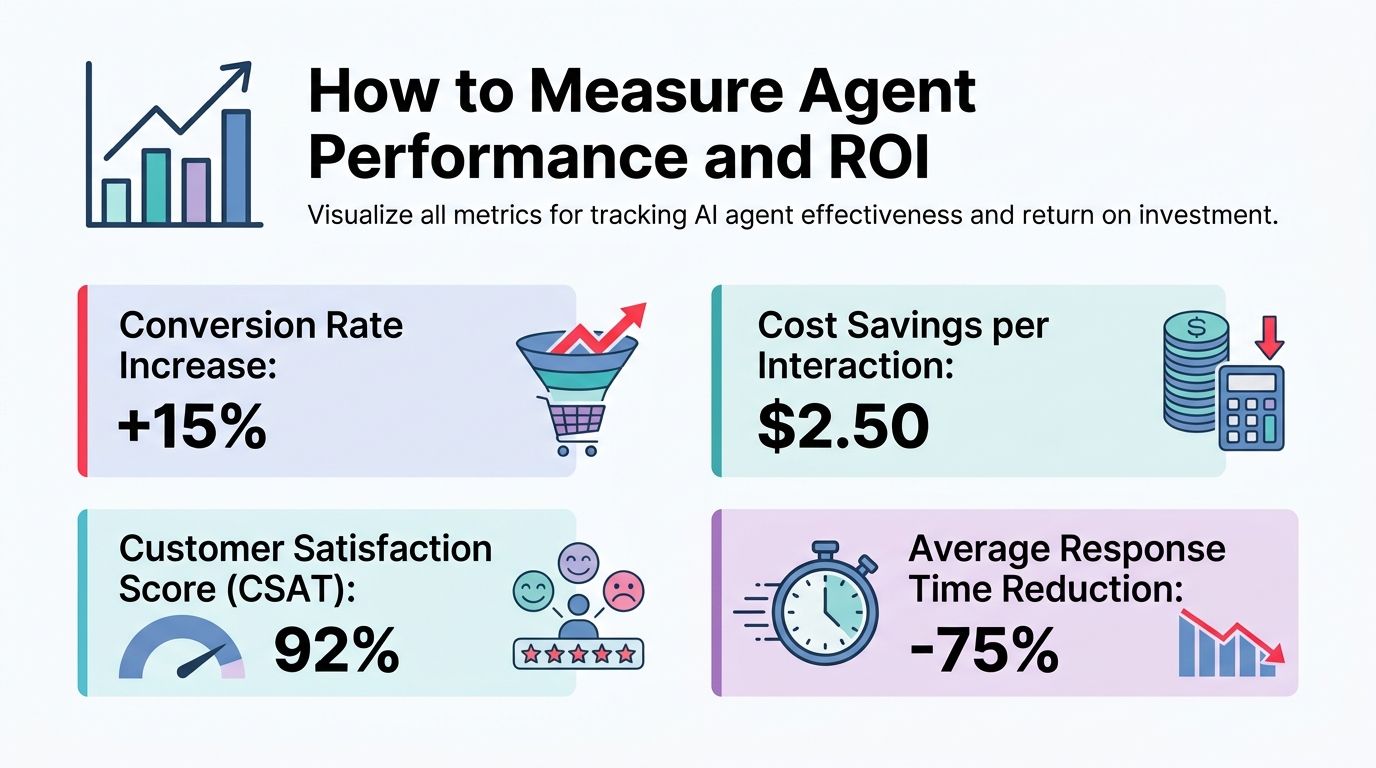
You need a scorecard before rollout. And you need one that rewards correctness before speed. The IEEE P3777 standard for benchmarking AI agents is useful here because it defines core metrics such as latency and intent accuracy, while requiring execution speed to count only after minimum correctness thresholds, such as 90% to 95% accuracy on routine tasks, are met. That prevents the classic “fast-and-wrong” trap.
Use the scorecard before you scale
For revenue teams, four metrics matter most:
- Task completion rate: Did the agent finish the commercial task within scope?
- Decision accuracy: Did it choose the right account, next step, message angle, or page recommendation?
- Human correction load: How much editing or rescue work did the team need to do?
- Time to output: How long did it take to produce a usable result?
Latency matters. It just doesn’t matter first.
A prospecting agent that returns drafts in seconds but forces reps to rewrite everything is a bad investment. A CRO agent that generates endless hypotheses but ignores tracking constraints creates work, not value.
Measure the saved labor, then check whether the saved labor turned into more pipeline, more tests launched, or faster response to demand.
A simple ROI model executives can use
Keep the math plain:
| Input | Executive question |
|---|---|
| Human time replaced | How many hours does the team spend on this workflow today? |
| Agent operating cost | What does the tool stack and oversight cost to run? |
| Usable output rate | How often does the team accept the output with minor edits? |
| Revenue effect | Did the workflow create more meetings, faster follow-up, or more completed tests? |
This gives you a simple operating view. If the agent reduces prep time, but the team doesn’t convert that time into more commercial action, there’s no business case. If the agent reduces prep time and the team uses that capacity to run more experiments or reach more qualified accounts, the ROI story gets real fast.
Start with one workflow. Benchmark the human baseline first. Then compare the agent against it under the same rules.
Your Implementation Roadmap and Governance Plan
Pilots are cheap. Production mistakes are not.
The companies that get value from AI agents treat implementation as an operating model decision, not a tooling experiment. Revenue teams feel that difference fast. A good agent reduces cycle time and expands output capacity. A poorly governed one creates approval bottlenecks, brand risk, and cleanup work that wipes out the margin.

Build or buy starts with workflow risk
The right question is not whether your team can build an agent. The question is whether the workflow justifies owning more of the stack.
For growth teams, I use three filters. Revenue proximity. Customer exposure. Process uniqueness. If a workflow touches outbound messaging, pricing logic, lead routing, or offer decisions, control matters more than feature breadth. You need visibility into prompts, approvals, logs, and fallback behavior before you need another model option.
A practical decision rule looks like this:
- Buy first: for narrow workflows with standard integrations and limited commercial downside
- Customize a bought platform: for workflows that depend on your CRM data, internal rules, and approval steps
- Build more extensively: when the workflow itself creates advantage and vendor limits block speed, control, or economics
This is also an org design decision. As agents take on research, drafting, triage, and execution tasks, managers need clearer ownership for exception handling, QA, and policy enforcement. If your leadership team is working through those role changes, this IT leader’s guide to AI jobs gives a useful outside view.
Governance belongs inside the system
Governance has to show up in runtime behavior.
AvePoint’s research on AI visibility and agent scale found that 72% of agent deployments fail due to missing escalation logic or rollback plans. The same research reported that 89% of leaders prioritize adoption, while only 12% have implemented shadow-mode testing to validate rollback capability. That gap is why first deployments stall after the demo.
An agent should have explicit operating limits:
- What decisions it can make
- Which tools it can access
- When it must ask a human
- How to reverse a bad action
- What audit record it must keep
An agent without escalation paths can create expensive rework even when early tests look strong.
The rollout sequence should also be controlled. Four stages are enough for most first programs:
| Stage | What the team does |
|---|---|
| Shadow mode | Agent runs the workflow without taking live action |
| Assisted mode | Agent drafts or recommends, and a human approves every output |
| Bounded autonomy | Agent acts inside a narrow scope with fallback rules and alerting |
| Production scale | Team expands usage only after review data stays clean |
That sequence protects revenue while giving finance and operations a clean read on whether the workflow is becoming a repeatable P&L lever.
If your team needs a planning template before procurement and vendor selection, use this AI implementation roadmap for growth leaders.
Sample Agentic Workflows for Growth Teams
The easiest way to make agents useful is to stop writing prompts and start writing operating instructions. Good agent design sounds more like a manager briefing a team member than a user chatting with a bot.
Workflow example for CRO ideation
Use a prompt structure like this:
-
Role
You are a CRO ideation agent for B2B landing pages. -
Goal
Review the page and produce test hypotheses that could increase demo requests. -
Inputs
Page URL, target ICP, offer, traffic source, current CTA, proof assets, analytics notes. -
Rules
Focus on one primary conversion action. Don’t suggest redesign for the whole page. Flag missing trust signals, weak message match, CTA friction, form burden, and unclear offer framing. For each hypothesis, include why it may work, what element changes, and what event should be tracked. -
Output format
Return:- a short diagnosis
- ten test ideas ranked by likely business impact
- implementation notes for design, copy, and analytics
- risks or dependencies that could block a clean test
This works because it constrains the job. It tells the agent what to optimize, what to ignore, and how to structure output so the growth team can use it immediately.
Workflow example for prospecting
A prospecting agent needs the same level of structure.
Use instructions like these:
- Assigned task: Research one target company and identify likely commercial stakeholders for our offer.
- Required context: ICP definition, offer summary, approved claims, customer examples, disqualifying signals.
- Process: Review the company’s website, product, hiring cues, and visible go-to-market motion. Summarize likely pain points tied to our offer. Draft personalized opening lines for each stakeholder based only on observed facts.
- Restrictions: Don’t invent details. If context is weak, say so. If the account looks unqualified, mark it as low priority.
- Deliverable: Account summary, buying hypothesis, stakeholder list, contact rationale, opening lines, and recommended next action.
The common mistake is asking for “personalization” without evidence. That creates generic fluff. Strong agents work from bounded evidence and clear commercial logic.
A Quick Decision Framework for Leaders
Use these five questions in your next leadership meeting.
-
Where is the revenue bottleneck?
Pick one. Slow follow-up, low landing page conversion, weak outbound coverage, poor AI search visibility. If the problem is vague, the agent project will be vague too. -
Is the workflow documented well enough to delegate?
If the steps live only in your best operator’s head, the agent won’t perform consistently. Write the decision rules down first. -
Do you have the context the agent needs?
That includes approved positioning, offer details, customer proof, exclusions, escalation rules, and access boundaries. -
Can your team review output quickly?
Early-stage agent rollouts need human judgment. If no one owns approval, quality drops and trust disappears. -
What’s the rollback plan if the agent gets it wrong?
This should be answered before launch, not after the first failure.
The best first project is usually the one with clear inputs, visible output, and direct commercial value. For some teams, that’s CRO with AI. For others, it’s GTM engineering, AEO, or agent commerce readiness. The right answer depends on where revenue is leaking today.
If you want an outside operator’s view on where AI intelligent agents can affect revenue first, Stimulead helps growth teams turn AI into measurable action across CRO, GTM engineering, AI search optimization, and agent commerce readiness. A practical next step is to book a strategy conversation through Stimulead and map one workflow to pipeline, conversion, or sales velocity before you spend on tools.