
Most advice on AI automation is pointed at cost reduction. That's too narrow for a growth-stage company.
If you're a CEO, CMO, or CRO, the better question is simpler. Where can AI automation increase pipeline velocity, lift conversion, or let your team run more tests and campaigns without adding headcount? That's where the revenue impact sits. The market shift is large enough that waiting is its own strategic decision. The global AI automation market is projected to grow from $129.92 billion in 2025 to $1,144.83 billion by 2033 at a 31.4% CAGR, an 8.8x expansion according to Grand View Research figures summarized here.
I've found the winners usually don't start with “Which AI tool should we buy?” They start with “Which revenue workflow is slow, manual, and repeated often enough to justify system design?” That change in framing removes most of the noise.
Table of Contents
- Stop Chasing AI Automation Hype
- What AI Automation Means for Revenue
- High-Impact Plays for GTM and CRO
- A Simple Framework to Measure AI ROI
- Your First 90 Days An Actionable Roadmap
- Building Your AI-Enabled Team and Governance
- How to Evaluate AI Vendors and Agents
- AI Automation FAQs for Growth Leaders
Stop Chasing AI Automation Hype
Most leaders still treat AI automation like a cheaper intern. That's the wrong mental model.
In marketing and sales, AI automation works best as an operating layer. It compresses research time, drafts usable first versions, routes leads faster, surfaces buying signals, and helps teams ship more experiments per week. Cost savings happen. But revenue impact usually comes first through speed and throughput.
That matters because GTM teams don't lose only on strategy. They lose on delay. The rep follows up too late. The campaign launches next week instead of today. The landing page test sits in design review instead of going live. A good AI automation system removes those delays from repeated work.
Practical rule: If a workflow touches pipeline, repeats often, and depends on messy human inputs like notes, emails, calls, or CRM text fields, it's a strong candidate for AI automation.
The bad implementations all look similar:
- Tool-first buying: A leader buys a general-purpose assistant and expects revenue to move.
- No workflow owner: Marketing ops, RevOps, sales, and content each assume someone else will drive adoption.
- No metric tied to money: The team tracks usage, prompts, or seats instead of meetings booked, conversion rate, or sales cycle time.
The better implementations start with one funnel constraint. For one company that might be slow campaign production. For another it's weak outbound personalization. For another it's poor visibility in AI search and recommendation engines. Stimulead's work in CRO with AI, GTM engineering, AEO, and agent commerce sits in those exact zones because that's where commercial gains tend to show up fastest.
CEOs don't need another AI explainer. They need a roadmap tied to revenue mechanics. That's what follows.
What AI Automation Means for Revenue
AI automation is a business system that connects data, decisions, and actions inside revenue workflows.
That's different from simple automation. A rules-based workflow can move a record from one system to another. AI automation can read a call transcript, classify account intent, draft the next email, score urgency, and hand the rep a recommendation inside the CRM. The value isn't the model by itself. The value is the workflow around it.
Think in systems, not prompts
A single prompt is a task. A revenue system has four parts:
Trigger
A form fill, booked demo, ad click, webinar signup, outbound reply, or pricing page visit.Reasoning layer
The model interprets context. It may summarize notes, classify intent, extract pain points, or generate copy variants.Action layer
The workflow updates HubSpot or Salesforce, drafts outreach, creates audiences, routes leads, or queues a test.Review loop
A human approves, edits, or rejects when the action has high commercial risk.
That review loop matters because current models still have real limits. Frontier models now score above 88% on legacy benchmarks like MMLU, but on Humanity's Last Exam they score only 31% to 37%, far below human experts at around 90%, according to Kili Technology's benchmark guide. In plain terms, AI is good at repeated work inside known patterns. It's weak at edge cases where commercial judgment matters.
Where human review stays in the loop
For revenue teams, that leads to a practical split.
Use AI automation aggressively for:
- Drafting and research: campaign variants, account summaries, outbound first drafts
- Classification: lead routing, transcript tagging, objection grouping
- Preparation: call briefs, follow-up suggestions, content repurposing
- Speed work: audience clustering, creative iteration, testing queues
Keep humans on:
- Pricing exceptions
- Strategic account decisions
- Final claims in ads and sales messaging
- High-stakes offer changes
- Any workflow where a wrong answer creates trust or legal risk
If you want a concrete example on the paid side, this breakdown of AI for Meta ad campaigns is useful because it focuses on actual execution choices instead of abstract AI talk.
Treat AI like a fast junior operator with infinite stamina and uneven judgment. It can do a lot of volume. It still needs supervision near the edge.
High-Impact Plays for GTM and CRO
The highest-return AI automation projects usually sit in the middle of the funnel, where small speed gains compound across traffic, meetings, and close rates.

Play one CRO testing velocity
Most CRO programs are slow because the bottleneck isn't analytics. It's production. Someone has to read session recordings, cluster objections, write hypotheses, draft copy, get design support, and push variants live.
AI automation can compress that cycle into a tighter operating rhythm.
A practical workflow looks like this:
- Input layer: Pull search terms, on-site search queries, chat logs, call transcripts, and CRM notes into one workspace.
- Pattern extraction: Use a model to group friction themes such as pricing confusion, proof gaps, weak CTA clarity, or audience mismatch.
- Variant generation: Draft multiple headline, CTA, proof, and section-order variants for a single page.
- Review and QA: A marketer approves claims, checks compliance, and pairs the copy with design components.
- Launch pipeline: Push approved variants into your testing platform and tag them by hypothesis type.
Speed directly translates into financial gain. According to Sopro's AI sales and marketing statistics, AI can cut campaign launch times by 75%, while also boosting click-through rates by 47% and ROI by up to 30%. That combination matters more than any one feature list. Faster launch means more tests. More tests means more chances to improve conversion.
A common mistake is asking AI for “better copy.” Better than what? The stronger method is to ask for variants against a known friction point. Example: rewrite the hero for visitors who understand the category but don't yet trust your implementation speed. That kind of instruction produces usable test material.
Play two GTM engineering for account research and outreach
Outbound teams waste time in three places. Research. Personalization. CRM hygiene.
AI automation can remove most of that manual load if you build the workflow around the account, not the email.
A usable sequence:
- Start with a target list from HubSpot, Salesforce, Clay, Apollo, or your own warehouse.
- Enrich context with company pages, role descriptions, recent announcements, podcast transcripts, hiring signals, and public customer stories.
- Generate account briefs that summarize likely pain points, current stack clues, and a relevant angle.
- Draft outreach by persona with different versions for founder, VP Sales, RevOps, or CMO.
- Log structured outputs back into the CRM so reps can edit and send instead of researching from scratch.
The trade-off is accuracy versus speed. Fully automated personalization often sounds polished but generic. The best teams use AI for the first eighty percent. Reps then add one sharp human insight before sending. That's enough to keep volume high without killing relevance.
This is the core of GTM engineering. You're not automating email. You're building a repeatable system for account understanding, message creation, and CRM execution.
Play three agent commerce readiness and AI search
This is the one many teams ignore until traffic starts shifting.
As buyers use AI assistants to research vendors, compare products, and recommend options, your site needs to be readable by machines that summarize and filter on behalf of the human buyer. That affects AI search optimization, AEO, and what I'd call agent commerce readiness.
A practical workflow here includes:
- Structure product and service pages clearly with unambiguous positioning, use cases, pricing logic, and category terms.
- Turn proof into machine-readable assets such as FAQs, comparisons, feature summaries, implementation details, and policy pages.
- Publish answer-focused content that resolves commercial questions directly, rather than burying them in brand copy.
- Map entity consistency across your site, listings, profiles, and key third-party mentions.
If your content team still writes every page for a blue-link search model, they're behind. AI systems don't browse like humans. They compress, compare, and recommend. Your content has to survive that compression.
For growth-stage teams, the commercial logic is simple. Better machine readability can improve category inclusion. Category inclusion creates more qualified traffic and more assisted consideration before a rep ever joins the deal.
A Simple Framework to Measure AI ROI
If an AI automation project can't be tied to labor savings, conversion lift, or pipeline speed, it isn't ready for budget approval.
That's where many teams get lost. They talk about efficiency in general terms, then struggle to defend the spend. A better approach is to model ROI the same way you'd model a funnel change or a sales productivity project. McKinsey reports that organizations investing in AI see revenue uplift of 3% to 15% and sales ROI uplift of 10% to 20%, with adoption concentrated in early customer journey work such as lead identification and marketing optimization, as detailed in McKinsey's analysis of AI-powered marketing and sales.
The three ROI models that matter
Use these three models in every business case.
Productivity gain
Hours saved per week × blended hourly cost × number of team members affectedConversion lift
Incremental conversions × average deal value or contribution marginPipeline velocity
Reduction in cycle time × deal capacity per rep or team throughput per period
Board-level filter: Don't ask whether the model is impressive. Ask whether the workflow produces more qualified pipeline, more closed revenue, or more output per salary dollar.
If you want a stronger measurement discipline around this, Stimulead's guide on how to measure marketing effectiveness is a solid companion framework because it keeps teams anchored to commercial outcomes.
AI Automation ROI Models
| ROI Model | Formula | Example |
|---|---|---|
| Productivity Gain | Hours saved per week × blended hourly cost × number of users | A sales team saves time on call summaries and CRM updates. Multiply weekly hours saved by the team's blended cost to estimate annual labor capacity recovered. |
| Conversion Lift | Additional conversions × average deal value | A landing page workflow produces more demo requests from the same traffic. Multiply the extra qualified conversions by average deal value or expected pipeline value. |
| Pipeline Velocity | Reduction in average sales cycle × additional deal capacity | A rep spends less time researching and preparing outreach, so active opportunities move faster and the rep can work more qualified deals in the same quarter. |
Two cautions matter here.
First, don't stack soft benefits and call it ROI. “Team morale,” “innovation,” and “AI readiness” may be real, but they don't belong in the core business case.
Second, isolate one workflow at a time. If you change targeting, creative, offer, and automation all in the same month, you won't know what moved the number.
Your First 90 Days An Actionable Roadmap
Teams often fail because they try to transform the whole commercial engine in one pass. The smarter move is to earn trust with one measured win, then scale.
Start with a roadmap that's narrow, visible, and tied to one GTM bottleneck.
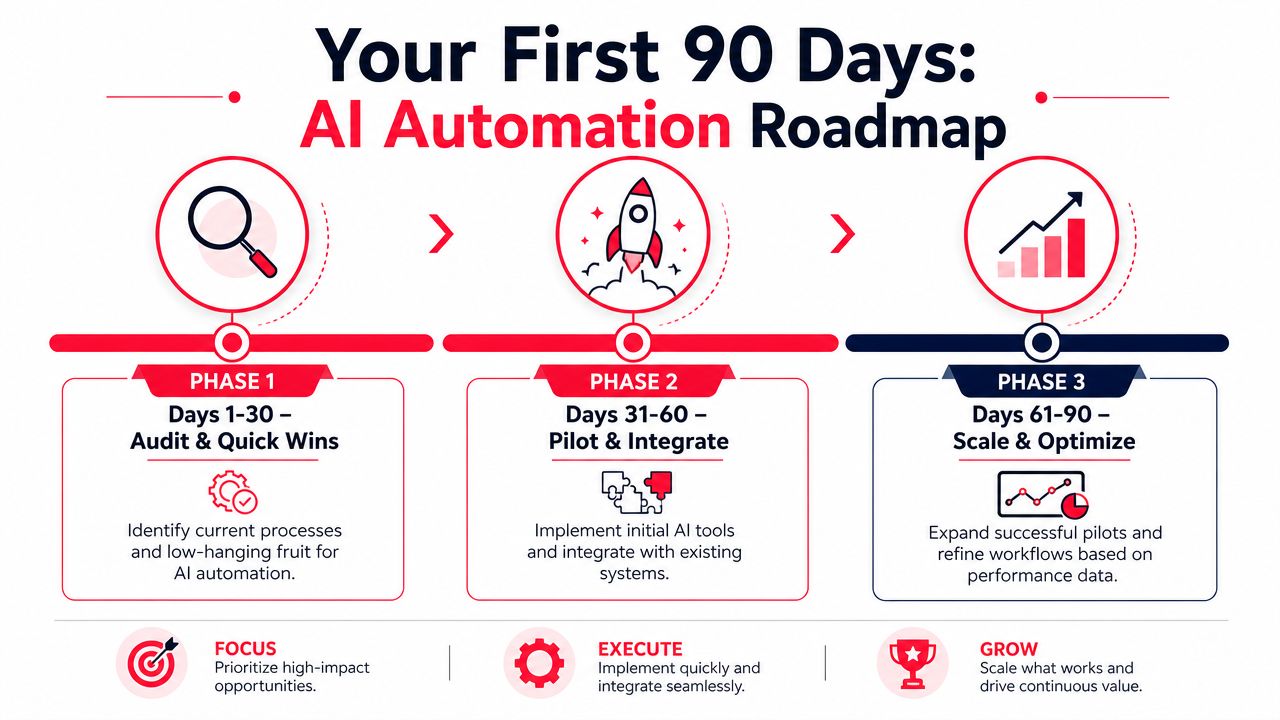
Days 1 through 30 audit and quick wins
Don't begin with strategy decks. Begin with workflow mapping.
List the repeated tasks inside marketing and sales that consume skilled labor but don't require senior judgment every time. Good examples include meeting summaries, campaign briefs, email first drafts, transcript tagging, basic lead routing, and CRM field cleanup.
Use this shortlist to score candidates:
- Revenue proximity: Does the workflow affect pipeline creation, conversion, or sales speed?
- Volume: Does it happen often enough to matter?
- Messy inputs: Does it rely on unstructured text, notes, calls, or pages?
- Low downside: Can a human review before anything customer-facing goes live?
At this stage, quick wins matter because they change internal belief. Reps start trusting AI when it gives them cleaner notes and usable follow-ups. Marketers start trusting it when it drafts variants they can ship.
A hands-on planning reference for this phase is Stimulead's AI implementation roadmap, which is useful when you need to move from idea lists to owned execution.
Days 31 through 60 pilot one revenue workflow
Pick one workflow. One.
For most growth-stage companies, I'd usually choose one of these:
- CRO content velocity for paid landing pages
- Outbound account research and personalization
- Lead qualification and routing
- AI search content production for commercial pages
Define the KPI before the pilot starts. That could be time to launch, rep research time, qualified meeting rate, or conversion on a target page. Keep the pilot team small. One owner. One reviewer. One executive sponsor.
Here's a useful walkthrough before you start implementation:
Run the pilot in production conditions. If the team has to behave differently than normal to make the test work, the result won't hold after rollout.
Days 61 through 90 scale what proved itself
At this point, the pilot either earned expansion or it didn't.
If it worked, standardize the process. Save prompts inside templates. Define approval rules. Create CRM fields for structured outputs. Document what humans still own. Then expand the workflow to the next campaign, segment, or rep cohort.
If it didn't work, don't force it. Most failed pilots break for one of three reasons:
- The workflow wasn't close enough to revenue.
- The inputs were too messy and the source data was weak.
- The team expected full autonomy when assisted execution was the right design.
By day ninety, you should have one live workflow, one KPI trend line, and one clear decision about the next rollout candidate. That's enough to move from curiosity to operating discipline.
Building Your AI-Enabled Team and Governance
You probably don't need a full in-house AI department. You need a few capable operators with authority, clear rules, and direct accountability to revenue metrics.
That structure works better because the core work sits inside existing teams. Marketing owns campaign production. RevOps owns process logic. Sales leaders own message quality and rep adoption. AI should support those functions, not sit outside them as a detached research group.
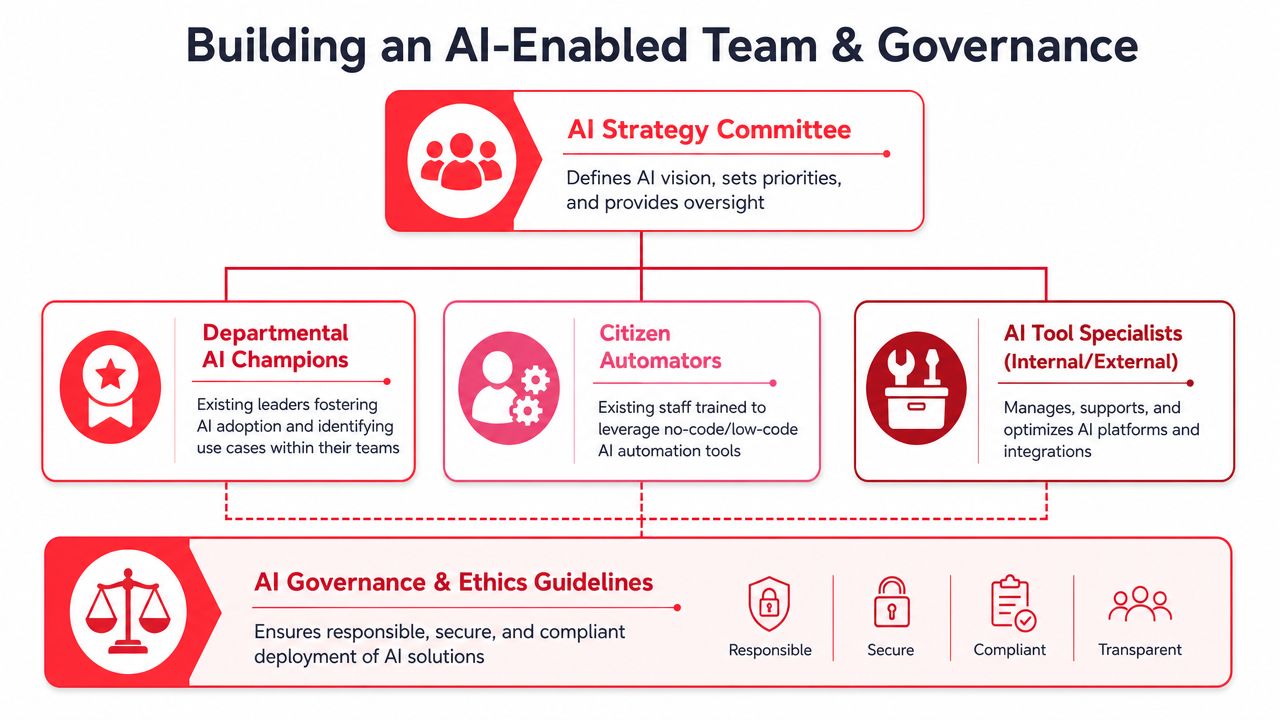
Use champions, not a separate AI department
Pick one or two AI champions inside each revenue function. These should be strong operators, not necessarily technical specialists.
Their job is practical:
- Find use cases: repeated tasks, manual bottlenecks, low-quality handoffs
- Test workflows: prompts, routing logic, approval steps, CRM updates
- Train the team: what to use, when to review, what to ignore
- Report outcomes: time saved, output volume, conversion impact
This model is usually faster than trying to hire a large specialist team. It also keeps domain knowledge close to the workflow.
The productivity case is strong. Businesses using AI-powered sales assistants for automation tasks report 25% to 40% productivity gains among sales teams, according to B2B Rocket's review of AI in sales automation. That productivity only turns into revenue if reps spend the recovered time on better conversations, cleaner follow-up, and faster opportunity movement.
Keep governance light and operational
Governance doesn't need to be bureaucratic. It needs to answer five questions:
| Question | What the team should decide |
|---|---|
| Which workflows are approved | Start with revenue-adjacent use cases and assign owners |
| Which tools are allowed | Limit sprawl and keep data inside approved systems |
| Where human approval is required | Customer-facing claims, pricing, contracts, strategic accounts |
| How outputs are logged | Keep an audit trail in the CRM, PM tool, or shared docs |
| Which KPIs matter | Tie usage to pipeline, conversion, and team productivity |
A monthly AI council with the CMO, CRO, RevOps lead, and one operator from sales and marketing is usually enough. If you need outside oversight without a full-time executive hire, a fractional CAIO model can fill the strategy and governance gap while your internal team handles day-to-day execution.
How to Evaluate AI Vendors and Agents
Most AI vendor demos are built to impress. Few are built to survive your stack, your data, and your workflow constraints.
The wrong choice creates rework. The right choice shortens your path to production.
The checklist I use in vendor reviews
Start with workflow fit, not features.
Integration fit
Does the tool write back cleanly to HubSpot, Salesforce, your ad platforms, and your analytics stack? If data gets trapped in the vendor UI, adoption will drop.Data handling
Ask where prompts, uploads, and outputs go. Ask who can access them. Ask whether your data is used for model training. If the answers are fuzzy, stop there.Model behavior
You don't need the newest model for every task. You need stable output for the workflow you're buying. Test the same input set across several days and see whether output quality stays usable.Workflow-native design
Generic assistants have their place. But if your team needs outbound research, creative testing, lead qualification, or AI agent workflows, a tool built around that job usually gets adopted faster.Human review controls
Approval steps, audit logs, version history, and role permissions should be built in. If they're missing, the burden shifts onto your team.
If you're comparing options broadly, this roundup of AI tools to boost productivity is a useful starting point. For leaders thinking more specifically about workflow design, Stimulead's guide to AI agent use cases helps narrow the list to commercial applications that matter.
One more filter. Ask every vendor to show the workflow live with your own sample data. If they can only demo polished examples, you still don't know how the product will behave in your business.
AI Automation FAQs for Growth Leaders
How much budget is enough to start
Enough to run one real pilot with the people and tooling required to measure it.
Don't spread budget across five experiments. Fund one workflow that touches revenue and can be judged inside a quarter. If you can't define the KPI and owner, the budget is premature.
Do you need to hire a data scientist
Usually, no.
Most growth-stage companies need a strong operator with process thinking, a RevOps or marketing ops partner, and one executive who can remove friction. Specialized technical help becomes useful when you need deeper integrations, custom scoring logic, or internal data products.
What mistake hurts ROI most
Automating the wrong workflow.
The biggest miss isn't prompt quality. It's choosing tasks that are interesting but commercially weak. Start with work that sits close to acquisition, conversion, follow-up, or sales productivity.
Buy less software than you think. Design better workflows than your competitors.
How do you keep teams from creating AI chaos
Set simple rules early.
Use an approved tool list. Define review requirements for customer-facing outputs. Log what goes into the CRM. Name one owner per workflow. That's enough for most companies at this stage.
How should leaders compare tools quickly
Use a short evaluation grid tied to your stack, workflow, and review controls. If you need a wide market scan before narrowing the shortlist, this directory of ways to evaluate AI tools for your stack can help you spot categories and vendors faster.
What should happen next
Pick one workflow this week.
Map the trigger, the reasoning step, the action, the review point, and the KPI. If you can't do that on one page, the workflow is still too vague. If you can, you're ready to build.