
AI adoption for sales teams stalls for a reason most vendors won't say out loud. The model is usually the easy part. The hard part is whether your workflow is clean enough, your data is trustworthy enough, and your governance is tight enough for AI to do real work without creating noise. That's why the teams that use AI weekly are already reporting meaningful productivity gains, while many organizations still sit in pilot mode or never get past a demo, even though 81% of sales teams are either experimenting with or have fully deployed AI and only 37% have fully implemented AI tools across their sales process (Cirrus Insight on AI in Sales, AI sales statistics roundup).
For CEOs, CMOs, and CROs, the right question isn't which tool looks smartest. It's whether your current process can support account research, qualification, outbound, deal scoring, and CRM hygiene without breaking trust. If you want a deeper commercial framing on why this matters, the argument in grow revenue with AI adoption is directionally right, but the execution layer is where outcomes are decided.
Table of Contents
- Why Most AI Adoption for Sales Teams Stalls
- The Three Sales Workflows Where AI Pays First
- A Three-Phase Rollout for Sales AI Adoption
- Build, Buy, or Fractional Advisory
- What a Good Sales AI Pilot Actually Looks Like
- Measuring Adoption by Tier, Not by Tool Count
- Governance Before You Let AI Execute
Why Most AI Adoption for Sales Teams Stalls
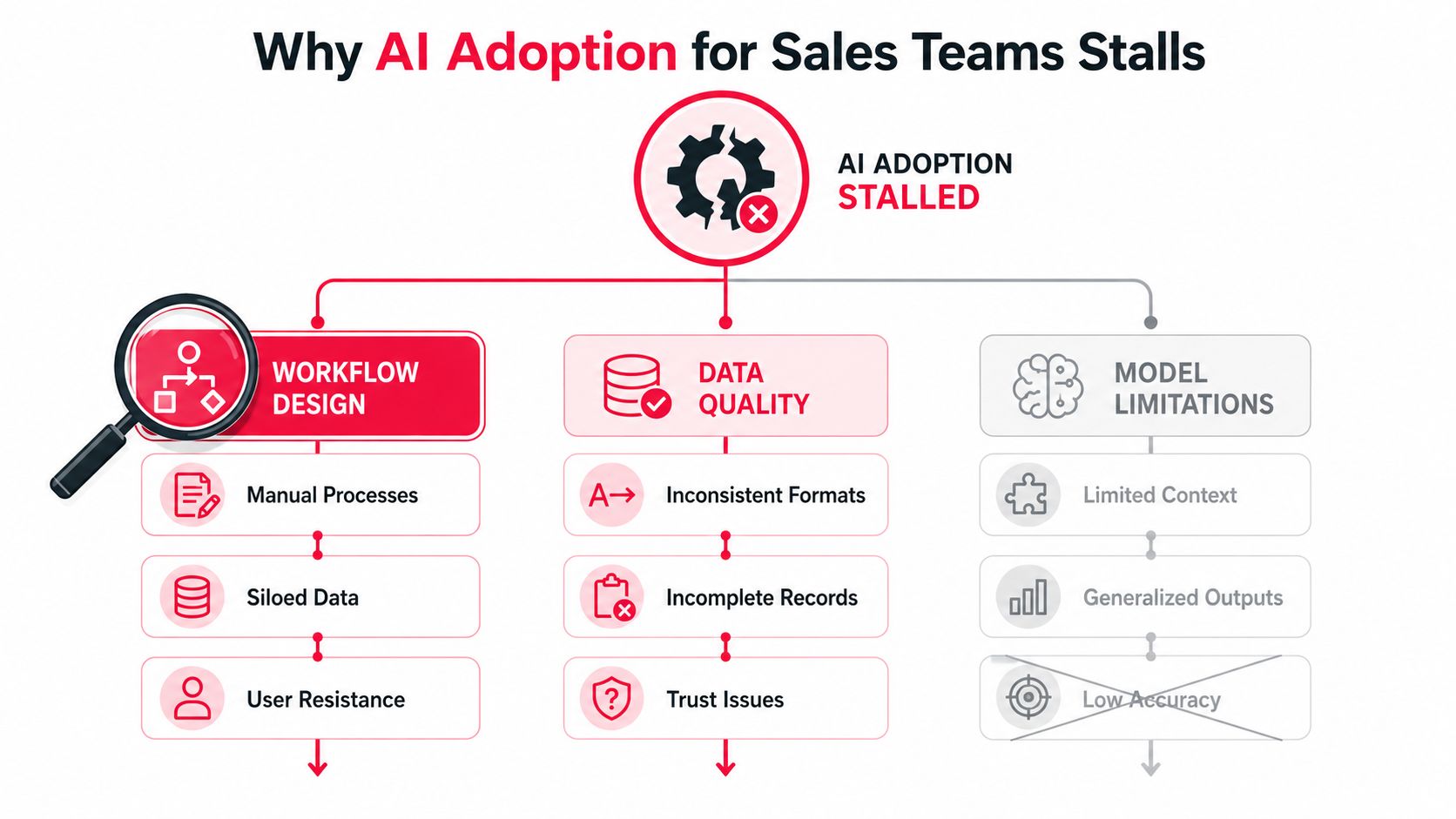
Buying an AI sales tool is procurement. Adoption starts when the tool fits a live workflow, the input data is good enough to trust, and the team knows exactly what changes in daily behavior. The stall usually shows up in the handoff between systems, for example when reps still have to clean CRM fields, paste notes into another screen, and manually rewrite the same follow-up because the first draft does not match the account context. That is a workflow problem, not a model problem. It is also why a readiness check belongs before vendor selection. Use an AI readiness assessment to identify whether the bottleneck is research, enrichment, or execution discipline. If your goal is to grow revenue with AI adoption, that distinction has to be clear before the rollout begins.
The adoption gap is really a workflow gap
A sales motion has four jobs, prospecting, qualification, closing, and expansion. AI creates the most value where humans lose time on repetitive research, note cleanup, follow-up drafting, and prep work. In practice, the first diagnostic should be simple. Where are reps losing time, and which of those tasks depend on structured data versus human judgment?
Practical rule: observe one week of rep activity, then map where time disappears into manual research, CRM hygiene, follow-ups, and prep. If you cannot point to the exact step AI should improve, the team is not ready to buy yet.
The adoption problem usually shows up as a mismatch between expected ROI and actual workflow friction. Leaders assume the tool will save time everywhere, then discover the team cannot trust the data, does not want another interface, or keeps doing the old process because the new one adds clicks. That is why the diagnostic should come before the vendor shortlist. The goal is to prove a specific workflow gap, not compare model quality in the abstract.
A good internal review should also separate experimentation from adoption. A rep who tests a chatbot on Friday is experimenting. A rep who uses AI for account research before every target-account review is adopting. That distinction matters because the commercial payoff comes when AI becomes part of the motion, not a side habit.
What good inputs look like
The fastest way to lose trust is to feed AI stale firmographics, missing intent signals, and fragmented notes. If the account record is incomplete, the model has little to work with, and the output will feel generic. In sales, good input usually means current firmographic fields, enough contact detail to route work cleanly, recent activity notes, and a clear source of truth for pipeline data.
A useful diagnostic is to score one sample of target accounts across three questions. Is the account data current? Are the notes usable without interpretation? Does the CRM reflect the actual stage and owner? If two of those answers are no, the tool choice will not save you.
Stimulead's AI readiness assessment fits here because readiness is the gate. Before anyone debates vendors, the team should know whether the bottleneck is research, enrichment, or execution discipline. That keeps the conversation anchored in revenue process, where it belongs.
The Three Sales Workflows Where AI Pays First
AI pays first in the workflow that shortens the path from activity to revenue. For growth-stage sales teams, that usually means prospecting and account research, AI-assisted personalization and outbound, or deal scoring and forecast support. If reps spend too much time on manual prep, start there. If outbound volume is fine but response rates are soft, start with signal-based personalization. If pipeline reviews are hard to trust, deal scoring is the first place to test.
Use cases that usually pay back first
The economics differ by workflow, but the pattern is steady. AI-assisted outbound can lift response quality because signal-based personalization can produce 15–25% reply rates versus a 3–5% industry average for cold email, while multi-signal personalization can reach 25–40% reply rates (Autobound on AI sales prospecting). ZoomInfo also reported that weekly AI users in seller workflows are linked with shorter deal cycles, larger deal sizes, and stronger win rates (ZoomInfo sales AI statistics). The conversion lesson is simple, and the improve conversion rates guide makes the same point from a different angle. Use AI where the inputs are already reliable enough to shape action.
| Use Case | Primary KPI | Reported Lift | Common Failure Mode |
|---|---|---|---|
| Prospecting and account research | Time saved per rep, qualified meetings booked | Faster research and prep, plus weekly-user deal cycle gains in reported benchmarks (ZoomInfo sales AI statistics) | The team automates research before defining a source of truth for account data |
| AI-assisted personalization and outbound | Reply rate, meeting rate | 15–25% reply rates, or 25–40% with multi-signal personalization (Autobound on AI sales prospecting) | Reps ask the model to write messages from thin or outdated context |
| Deal scoring and forecast support | Forecast accuracy, win rate, deal velocity | AI-using teams report stronger revenue growth and more frequent quota attainment (Salesforce) | Managers trust scoring outputs before cleaning stage definitions and close-history inputs |
If your data is thin, start with research and enrichment. If your data is solid but outbound is weak, start with message generation around real signals. If leadership cannot trust the forecast, score deals only after CRM fields are cleaned and stage hygiene is clear.
A Three-Phase Rollout for Sales AI Adoption
The rollout should stay boring on purpose. AI adoption fails when sales teams scale before the first workflow proves it can handle real inputs, real managers, and real handoffs. A clean rollout has three phases, foundation, pilot, and expansion, and each phase needs an owner, a gate, and a stop condition.
Foundation weeks 1 to 2
This is the cleanup phase. Fix CRM fields, decide which records are authoritative, set permissions, and build a small prompt library for the one use case you are testing. If the use case is account research, define the target account list and the minimum output format for a usable brief. If the use case is outbound, define the inputs that must be present before AI can draft a message.
The point is to remove ambiguity before anyone uses the tool live. When teams skip this work, they usually create a pile of inconsistent outputs, then blame the model. The model did what it was given. The workflow was never ready.
Use this phase to force decisions about data ownership and process standards. Sales AI gets traction only when the team knows which fields matter, which sources count, and what a good output looks like before reps touch the system.
Pilot month 1
Pick one use case, two reps, and a defined success gate. Keep the pilot narrow enough that you can compare behavior before and after. The test is whether AI changes how reps work, not whether they enjoy using it.
Track revenue-linked KPIs such as qualified meetings booked, time saved per rep, and reply rate against a control sequence. A common failure mode is letting the pilot drift with no decision point. Set the gate at the start, then decide whether to expand, revise, or stop it.
The pilot should also reveal where the process breaks under live use. If reps keep rewriting the output from scratch, the prompt is wrong, the input is weak, or the workflow is asking AI to do work the team should own.
Expansion quarter 1
Expand only when the pilot shows a workflow change, clean handoffs, and a result you can defend in a pipeline review. At that point, add more reps, then adjacent use cases. Expansion without proof spreads confusion faster.
An external advisor can help in the first phase if the team needs vendor filtering, workflow design, or governance. Stimulead's fractional CAIO versus full-time chief AI officer page is relevant here because the choice usually comes down to execution capacity, not job titles.
Build, Buy, or Fractional Advisory
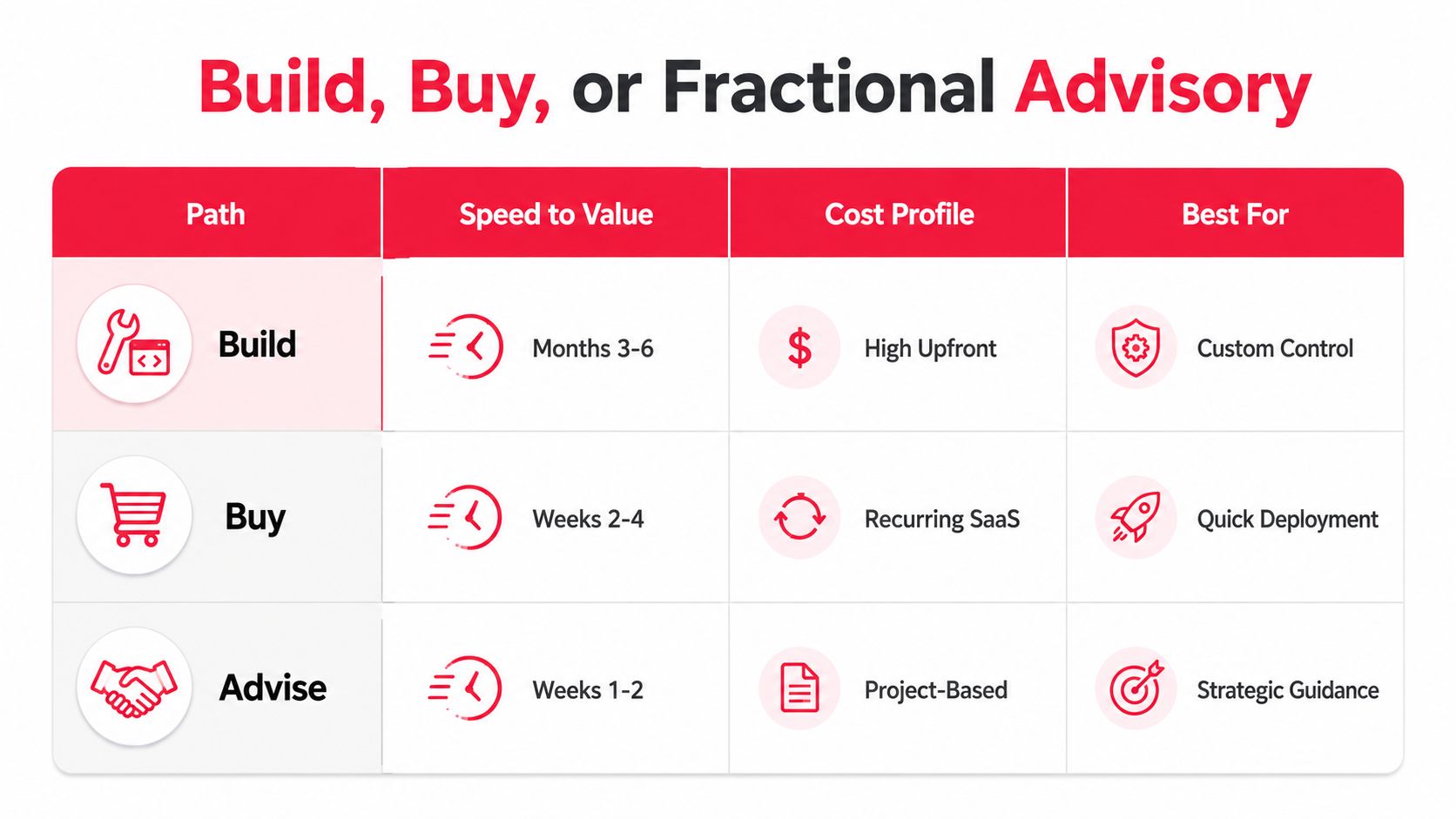
Growth-stage sales teams often spend too much time debating whether to build a custom stack and too little time asking who will own the workflow after launch. A build gives control, but it asks for engineering time, cleaner data, and someone who can keep the system aligned with revenue goals. A bought tool gives speed, but it still needs rollout discipline, manager coaching, and a process that fits how reps work. Fractional advisory fits when the company needs a roadmap, implementation oversight, and a vendor filter without adding a full-time AI leader too early.
Choose by execution reality
If the team is under 50 reps, a custom build usually makes little sense unless the workflow is highly differentiated or the data is unusually proprietary. You can spend months wiring systems together and still miss the core bottleneck, which is usually handoff quality or prompt design, not the model itself. A bought tool can get you to visible use faster, but only if someone owns standards for inputs, adoption, and manager follow-through.
A fractional CAIO is strongest when the problem is bigger than product selection. If leadership wants the rollout tied to pipeline, the advisor can turn executive goals into a pilot plan, pressure-test vendor claims, and keep scope from drifting into a software shopping exercise. That matters when the team has enough demand to act, but not enough internal AI depth to diagnose which workflow breaks first.
There is also a specific case where advisory beats both build and buy. If the team already has tools in place but reps are using them inconsistently, the issue is usually not technology availability, it is workflow design, governance, and manager behavior. A fractional advisor can diagnose why output gets rewritten, why records do not flow cleanly through the stack, and why the team does not trust the system enough to use it without heavy editing. That is the right call when the company needs adoption repair, not another platform.
The choice gets clearer when you ask three questions. How fast do you need first value? How much data control do you need? Who will own adoption after the purchase? If those answers are fuzzy, buy less technology and more process clarity. If you need help pressure-testing prompts and workflow handoffs before you commit, the AI prompt improvement tips resource is a practical starting point.
The decision rule
- Build when the workflow is unique, the data moat is real, and the team can support months of implementation.
- Buy when speed matters more than customization and the use case is narrow enough to test quickly.
- Advisory when leadership needs a practical roadmap, vendor evaluation, and oversight that keeps the rollout tied to revenue.
If you want a deeper comparison of executive AI leadership models, Stimulead's AI growth partnership discussion is a practical place to start. It frames the decision around speed to value, oversight, and the amount of internal lift required.
What a Good Sales AI Pilot Actually Looks Like
A good pilot is narrow, measurable, and short enough that no one can hide behind vague progress. One of the cleanest pilots I've seen is account research automation for two SDRs over four weeks. The input was a target account list. The output was an enriched account brief plus a personalized first-touch draft. The KPI was qualified meetings booked, supported by time saved per rep and reply rate against a control sequence.
The pilot shape
The first week exposed the usual friction. CRM field mapping was inconsistent, which meant the enriched data didn't always land where reps expected it. Lead routing also needed cleanup because one rep was seeing records before the correct owner assignment had settled. That kind of breakage is common, and it's why pilots need a real operator, not a passive buyer.
The behavior change was obvious once the workflow stabilized. Reps stopped spending the first half of the day hunting for context. They opened the account brief, checked the signal, and sent a tighter first touch with less rewriting. That's the kind of shift that matters, because it changes how many accounts a rep can work with confidence.
Pilot rule: if the rep still has to rewrite everything from scratch, the system is too fragile to scale.
The decision gate came from comparing the pilot sequence against the old sequence on the same target profile. The team looked at whether the workflow improved output quality, whether the rep used the tool daily, and whether the pipeline result justified expansion. The pilot either earns more surface area, or it doesn't. There's no prize for keeping a weak test alive.
For prompt quality, the AI prompt improvement tips resource is useful, especially when teams are trying to standardize first-draft quality across reps. In sales, better prompts help, but only after the underlying workflow and fields are clean enough to support them.
Measuring Adoption by Tier, Not by Tool Count
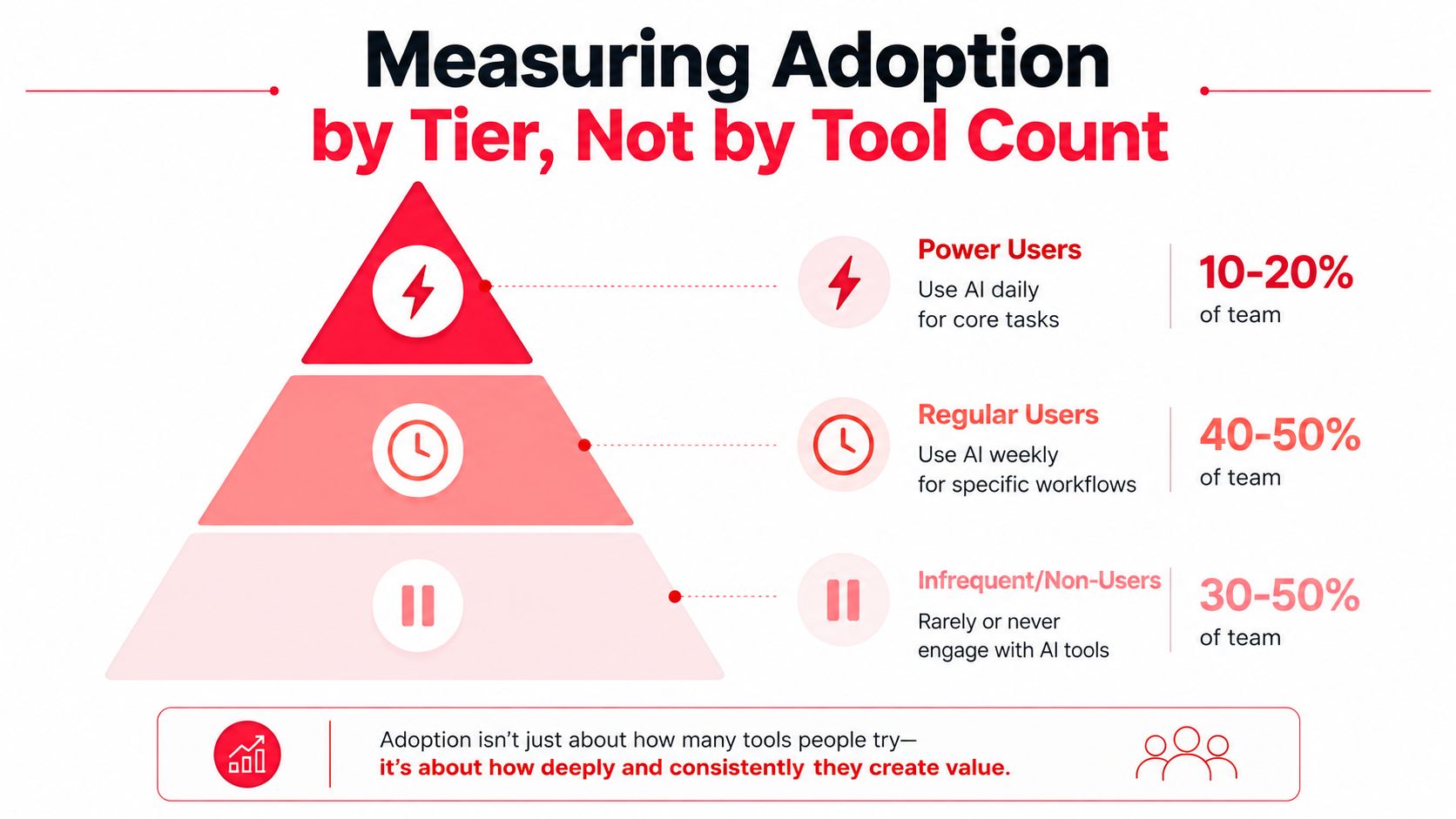
Seat count tells you very little. Adoption tier tells you whether AI is changing how the team works. I've seen sales leaders celebrate a rollout because every rep has access, while usage never gets past a quick test and a forgotten tab. The better read is simple, who uses AI every day, who uses it only when needed, and who has already stopped using it. That gives you an adoption curve you can manage instead of a vanity metric.
What to track each week
The cleanest weekly review is short and specific. Count daily users, weekly users, and inactive users. Then compare those groups against pipeline created, forecast accuracy, deal velocity, and win rate on opportunities that were qualified by signal, not just logged in the CRM. The point is to see whether AI is changing revenue work, not whether licenses were assigned.
A useful pattern is to watch for adoption drift before it shows up in revenue. If daily users stay steady but weekly users start slipping, the workflow is probably too clunky or the inputs are too messy. If usage is high and outcomes do not improve, the use case is probably misaligned with the work reps do. Either way, the tier view shows where to intervene.
| Tier | What It Means | Weekly Review Question |
|---|---|---|
| Daily Users | AI is part of core work | Are they spending less time on manual tasks and producing better pipeline output? |
| Weekly Users | AI supports specific workflows | Are they using it in the right stage of the process? |
| Inactive Users | Little or no real usage | What friction is stopping adoption? |
A good weekly review also needs a benchmark inside the team, not just a roll-up across the whole org. In a 40-rep SDR team, power users booked 2.3x more qualified meetings than infrequent users, which made the gap obvious to managers without turning the review into a feature count. That kind of comparison tells you whether adoption is concentrated in a few reps or spreading across the team.
The weekly discussion should also tie usage to the exact workflow the team is trying to improve. If account research is the first target, check whether daily users are producing cleaner briefs and faster first touches. If outreach is the target, check whether the team is sending more relevant messages without extra rewrite time. The adoption tier model matters because it shows whether the rollout is becoming part of the operating rhythm or staying cosmetic.
For the governance side of those reviews, AI governance best practices for sales teams give managers a useful checklist for access, approval, and audit trails before AI starts touching live revenue work.
Governance Before You Let AI Execute
A rep uses AI to draft a follow-up email and cites a customer outcome that was never verified. The message looks polished, but a compliance flag lands because the claim is unsupported and the approval trail is missing. That is the core governance problem in sales AI. Once AI drafts outreach, scores deals, or enriches CRM records, you are not just managing content quality, you are controlling what can touch revenue work, who can see the inputs, and how every change gets traced.
The bigger failure is usually upstream. Teams assume the model is the risk, then skip the workflow design and data cleanup that make the model safe to use. McKinsey's guidance pushes leaders to design for adoption and scaling from day one, while Bain's view of AI value in sales points to process redesign and cleaner data rather than a point tool dropped into a messy stack.
Four governance layers that matter
First, outbound needs approval workflows. If AI is drafting first touches or follow-ups, a manager or template owner should define what can go live without review. That matters most in sequences that reference customer results, product claims, or regulated terms, because one weak line can create a compliance headache long after the send.
Second, any AI-generated claim needs a citation standard. If the model references a customer outcome, a product claim, or a market statement, the rep should know what evidence backs it up. If the evidence is not easy to find, the claim should not go out.
Third, data access needs clear boundaries. The model should only read what it needs for the job. Let it pull from everything, and you raise the risk of exposure, muddled context, and weak output that sounds confident but is wrong.
Fourth, keep an audit trail for pipeline changes. Reps and managers need to see who changed what, when it changed, and why it changed. Without that record, AI-assisted updates turn CRM cleanup into guesswork the moment a forecast, sequence, or stage review gets challenged.
A one-time governance memo will not hold. Review the rules monthly. Update them when the use case changes. A team that starts with account research may later allow AI to draft outbound or summarize calls, and each step needs a new approval boundary. The governance layer is where agentic AI becomes either a durable operating habit or a liability leadership notices after the damage is already visible.
For a practical framework on permissions, review, and traceability, Stimulead's AI governance best practices resource is useful. The rule is simple. If the system can act, it needs permission, review, and traceability.
A simple 30/60/90 day view
In the first 30 days, run the diagnostic with two reps and one manager, choose one use case, and define the pilot gate. That keeps the team focused on one workflow and one set of controls instead of scattering effort across a dozen AI tasks. By day 60, you should know whether the workflow changed, whether the data held up, and whether adoption is daily or sporadic.
By day 90, decide whether to expand, adjust, or stop. If the workflow still depends on manual cleanup, weak approvals, or unclear data ownership, the pilot is telling you the stack is not ready yet. That is useful information, because it keeps budget tied to execution instead of activity that only looks productive.
If you want outside help, bring it in early for diagnostic work and vendor shortlist pressure-testing, then later for implementation oversight once the pilot is live. That sequence keeps the spend tied to actual rollout decisions. It also keeps the team from treating tool evaluation as progress.